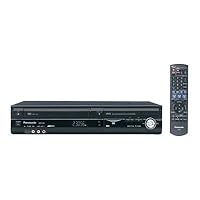
 I have been using this unit (I paid $240 at Costco) for a couple months now. DVD recording quality of broadcast/cablecast television in it's 1-hour "XP" mode is excellent. Other modes: (SP) 2-hour, (LP) 4-hour, and (EP) 6-8 hours recording modes are okay, but pixelation and compression artifacts become more obvious, particularly in complicated and/or fast moving scenes. And it's QAM digital tuner is excellent at recording SD and HD signals if passed through by your cable company. (I use cable, but don't have a cable box. I just subscribe to basic analog cable, but my cable provider Comcast includes local digital unscrambled channels in this package as well, such as FOX, NBC, CBS, and ABC, something I didn't realize they did until I bought this digital recorder and an HD TV set).
I love using RAM discs to record TV programming. RAM discs allow you to simultaneously record one program while watching another program already recorded on the disc, if your recorder features "chasing playback," which this recorder does. This makes watching an evening of television very easy, and being able to skip through all the commercials. And not having to wait for the recorder to finish all the evening's scheduled recordings before starting to watch. DVD-RW and DVD+RW discs do not allow that feature -only DVD-RAM discs and recordings.
I'd give this unit even higher marks (a 9 or 10) were it not for it's buggy software driving all of its features. The unit occasionally gets "confused" and locks up -not responding to buttons on unit or on remote control. You have to unplug and re-plugin to reboot the software. (Actually, this newer model now features a small "reset" button on the front of the machine, to reboot the unit.) This happens about once a week. This is only a minor inconvenience (takes about a minute to reboot), and re-powering it does not make it lose any of its stored channels setup or scheduled recordings memory.
The unit (and interestingly two other Panasonic DVD recorders I have) also suffered a problem with recognizing what date it was for a while if left set automatically. I had to set the date manually for a while (a couple weeks). But now automatic date seems to be working again. I suspect some software bug.
The other problem I have occasionally, is that it occasionally fails to record a scheduled program, for no apparent reason (there's still room on disc). I have not been able to figure out why (although the manual suggests it could be due to digital rights management issues on digital broadcasts, but I'm not convinced of that).
March 2009 Update:
Over time, and especially in the last month or so in particular, the machine's software got buggier and buggier -lots of system freezes, causing me to have to press the "reset" button almost once a week, or more often. Tonight, it finally gave up the ghost -the system has completely crashed, and no resets or re-powering will make it come back online. So, I got about a year's worth of heavy use from it, which I guess isn't so bad. There doesn't seem to be any other DVR out there that gets overall better reviews, with all of Panasonic's features (especially on the features that are most important to me). So even with all its shortcomings, so I will likely buy another.
What I really want is a set-top combo HD and DVD recorder with digital QAM tuner, but that doesn't seem to exist anywhere at this point in time. Maybe there's a way to build one using Windows XP 2005 Media Center Edition and an external digital tuner. I have just such a setup going now, which works great, except with only an 2006 analog-only tuner.

When the device works, it works as I expected it to, although it seems to have more problems tracking than I wish.
The real issue is the software which, in my opinion, is the worst I've ever encountered. This is saying a lot, as I've used every version of Windows, including Vista!
Every problem the device has recording, it appears to interpret as a copy protection violation, and turns itself off. It has a "shoot the wounded" design philosophy: Every problem that occurs is fatal. It allows no recovery, does not allow ejection, and always turns itself off. You have to go through 5 or 6 layers of menus to get to common option choices, but the control has keys for lesser used functions. It has "system modal" screens for many functions. For example, if you finalize a DVD recording, only "Ok" is recognized. "Play", "Drive Select" or any other key is ignored.
My problem right now is that this $280 device failed to record in the middle of a VHS tape to DVD transfer, and now has locked the DVD in the recorder. Nothing works to get it out, including the secret STOP + CHANNELUP combination. It goes into an endless cycle of resets following by turning off.
I expected hardware issues with DVDs, which are still a little temperamental. What I didn't expect was software so bad that it prevents operation of the device. If you're looking to buy a VHS->DVD recorder, you would be wise to avoid this one, despite its apparent attractive price and features.I did EXTENSIVE research when deciding which DVD/VCR Combo Recorder to buy. I decided on this unit since it had so many features and capabilities. I still don't know them all after 3 months of ownership. After I bought the 1st one, a month later I bought another identical one for the bedroom! Why? Because it really is that good. It has tons of recording options SP, XP, LP and EP-which gives you a choice of 6 hour and/or 8 hour EP speeds. It also has a handy option of FR (flexible recording) which basically uses the best quality possible for the remaining space on your disc. For example, if you have 2 hours left on your disc and want to record a 1 1/2 hour show/movie, choosing FR will extend the record time to utilize the entire remaining space on the disc, thus giving it the highest quality possible in the space provided. Like any recorder on the market, quality depends on which setting you choose. I've been recording all my movies that are saved in my FIOS DVR in the 6-hour EP mode, and the quality is great. And YES, you CAN record shows from your DVR to DVD. When I was doing research some "reviews" for other units said you couldn't do that because of copyright issues. Not a problem here, HOWEVER I have not yet tried to convert old (store-bought) VHS movies to DVD on this unit. There may be a copyright protection "blocking" issue there, but if there is, I can almost guarantee you that ANY unit will have the same issue. Thank the movie studio lawyers for that. But I HAVE transferred old recordings from VHS to DVD in this unit and it worked great. The quality is only a slight improvement, but that's only because of the quality of my VHS tapes from the get-go, which were all recorded in 8-hour mode on my old VCR. Are you still with me?! All-in-all this is a great product, and worth every penny. Oh, and a quick footnote: if you decide to buy one, choose the "quick start" option which is discussed in the manual. Otherwise the unit takes awhile to actually turn on (warm up).I wish I had downloaded the owner's manual and looked through it. I would have found clearly stated that this product will not record digital channels directly to VHS tape. I was looking for something to simplify recording shows on digital channels, and DVD recording isn't exactly simple. The VHS will only record analog channels or from AUX inputs. You can record to DVD and then copy to VHS, but why go to that extra effort? So after the DTV transition is over, the VHS recorder will be mostly useless.
This is the most user unfriendly video device I own. It is also unstable, locking up and switching to the wrong channel when changing channels. It also looses signal frequently (although all my other DTV converter boxes still have signal).
It has some easy to use features, and is very quiet (you swear it isn't recording when it is). However, in all, I believe it creates more problems with the DTV transition than it solves.
For those looking to convert your VHS tapes to DVD. If you purchased the VHS tape, then the tape is most likely copyrighted and no VHS and DVD combo on the market, including this one, will copy it!After reading many reviews of this recorder, I took a chance and bought one. So far my faith in Panasonic was worth it. I have been transfering vhs to dvd and recording off air using an antenna with exellent results. My recordings of HD programs off air look as good as the original when played back on my plasma tv.


No comments:
Post a Comment