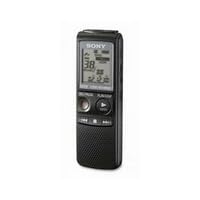
 I purchased this recorder so I could use speech recognition software if I wanted to, without paying for any additional microphones/headsets. In fact, the recorder is Dragon (a famous brand of speech recognition software) certified to produce "Maximum Accuracy Dictation."
Functionally, this recorder has an easy to reach (i.e. no plastic cover on it) USB port on the left hand side, an easy-to-distinguish recessed Record button, buttons to navigate between folders, play back existing recordings, split an existing recording, change recorder options, change playback volume, erase an existing recording, and a Hold button. The recorder itself is small, lightweight and easy to hold.
For storage, the recorder can hold as many as 99 separate recordings in each of 5 independent folders. This is useful to categorize various voice recordings, such as meetings in one folder perhaps speeches in another.
However, an easy to use recorder is meaningless if the recorder doesn't produce good recording quality. Here, this recorder delivers nicely. The built-in microphone is very good and has a wide dynamic range (i.e. it clearly picks up high and low frequencies). There are two sensitivity settings for the microphone---Low which is for individual dictation, and High which is for group meetings (or recording things farther away from the recorder). In addition, the recorder has a good built-in speaker.
If you need better recording quality (or want to play back the messages privately), the recorder provides a headset jack and a microphone jack.
As for recording quality, standard quality recording (44.1 kHz @ 48 KBPS) produces clearly understandable voice output. In this mode, the recorder can store up to 48 hours of voice recording and can run for up to 35 hours on 2 AAA batteries. This is the best mode for normal dictation (since it provides 4x as much space as the highest quality mode---which can only store 12 hours of data and run for 20 hours).
They have a super long recording time they brag about on the box. This is the LP mode (11.025 kHz @ 8 KBPS)---288 hours. This sounds impressive, but it is nearly useless. When I recorded a brief amount in this mode, my voice sounded very metallic and I heard weird high pitched metallic warbling in the background. There was somewhat less warbling at Low microphone sensitivity, but although my voice was understandable, but I don't recommend this mode for any real recording. The metallic warbling is very distracting.
In addition, the recorder can run on rechargable AAA batteries (NiMH) or even run from power provided over the mini-USB port. These are good options to save on batteries and perform very long recordings.
In my experience, the standard quality is fine for normal dictation. If I wanted to record music, EVPs, or for dictation into speech recognition software, I would use the maximum quality mode, since it is better at capturing higher frequencies and may better capture faint noises.
However, there are some downsides to this recorder. First, the recorder does NOT record data natively as MP3s (which it claims to on the box). This is why I gave it 4 stars instead of 5.
To access the recorder, Sony provides Windows software to copy voice files off it. The Windows software can store the files as MP3s, as well as encode MP3s so the recorder can play them back, so, if you are not using Windows, you cannot transfer recordings from the recorder.
Basically, if you are using Windows the recorder software is not a problem. If you are not, the computer will not see the recorder and you will be unable to use it. The recorder will still function very well as a normal voice recorder, but you will not be able to access the digital data on it.
Secondly, the recorder cannot accept any type of memory card to expand its capacity.
Beyond that, this recorder does not record sound in stereo, although it will accept stereo microphones. For me, since I'm only using it for voice dictation, this is not an issue, but for anyone who wants to use it to record music (such as an impromptu jazz session), it might be.
Finally, the recorder does not act as a USB drive or as an MP3 player. You can load music files (converted to Sony's proprietary sound format) onto it, but it doesn't have shuffle, playlists, or other standard MP3 player features. For me, these aren't issues since I have separate gadgets to fulfill these needs far better, but some voice recorders have these features.
In conclusion, if you are using Windows and you need a high quality, reasonably priced voice recorder, this will fit the bill nicely. If you want a recorder that is more of a Swiss Army knife of gadgets, this won't work for you.

This model just came out in January '09. I use its native SHQ format, which I believe stands for Super High Quality. I think Mac users are out of luck as far as transferring digitally to their computers. But I use Vista and the software installed seamlessly. I had made five or six test recordings ranging from ten seconds to two minutes. They all transferred via USB within seconds. The software is called Digital Voice Editor and is pretty cool. You can use it to make some settings on the recorder like recording formats, mic sensitivity and file-naming conventions. You can play back the files at variable speeds, good for transcribers. You can also set it so that the files are automatically deleted from the recorder once they're transferred to PC. I haven't tried the MP3 player feature. I didn't buy it for that. I bought this as a means to record musical ideas, melodies, or lyrics while on the road. In my view, the quality is good enough that once on the computer, those files could be used as samples in my next song.
I looked at about ten different Sony models in the store before getting this one. Some of the higher-end models had smaller displays. I like the larger display, as well as this being one of the few models in black. The buttons are larger than most models and well-placed. The speaker is decent, but even the cheapest Sony headphones are better. One reviewer says this will not record in stereo. I'm not sure this is correct. The specs state it does, but I haven't tested it enough to determine for myself. I use a cheap little PC microphone that came with some old Dell computer. It has a stereo jack and produced audio much better than the built in mic. I may upgrade to a Sony ECM-DS70P Electret Condenser Stereo Microphone in the future, as it will also work well on my camcorder.
If you're a Windows user this is a great portable recorder for getting ideas onto the PC for editing, pod casting, etc. Those who have no need to transfer files will find it is a great field recorder with very clean audio, suitable for recording lectures, conducting interviews or the occasional "note to self."
Buy Sony ICD-PX720 Digital Voice Recorder with PC Link Now
I use this recorder for recording class lectures and meetings. Once the file is transferred to the computer, the quality of sound is excellent. The software (comes in a CD with the recorder) allows you to increase/decrease the volume. Even if you are sitting very far (30-40 feet) from the speaker, you could record and listen to the speech later on. Memory space allows you to record for about 12 hours.Read Best Reviews of Sony ICD-PX720 Digital Voice Recorder with PC Link Here
First, let's correct the Amazon specs on the size and wt. of this item. The true dimensions are 4.25 in. tall, about 1.5 in. wide, and .75 in. thick. The recorder weighs in at 3 oz., with batteries installed. I've included an uploaded photo of the recorder hand-held.The manual is extensive, although the odd labeling of the recorder's keys makes it a little hard to follow. A slide switch on the upper left side of the recorder labeled "Hold" turns it on and off. You can select one of the five message "folders" (A-E) by going through a menuing process. Each folder can hold up to 99 messages, depending on your chosen recording quality level. Once you have selected a folder, creating a message is accomplished just by hitting the large red "Rec/Pause" button. You can pause and continue a message just using this button. Playback is also simple, using the large "Enter" (Play/Stop) button.
More complicated features allow you to add-on to a previously recorded message (one which has been "Stopped"), split a message into two separate messages, record with voice-activation, etc., etc. Messages can be erased one at a time or folder-by-folder.
The included software lets you upload the contents of your recorder to your PC and play the messages from the recorder or the PC. I have run mine on an XP-Pro machine, and checked to see that there was a Sony update for Vista 64-bit compatibility, which downloaded and installed just fine. Once the messages are on your PC, you can re-name them (just like any other files), delete them, or split them up. You can also convert them from native format to MP3.
The recorder has four different recording quality levels and two levels of mike sensitivity. An editing feature lets you boost the sound for otherwise unintelligible portions of your messages (I didn't try this).
The playback volume range seems acceptable even for use outdoors, and I haven't yet tried recording in a windy environment.
All in all, it's slick--much better than I anticipated. Back in the day, you had to spend several hundred dollars for a recording/transcription device like this, and it chewed through tape cassettes.
One thing to be aware of: the recorder is so small that it might be easy to lose. There is a string lanyard thread-through point in the lower right top edge of the device, and I am ordering a string lanyard connector for use with a neck lanyard for it.
Want Sony ICD-PX720 Digital Voice Recorder with PC Link Discount?
I bought this device to record conference speakers for our organization. I decided on this unit after reading that it has excellent sound quality and can record in mp3 format at 192kb encoding. Both of these are true: the only positive thing I can say about this unit is that the sound quality is fantastic. It's getting the files off of the device that proves next to impossible if you use Windows 7.The ICD-PX720 does not support UPnP (Universal Plug and Play). UPnp is pretty much the standard for audio devices be they voice recorders or mp3 players. It allows Windows (all versions) and Mac (OSX 10.xx) to view the device as a hard disk and add/remove files to it using Windows Explorer or Finder in Max OSX. Without UPnP, the only way to move files on or off the recorder is using Sony's proprietary Digital Voice Editor software 3.2.01. This software is Windows only (read this voice recorder does not support Macs or Linux!). It also DOES NOT SUPPORT Windows 7. I tried using various compatibility modes in Windows 7, but to no avail.
I've always considered Sony as a brand to be a little more expensive, but worth it because of quality and service. Sadly, in this case they have dropped the ball. Not having a Windows 7 tool set available at the end of November 2009 when the Windows 7 release candidate and beta have been out for almost a year is just inexcusable. This is literally the only device I've found in 6-months of using Windows 7 (beta, then RC, then the final release) that does not support Windows 7. Add in that it is unusable by those who prefer Macs & Linux, and it really is an inferior device to the other, similarly priced voice recorders on the market. I intend to return this device. I've already bought a Olympus Digital Voice Recorder (VN 6200PC) that is UPnP and doesn't require proprietary software to access my audio recordings--it's not perfect but it's 5x better than this piece of trash.
Conclusions:
1) Has great audio quality
2) Is not a UPnP device
3) Does not support Mac or Linux, nor does it currently (Nov. 2009) support Windows 7
4) Requires a proprietary software to function
5) Inferior to other similarly priced options
1.5 stars out of 5. Not recommended unless you run Windows XP or Vista only and don't mind being locked into using a proprietary software to access your files.


No comments:
Post a Comment