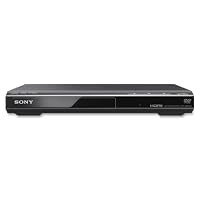
- Ultra Slim, New Mid Size Design
- HDMI Output, 1080P Upscaling
- JPEG, MP3 Playback
- Multi Disc resume, Multi-band TV Remote
- Energy Star

I am attaching a collage of three photos under customer photos that I will be referencing in this review.
Photo #1 shows everything that came in the package: the DVD player, instructions, 3-RCA component video coax cable, remote and batteries. NOTE: HDMI cable is NOT included.
I placed the unit next to the rulers so you can see the dimensions of the unit: 10.5 inches long x 8 inches wide x 1.5 inch high. The power cord is 58 inches long.
The top of the DVD player is flat, so I was able to stack other things on top of it. The unit has no display, other than a green light next to the power button which tells you when the unit is on.
Photo #2 shows the DVD on a digital scale. It is very light weighing in at 2 pound and 1.4 oz
Photo #3 shows the back panel and the HDMI cable (not included). HDMI (High definition Multimedia Interface) delivers audio and high def video over the same cable. When you use HDMI cable you don't need to use the RCA cables that came with the DVD. I am showing the shape of the HDMI connector in case someone will find it helpful as it needs to be purchased separately. Amazon sells them at a really good price DVI Gear HDMI Cable 2M 6 feet
UP-SCALING
-----------
This unit provides good up-scaling. Up-scaling is the ability to play standard definition DVDs on a high definition TV. Standard definition TV set and regular DVDs have a maximum resolution of 720x576. The high definition sets have higher resolution. If you play a standard definition DVD on a high resolution TV the video without up-scaling feature the video will look pixelated. Up-scaling adds pixels to the video to smooth out the pixelated images. The final image is not as good as tru Blu-Ray DVD, but I find it completely acceptable. I am watching the movies on LCD TV. Up-scaling works best on LCD and Plasma TVs, and not as well on CRT-based high definition TVs.
The default HDMI output from HDMI OUT output is set to 1920x1080p. This can be changed if needed, and is controlled by the TV/projector settings.
SUBTITLES and FAST/SLOW SPEED CONTROLS
----------------------------------
The DVD player supports 5 speeds: 0.6x, 0.8x, 1x (normal), 1.2x, and 1.4x. The speed is changed by repeatedly clicking on the fast/slow speed button on the remote. There are two ways to turn on subtitles: at the start of the DVD and at any time via remote. The sound is very good at each speed, however the subtitles are only shown at normal speed. When I tried forcing them on at another speed via remote control the player generates a message "operation not possible". As soon as I return to 1x speed the subtitles are shown again.
DVD player supports the following file formats:
-----------------------------------------------
1. Video: MPEG-1
2. Photo: JPEG
3. Music: MP3
Supported extensions:
--------------------
.mpg, .mpeg, .jpg, .mp3, .wma, .m4a, .wav,
Supported disks:
-------------------
DVD, DVD+-RW/+-R/+-R DL, Music CD/Super VCD, CD-R/-RW
RESTRICTIONS:
--------------
Files with copyright protection (digital Rights Management) cannot be played
Lossless files cannot be played
The player cannot play images in DVD-VR mode with CPRM (Content Protection for Recordable Media)
The player is designed to play disks with Compact Disk (CD) standard. DualDisks and music disks encoded with copyright protection do not conform to CD standard and may not be compatible with this unit.
WARNINGS from the manual:
-------------------------
1. To play a complex hierarchy of folders may take some time. Create albums with no more than two hierarchies.
2. The player will recognize a maximum of 200 albums and 600 files
It can recognize 300 photo and 300 music files if Photo(Music) is selected
3. The player cannot play a video file of size more than (720 width x 576 height)/2 GB
The remote is compatible with the following TVs:
------------------------------------------------
Sony (default)
Hitachi
LG/Goldstar/NEC
MGA/Mitsibishi
Panasonic
Philips
Pioneer
RCA
Samsung
Sharp
Toshiba
INSTALLATION:
---------------
1. Plug in HDMI cable
2. If you are using HDMI cable ignore RCA cables enclosed in the box
3. Plug in DVD into power and attach HDMI cable to the TV
4. Now you need to configure your TV to recognize the new HDMI component
For my SONY TV there were three steps
4a. Under components menu Label Video inputs
This option tells TV which HDMI input to use and which one to skip. My TV has four HDMI connections, one already used and three were available. I was not sure which one I used for DVD so I enabled them all in this step
4b. I went to the list of all inputs where I saw all 4 HDMI connections I tried each one. Two of them generated an error that there was no input, one was my old connection (DVR) and one was the new DVD. This told me
which inputs I should disable.
4c. I went back into "label video inputs" and set the label to "skip" for the two HDMI connections that told me "no input"
A note on price: Sony DVPSR510H DVD Player is offered in several listings, price compare to get the best deal. The unit sold in this listing is Factory Refurbished.
Overall, DVD player works well. The tray operations smoothly, the quality of the display is good, the remote works well. The only thing I don't like that the DVD turns off itself in 30 minutes if I put it on pause. I would have liked the ability to control this manually, or alternatively have the automatic power off be 2 hours. The unit does not shut off if it is being used. The auto shut off happens if the unit is in pause or stopped.
Ali Julia review
Buy Sony DVPSR510H DVD Player Upscaling - Factory Refurbished Now
This dvd player meets all my expectations. It is the second Sony upscaling player I own and for the money the quality is excellent. Seller shipped fast and secure.Read Best Reviews of Sony DVPSR510H DVD Player Upscaling - Factory Refurbished Here
This player works great. So simple to set up and use. Picture is excellent. High def quality for a fraction of the cost.Want Sony DVPSR510H DVD Player Upscaling - Factory Refurbished Discount?
This DVD player is quite basic and easy to set up (plug it in and attach the TV cables). We were leary of getting a refurbished player, but it works fine and so far has met our expectations.

No comments:
Post a Comment