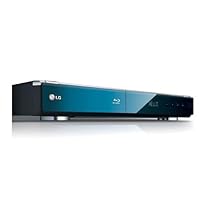
- Networked Blu-ray Disc player connects to Netflix and YouTube streaming video without a computer via Ethernet and Wi-Fi (802.11n)
- Full HD 1080p output for Blu-ray Discs and upconversion of standard DVD video to 1080p
- BD Live capable for accessing bonus content from BD-Live Blu-ray Discs; Dolby TrueHD/Digital Plus and DTS-HD; 1 GB built-in memory
- Outputs: 1 HDMI, 1 component, 1 composite, 1 analog audio (L/R), 1 digital optical audio, 1 digital coaxial audio, 1 discrete 7.1 channel audio
- Includes remote control and component AV cable; measures 17 x 2.2 x 10.9 inches

Setup out of the box was quick and simple. I plugged it in and set a few audio options, video needed no adjustment from the defaults.
The network setup wasn't too bad, but I did have some issues with encryption. I also purchased a new wireless router (the Netgear RangeMax WNDR3300 Wireless-N Router) to replace the near-decade-old Linksys I have. I tried two different encryption types, and both both times the player could connect after entering the key, but refused to obtain an IP address. Disabling encryption on the router caused the player to obtain an IP address quickly, and setup was complete. Currently I'm running without encryption but with MAC address filtering. I'm okay with that, but I might go back and try encryption again now that I've downloaded a firmware update for the router. Other reviews state no problems setting up with encryption, so the problem might be specific to my setup.
Netflix functionality took a few seconds to set up. Anything in your "Watch Instantly" queue is displayed in the Netflix menu and you can rate any of them from the player. Unfortunately, at this time there is no ability to browse or search for anything that's not already in your queue. With the right connection, the higher quality video is quite good as good or slightly better than standard definition cable. At this point, audio doesn't get any better than stereo, and while it's not crystal clear, it's not bad. Hopefully some new features will be added in future firmware updates.
The YouTube player is nice too. This supports searches, "Top Rated", "Most Viewed", "Recent Videos", etc. It's fun to play around with, and I'm glad the feature exists on this player, even if the novelty might wear off a little over time.
I did a firmware update this morning (it wasn't available yesterday), and now there is a new menu item for CinemaNow. I haven't messed with it much, but apparently you can "rent" a movie for around $3.99 or "buy" a movie for $15-$20. There's a section for TV, but it merely says "Coming Soon". I don't see the point in this really, since Netflix covers the rentals (for much cheaper), and the movies seems to be the same price as going out and buying the DVD. I'd rather have the DVD than an over-compressed soft copy for the same price.
I can't get the Media Server stuff to work at all [fixed! -see updates below]. So far, I've dedicated about 6 or 7 hours to getting this to work. None of the other reviews have mentioned a problem with this, so I guess it must be me. I installed the included Nero MediaHome 4 Essentials software, and added a directory to share. I started the server fine, but the player constantly tells me "No Server Found". I have tried two different wireless routers and an infinite number of settings adjustments. My firewalls are off. I just can't get a break. As a software engineer with a degree in the field, you can bet that it's pretty frustrating for this to beat me. I'll update the review if and when I get it working. Others have not had the same problem as me, though. So I imagine that this is NOT a problem with the player.
There are also a number of little features related to the playing of DVD's and BD's that I like. The player remembers each movie's last position when it was stopped and/or removed. So the next time you start up that movie, it will resume where you left off.
The video settings are reasonably full-featured as well. Brightness, Contrast, etc. are all adjustable, and you can adjust colors manually (just the reds, just the yellows, etc.) Upconverted DVD's have a couple of NR options, and there's an auto-contrast feature which seems to work pretty well. There's also a zoom feature that let's you zoom in on a part of the screen to get a closer look. That's cool.
Overall, this player was definitely worth the money for me. I'm looking forward to the day when I can get the media server working, but even without that feature, I love this player. It's worth every cent. Great video, great audio, and instant Netflix that doesn't involve me using composite cables to mirror my laptop screen to the TV. Progress!
--------------- Update 05/27/2009 ------------------
Now I seem to be having an additional problem. I tried two DVD's that have an alternate picture-in-picture track that can be enabled. They pop up with a small video in the corner of the screen every so often when the option is turned on (like a video commentary track). I can't get either of them to play with sound. The video shows up but you can't hear anything. There is no mention of this in the manual, and nothing that I can find online about it. One person with the same problem (but a different player) said that their player had a "Secondary Audio" option that was turned off by default, and turning it on fixed the issue. This player does not have that option. None of the standard audio tracks contain the PIP audio. I've just about given up. If someone can tell me how to fix this, I'd be grateful. Otherwise I'd knock this down to three stars until it's fixed in firmware. For reference, the two Blu-Ray discs I'm talking about are Futurama: Into The Wild Green Yonder and Groundhog Day.
--------------- Update 06/05/2009 ------------------
Following the recommendation of xoco (see Comments), I changed the audio from Primary Pass-Through to DTS Re-Encode. This fixes the PIP audio track problem. I'm satisfied with that, although I'm not sure if I have lost anything by making the switch.
--------------- Update 08/25/2009 ------------------
SUCCESS!! Finally, I can see my PC as a media server. Whatever issues I had were fixed with the latest firmware download (BD.8.08.498.B). As soon as I finished the download and rebooted the player, my PC was visible in the My Media section. Nero MediaHome 4 still does not seem to work, but the standard sharing built into Vista works fine. That's the (very) good news. The bad news? I immediately shared one of my video directories to try it out. I tried a couple of videos that I had scaled down to 720p to put on Flickr, and even scaled down they were horribly choppy and slow. I may need to start messing with router settings again to see if I can fix this. Currently, the streamed videos are completely unwatchable.
Additionally, one of the previous firmware updates added high definition support for Netflix streaming. And they seem to have fixed an issue where the video quality was always lower than it should have been, given the speed of the connection. With a 22MBps connection, I was previously getting generally 50-75% "bars" on the quality scale. Now I'm usually getting 100% (HD), and sometimes one or two steps down from that when I'm using at peak times. It's a vast improvement. And the HD quality is better than I could have imagined for streaming video.
Buy LG BD 390 Network Blu-ray Disc Player Now
And I mean, 'so far.' This is my third BD player, since my last two did not make it past one month. My first was a SONY BDP S350. After a month, it broke down (see my review on that player's Amazon page). I figured, it happens. I traded that player in for a Samsung P3600, based on rave reviews (including those of the Best Buy sales people). The Samsung did not last 24 hours! (again, see my review on that player's Amazon page). Now I started getting frustrated.After spending enough (way too much) time on-line looking at reviews of several players on various sites, I decided to go for the LG BD390. Sadly, the Best Buy by me said it did not have this latest model. I was happily surprised to find out, when I got to the store to bring in my Samsung player, that they DID have the 390! I snatched the last box they had!
While this may all change in time (I sure hope not), based on my past BD experience, so far this player is AMAZING. Where do I start...
The owner's manual: the easiest to understand, best written I have seen in a long time.
The remote: flawless. The Sony one was too bulky. The Samsung one did not respond unless you pressed each button several times, completely directed at the player. The LG remote responds fast and is simple and to the point. It even responds when not aimed directly on the player's face!
Picture quality: No complaints either from the Sony, Samsung or LG. All were/are beautiful, using an HDMI cable on my 42 inch SONY WEGA. The LG makes connections and settings much easier to understand than the other two brands I mention. Of course, this being my third player, I can do the connections and settings almost in my sleep by now!
BD experience: So far the discs I have watched all played with no issues. Loading time is lightning speed. While I expect the other shoe to drop, based on people's reviews of just about every BD player out there, so far it has not. Considering my Samsung player died 24 hours after I bought it, I am happy that this player actually turns on still!
Sound: While the three are comparable, the LG's sound output is not only gorgeous, but it is also EASY to set up. I use a DTS/Dolby Surround 5.1 receiver and hook it up with an optical cable. Setting the player for it was easy. The Samsung, on the other hand, spoke a language of its own and I had to do some hit or miss until I got it to work with the receiver. LG gets the thumbs up.
The look of the player: flawless and smart. The player is a little large, so it has its own shelf on the entertainment module...but it almost deserves it. The buttons are on the front of the player (imagine that! Samsung's are useless ON THE TOP!), except for the ON/OFF and EJECT buttons, which are on the front/top. Still accessible from the front.
Network Connectivity: OK, so I may not be a lot of help here. The other two players were a nightmare to set up, and the Samsung's wireless was almost useless (see everyone's review on this). However, I use a wireless bridge anyway, so I simply hooked that up to the LG player's ethernet input port and, within a minute, had it all set up and running smoothly. The player was happy and so was I.
The LG player needed one update, but I do not see this as a bad thing (I wish the darn Samsung would have had several!)as updates can --usually, though not always--improve your player's performance. The Sony had 9 updates when I got it! (now THAT was not a good thing).
Netflix works great so far. Some people have complained that after an hour or so the movies will not stream any longer, or stop and then restart. This is, in my view, an internet set up issue, not the player, and LG even tells you that. They recommend a wired connection for streaming, so we can't blame them. I used to watch Netflix movies streamed wireless on my MACBOOK PRO and, every so often, that would happen. Wireless connectivity is not flawless. On the upside, Netflix let's you start the film from where you last stopped, or from the beginning. So, if the first stream should fail, try, try again! So far I have not had to. Only once, after streaming on Netflix, the player froze and I could not move around the Netflix menu. I had to force shut off the unit. The player reset itself and worked fine after that.
Netflix also keeps the movie on your queue until you manually delete it, which is great. It also saves the spot you were watching in case you have to stop the movie. Also, while not everyone likes it, I enjoy having control of my Netflix queue from my computer, not the player. I can then sit in front of my TV and have all the choices I have made earlier right there before me.
The LG does not offer PANDORA (as of yet, but I have a feeling it is coming), but it does offer YouTUBE and CinemaNow. The latter I find useless when one has Netflix. YouTube is a personal thing. I do not care for it (not to mention the YouTube video quality is usually awful on a computer screen, let alone on a 42 inch screen).
So, while I may be missing some other great things about this player, right now I am happy for one thing: IT WORKS! I may need to update this review at a later time but, for now, I can say this is the BEST BD player I have owned thus far. It works, it plays the discs, it streams Netflix and seems happy doing it all. I can also say that, if it should ever die on me, I will probably get another one of the same. I cannot say the same for the SONY or the SAMSUNG.
UPDATE:
A year later, the player is still flawless. A few updates were encountered in this time (one of the latest added VuDu). It has played EVERY disc (DVD, Blue Ray, DVD+R, DVD-R) with no issues at all. None. All played great. The Netflix streaming has also been great (and for the MAC users who have been complaining, I am a MAC user too, I just do not use Airport to connect). Considering what I put up with from the other two brands of BD Players, I would replace this one with another LG anytime! My ONLY pet peeve: the player will shut itself off after a few minutes of inactivity and there does not seem to be any way to bypass this. That's all. Not bad I'd say! A year and still going strong....
Read Best Reviews of LG BD 390 Network Blu-ray Disc Player Here
Bottom line, this is simply the best network Blu-ray player on the market. Blu-ray playback, flawless. Streaming Netflix via wireless internet connection, flawless. Any complaints are most likely user error or due to slow internet connection speed, so I have an important bit of advise to potential buyers. HD Netflix requires an internet data rate of ~8mbps. Entry level cable or DSL data rates are 5 and 3 mbps respectively. You will need to upgrade (usually costs $5-$10 per month) to stream HD Netflix. Cable users will be able to watch SD no problem at ~5mbps but SD requires about 3.5 mbps minimum, so entry level DSL users will have some problems streaming SD Netflix. Some DSL service is only 1.5mbps which is well, silly.One more note: I am a Mac user and I can connect the BD390 to the internet and run all the available applications advertised just fine. The only thing you can't do is route iTunes directly from your computer to your TV via the BD390, which you don't really need if you use Netflix. Not a deal breaker.
Want LG BD 390 Network Blu-ray Disc Player Discount?
Purchased a BD 390 2 weeks ago. Out of the box I was able to hook it up to 802.11n and a hardwire connection. The first night I downloaded a firmware update. All worked well that night. The next day, the unit locked up after turning it on for 30 seconds. After another 30 seconds, the unit turned itself off. This happened under any function ... consistently. I called LG support and spoke to a tech rep. We troubleshooted it with me over th ephone and he said it was a defective unit and needed to be returned to LG I would get it back after 3 to 4 weeks. A brand new unit? I am not that patient. So I returned it to Amazon and they sent me a replacement in a few days.I setup the unit the night it was delivered. Setup was easy and Netflix came in well. I was also able to see videos and hear mp3's on my NAS same as the other unit. I downloaded a firmware update that night. The next day, the unit locked up after turning it on for 30 seconds. After another 30 seconds, the unit turned itself off. This happened under any function. I called LG support and spoke to a tech rep. We troubleshooted it and he said it was defective and needed to be returned to LG I would get it back after 3 to 4 weeks. Amazon would not replace the second unit so they kindly refunded my money thank you Amazon! Difficult to believe I bought 2 bad units that have exactly the same failure. I begged the LG tech to tell me how to revert back to the older firmware, they told me how to reset it but the process failed on both units.
So, I went to Best Buy and bought a LG BD 370. Not quite the same functionality, but close to the BD 390. Setup was easy. Netflix came in great on hardwire ethernet thru a gigabit switch to FiOS. I downloaded the firmware update crossed my fingers. The next day the BD 370 worked the same as the first day. It has been 3 weeks and the 370 is still working. I just can't recommend the BD 390 even though it had all the features I was looking for. I will buy the new Sony BDP-N460 since it has the same features as the LG BD 390 and hopefully without the BD 390 product failures.
A ray of hope. I did get an email a week later, after the 2nd unit failed, from a LG tech support guy asking me what functions caused the unit to fail. The answer is all; Blu-ray player, netflix, setup, just sitting there after turning it on. I replied to the tech's email with my answer but have not heard back yet a bit over a week has gone by. I am curious if the problem is linked to a firmware update issue. I love the features, I just want a product that works more than 30 seconds.
I advised the LG support folks that I would write a review of this experience and even spoke to a supervisor for a better solution than "send the unit back to LG for repairs and get it in 3 to 4 weeks." The person did not care. Poor customer service considering the BD 390 was new.
---
Update April 2010: I purchased the Sony BDP-N460 last year and it works flawlessly. I have it connected to a wired gigabit switch. The LG 370 still works well ... also connected to a wired gigabit switch. I noticed the quality of a connection on wireless with the LG was not very good. The WAP is a Netgear Wireless-N unit (300 mbps) and with the player only several feet away, the connection's bandwidth was too low for high quality internet video. Not an issue with the wired connection. It was worth the effort to install LAN ports in the rooms to obtain quality video for internet streaming.

The menus are easy to use and fun. It is like having a second computer in my living room. I love this player so much that I am going to buy the extended warranty today so that nothing happens to it. I am an electronics geek. I have had the samsung 1600, 3600, and LG BD370. This one takes the cake. I don't care that I paid full price. I would have paid another $150 for this unit. Trust me you WILL NOT BE DISAPPOINTED! I am in love with this unit. LG you blew me away with this player.
I have been having so much fun with this unit I can't explain. Do your selves a favor and buy this unit. You can respond to my review and I guarantee you will agree.

No comments:
Post a Comment