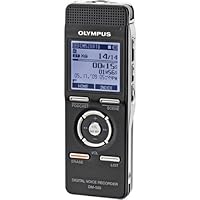
 I'm amending my initial review -I decided to keep the DM-520 after all because of its outstanding features when used as Olympus intends it to be used. (I've been using the DM-520 for about a month.)
Initially I'd planned to use this recorder for dictation -but, that's not it's intended market. It really is meant to be a recorder for music (live performance, vocals, instrument practice, etc.). I've been using it to record guitar lessons with my instructor, and I love it for that purpose. In this context, I set up the recorder at the beginning of the lesson and stop recording at the end of the hour lesson. Playback is phenomenal -I'm using WMA "SP" mode and the sound is great. The 8 gig Micro-SDHC card I put in has almost 1,000 hours of storage using the WMA SP format (less capacity, of course, when recording in stereo and "high quality" modes).
I would not,however, use this recorder for dictation, which was my original intent. I'm very impressed with the ergonomics and options, but disappointed in the absence of a couple of features that are critical to dictation.
I've owned several Olympus recorders, and except for the lowest priced models, they have all featured the ability to "punch in" new material in the middle of an existing recording. This feature is very important to my work as a writer. I use a recorder to take notes, and, while reviewing the notes at a later time, I need to be able to expand on the original thoughts and observations by inserting into an existing recording. I also need to be able to append to the end of an existing recording so that an entire article or chapter is one continuous file. The DM-520 can't do any of this!
My Olympus DS-2400 does this perfectly -you just press the F1 key during playback and the recorder stops playback and lets you press the Record button to insert a new segment. Also, you can choose to playback up to a point midway in a recording, and record over the remainder of the recording, or, you can just add to the end of a recording.
I've come to accept these features as a requirement of any dictation recorder. I don't use my inexpensive recorders (like my WS-200S) for "work" because they all start a new recording as soon as the Record button is pressed. You can't add to an existing recording, insert into an existing recording, or overwrite an existing recording. So, you end up with a bunch of chopped-up, disconnected recordings that you have to sort out later on.
After a few weeks using this recorder, I can recommend it for the purposes for which it was designed: "field" recording, music playback, and other purposes where dictation features are not important.

At first I was disappointed because, out of the box, you cannot make recordings while it's plugged in to the power supply. The default configuration assumes that when the USB connector is plugged in to the power supply, you are really doing file transfer rather than recording. In this respect, my old Olympus DS-40 is better, because the external power supply connects to a mini power jack that is separate from the USB port. Another non-intuitive difficulty I encountered in using the power supply is that it will NOT recharge the internal batteries unless you hold the "STOP" button down while plugging in the power supply.
It takes some digging through the PDF manual hidden in one of the recorders file folders to discover the "USB Connect" configuration settings, where I was able to change the configuration to ask on startup whether I was charging the device in PC mode or in recorder mode. The quick start printed manual does not contain that information. Frankly, I prefer the intuitive simplicity of the separate power connector on the old DS-40. Also, the DM-420 manual says you cannot leave regular alkaline batteries in place while running the recorder on the power supply, and yet the power supply does not work if the batteries are removed. My old DS-40 can run on the power supply with batteries removed, and it doesn't care if the batteries are regular or rechargeable because it's not trying to recharge them. So, having the capability of recharging batteries inside the DM-420 is a mixed blessing. Because I use the recorder in my office always connected to the power supply, I've almost eliminated my contribution of dead batteries to the environment.
Over all, the operation of the external power supply in simply recharging batteries, or making recordings while on the power supply, or operating as a replacement for completely dead or missing batteries, or recharging the batteries while connected to the PC via the USB cable and transferring recordings, is very non-intuitive and requires careful reading of the manual. It shouldn't be this difficult, because my HTC smart phone, which I also use as a recording and playback device, is completely transparent to use of the external power supply/charger which also connects via the USB port.
My use of the recorder is not completely restricted to the office. I carry it to the gym, on walks and on the airplane in order to listen to music and books on tape. With the microSD card slot, I can carry hundreds of hours of audio.
The quality of audio from WMA and MP3 music files that I copied to the device are excellent, and the stereo recordings I've made in the office are excellent (using two separate left/right microphones connected via a stereo-to-mono Y splitter). Recordings made from the phone are monophonic, but also quite clear, being limited by the phone line quality not the recorder.
I strongly advise any purchasers of this device to at least skim through the detailed (128 page) PDF manual that's hidden in a folder on the recorder itself. The recorder can be highly configured to a wide variety of different recording and playback possibilities, and if you don't read the manual, you will definitely be missing out on a lot of possibilities. I copied the PDF file to my PC and printed the whole thing out using the duplex and 2-up paper saver settings on my printer it was well worth the effort, and only cost 32 sheets of paper.
By the way, the external AC power supply/charger (Olympus A514) is NOT included with the DM-420 recorder being reviewed here. You must order it separately. Otherwise, you are limited to recharging the batteries of the DM-420 by plugging it into the USB port of a computer.
In conclusion, I think this is a great little recording and playback device, in spite of the faults found in its user interface. The complex user interface conceals a great degree of flexible configurability, accessible only by careful reading of both the quick-start and hidden manuals. If you are one of those folks who never read the owner's manual, I'd hesitate to recommend this device to you.
Amendment:
Some folks have complained that when they use drag and drop to copy music to the recorder, they cannot find and play it on the recorder. If you have a microSD memory card in the recorder, you may have copied music to the microSD card but the recorder is still looking only at the built-in memory. I made a lengthy comment on Dr. Jerry Stettheimer's review in which I describe the procedure for switching your recorder from the built-in memory to the microSD memory.
I've been using the recorder for 12 1/2 months now, no problems. I must say again reading the manual is VERY important to get the most out of this device. The BIG, DETAILED COMPREHENSIVE manual (128 pages) is concealed as a PDF in a folder in the built-in memory named OL_MANUAL. You will need to copy that into your computer and use Adobe to open and read it. The printed "quick start" introduces you to about 10% of the capabilities of this recorder. If all you read is the quick start brochure, you might as well have bought an old cassette recorder.
Buy Olympus Digital Voice Recorder With Micro Secure Digital Card Slot- Choose Size Now
At the outset, let me say that I am not the typical user for whom the DM-520 was designed. For example, I don't categorize my music into playlists, albums and artists. I simply have a bunch of diverse audio files, including music, that I've successfully transferred to the device for my listening enjoyment, and the device plays it all beautifully. Because of my prior successful experience with Olympus DVR's, I was impressed when I read about the improvements included on the DM-520, specifically:(1) The increased memory to 4GB, plus the additional SD memory card feature.
(2) The convenience of using two AAA rechargeable batteries.
(3) The improved stereo microphone.
The opening screen on the DM-520 indicates the three major sections for holding recorded data:
(1) Recording
(2) Music
(3) Podcast
Like some of their other models, the Recording section has 5 folders available for making recordings. The folders are labeled A through E, with each folder being able to hold a whopping 999 files. A special word of gratitude for the built-in stereo microphone which is absolutely amazing, with incredible sound quality.
The Music Section actually has two sections, both of which can hold audio content. There is the Music Section itself, and a sub-folder labeled "Audible", set up to accept commercial audiobook files. As mentioned, the Audible folder can hold any audio content, not just audio books.
The Podcast Section was set up to accept Internet podcasts, but fortunately, it has the flexibilty to hold any audio content.
According to the User Manual, there are three methods for transferring content to the DM-520:
(1) Sonority software program
(2) Windows Media Player
(3) iTunes
None of those three methods work for me. Fortunately, when the device is plugged into the PC using the supplied USB cable, it is treated as a separate drive, and files can thus be transferred each way using the file transfer features of Windows Explore. This allows me to bypass the above 3 User Manual methods of transferring files, and instead use the tried and true Windows Explore method. In my opinion, this was the unit's main redeeming feature, and it wasn't even mentioned in the Manual.
I had to call the Olympus Support line a couple times because some of the unit's features were a little mysterious at first. But Support was very helpful, and the DM-520 is working like a charm.
Bottom Line: This is a great high-quality DVR and well worth the price. The Sonority software and the User Manual could have been explained and written better, but what else is new? Overall, it is a sweet, versatile and powerful device.I bought this to record forensic examinations I do. So people may be speaking quietly, whispering, crying etc. The initial couple of times I tried it, I could not get enough volume out of the internal mikes. I tried the different scene settings and still the sound wasn't there. It wasn't until I fought through the manual and found out how to use the monoraul zoom microphone setting that I was able to get acceptable sound from two people speaking in a modest size room. Which brings me to the manual. Of course, it's only on disk, so you either have to read it on screen or print it out. And it's written in Japanese English... "the functioning of the Euphony will be the sound enhanced." Thereby, making it next to useless when trying to drill down through the various menu settings to try to make adjustments. Olympus is a huge company--you think they could afford an English speaking technical writer.
The software that comes with it seems to be first-rate, enabling all kinds of conversions, joins of separate files, volume-matching etc. It is very helpful in making adjustments for what is recorded.
One other point--I know websites are supposed to sell things, but I went to the Olympus site multiple times to see which of their digital recorders would do the job I needed done. The site is so loaded with praise for every product that it's very hard to make a reasonable decision about which of their devices to buy. Is the $400 professional dictating one really the one I should have gotten? Why did this one win Hammacher-Schlemmer's 'best' rating as opposed to the others? Would the $99 one have been as good?
I now own it and still have no idea if I got the right one.
Want Olympus Digital Voice Recorder With Micro Secure Digital Card Slot- Choose Size Discount?
The Olympus DM420 is an excellent recorder. The control buttons and menus are very easy to use. Even the battery compartment very well designed and much easier to use than anything else I've seen. The display shows the battery level and plenty of information about the settings in use during recording and playback, as well as the timestamp. It is an excellent recorder for both voice and line input. Although not advertised or specified as having a line input, it is sensitive enough to accept a tape out signal using the microphone input, so that there is no need to worry about setting the volume level of the earphone output of the radio being recorded. The pdf instruction manual is stored in the memory and can be copied to your computer for learning all the options not obvious on the screen menu. I had to read the manual to understand the settings related to using the USB connection for file transfer versus external power for recording or playback. Another useful feature not indicated in the published specifications and reviews I had seen, is the ability to program the recorder to record at three separate times with various settings for program length and quality. The feature of this recorder most important for my choosing it over others is the ample playback speaker which produces enough volume, with 320 mW power output, for listening without earphones, and still, the replaceable, rechargeable batteries last many days between charges.

No comments:
Post a Comment