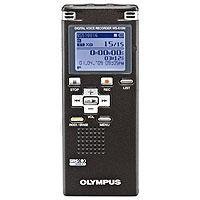
 I own another Olympus recorder which I bought years ago and I paid a ton of money for it. It was money well spent. I was intimidated by the "digital" part of it for a long, long time, but once you get the hang of it, these are so fabulous.
There's a button on the front that lets you move between folders A-E. That letter will appear on the screen and you can work on 5 different projects easily---just press the little button and it will take you to the folder you want where you can store all your notes for that project.
Within each folder are 199 files---I know this sounds confusing if you are new to the digital world, but the recorder does it all for you. You just go to the folder (tap the far right top button several times and it will go from A to E on the screen. You stop at the letter you want). Then press record and Talk! Easy!
When you are done, you'll see on the screeen 1/1---which means two things: you have just created a file and there are a total of 1 files in your folder, 1/1. The next time you record, it will say 2/2---which means you are in the second file and there are 2 files in your folder and on and on it goes until you get 199 files.
Now let's say you want to go back and listen to file 1 of your 199 files. You click back through them manually with the (


No comments:
Post a Comment