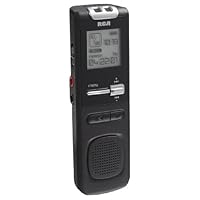
 I bought this voice recorder because I needed an inexpensive solution to a lot of classes that I was going to have to take lots of notes on. I was looking for a digital recorder, and it had to be a recorder that I could plug into my computer for quick file transferring. As long as that was true, I didn't mind how big the memory capacity of the recorder was, since I could always fill it up and empty it at the end of each week.
· Price: the recorder is pretty affordable compared to some of the other products out there with far more bells and whistles than I need, so I felt it was great.
· Interface: The digital display is clear though swapping between folders is a little more time consuming than I would like, navigating through the brief menu is easy enough.
· Connectivity: This recorder has a built-in USB port which attracted me to it immediately. I didn't want to be carrying any cables around with me, so I was pleased by this. The port is great and sturdy. It hides away cleanly under a plastic cover so you won't worry about dust. When the USB port is out, it locks firmly so there is no fear of it being pushed back into the recorder when you are inserting it into the computer's USB port. Good job on that. An important thing to mention is that thanks to the USB port, you can transfer files directly to your computer. There are voice recorders out in the market which are "digital" in the sense that they do not require blank media such as minicassettes to record the audio; they store the audio in internal memory, but in order for you to archive that audio, you need to do it through playback in real time. You need to actually sit down and press play and sit through hours and hours of audio while it's recorded into your computer. This recorder produces audio files which can be quickly copied into neatly organized folders in your computer. One very important thing to remember is that the recorder must be turned ON before you plug it into a USB port.
· Files: The lower sound quality settings produce files in .VOC format, while the High Quality setting produces sound files in the .WAV format. This is important and I will talk more about it later.
· Memory capacity: This recorder doesn't have an enormous amount of memory capacity, but it was enough for me. It has 512MB of built-in memory. It cannot be increased or upgraded using additional memory cards, but you don't need to. It can record a little over 17 hours on high quality, more if you choose lower quality settings. So, although you're stuck with 512MB, it's plenty.
· Compatibility: Now, if you're using a PC, you're golden. This is totally compatible for PCs, it comes with some nifty software for managing your audio recordings. Both the .VOC and .WAV files work fine in Windows. If you're using a Mac, this is where you might have a little trouble. I use a Mac and at first I went with all the reviewers that said the recorder worked fine with their Macs. The .VOC formats don't work on Mac OS, but the .WAV format works fine, so I was happy about that. However, when I plugged it into my Mac, it just didn't work. I was disheartened, but I didn't return it because I could always use my wife's PC laptop and then transfer the files to my Mac. It would be a painful and bothersome process, but one I could live with.
The problem, though, was not the recorder. I was running Mac OS 10.4 (Tiger), and apparently it doesn't work with Tiger. I plugged the recorder after updating to Mac OS X 10.5 (Leopard) and the recorder just popped up on my desktop.
So YES, this recorder WORKS on Macs just like other reviewers have said, but they failed to mention what system they were running their Macs on!
· Sound Quality: The recorder works very well on High Quality. I always keep it on that because it produces the .WAV format files that I require on my Mac anyway. As I said, .VOC files don't work on Mac OS.

Last night I opened a manual... To my surprise VOC recoding is only done in LP and SP mode, and HQ mode, the one I was going to use, records in WMA (Windows Media Audio). No need to convert files anymore, just copy them to PC and play with Windows player or any other player. Reading a manual saved me a trip back to the store.
With a recorder price under $30, ability to record in WMA format, play and edit options, easy file transfer via built in USB port, in my opinion, this recorder offers a really good value.
Buy RCA VR5220 512 MB Digital Voice Recorder (Black) Now
I purchased this despite reading the other reviews that said they could not get this to work on their mac. I run Mac OSX and had no problem with this voice recorder. The voice recorder must be turned on before you plug it into your USB port. After that it should show up on your desktop just like an other external device. Click on that and in one of the folders you will find a VOC file. To play this VOC file, you must download a converter. The one I use is SoundConverter, and it works great (make sure to change the output to your desired file type, such as MP3). If you are a Mac user, you are probably searching high and low (like I did) for an affordable digital voice recorder. This was cheap, and thus far I have been impressed with the quality and overall functionality of the device. I will update this review after I have used it for a longer period of time.Overall, if you are a Mac user looking for something that is compatible, this does indeed work. You just drag the file onto the desktop, convert it, and you have your recording.
Read Best Reviews of RCA VR5220 512 MB Digital Voice Recorder (Black) Here
I bought the recorder to produce sound tracks for online slide shows. The resulting files are of excellent quality and the integral USB connector along with microphone and earphone jacks are nice touches, but there are four problems which are irritating:1. The resulting files are .VOC format which must be converted to be usable with anything but the included Digital Voice Manager software. That information should be on the box.
2. The Digital Voice Manager software which comes with the device insists on installing to the C: drive. I install all software to another drive.
3. If the user is not alert during installation, unrelated software like Ask and Weather Bug will be installed. There is no need for this unrelated software. In addition, a piece of software to recognize that the recorder has been plugged into a USB port is installed. I have no need for this add-on. It can be removed leaving the voice manager in place, but the extra steps are a pain, especially since the ony reason to install the voice manager software is the proprietary .VOC file format.
4. The controls are incomprehensible without extensive study of the poorly written instructions. This is a recorder. So put buttons on it which do the things recorders are supposed to do instead of hiding them behind multipurpose buttons and tiny icons. And write the manuals in standard English.
I will use this recorder a lot, but I know that I will eventually trade it for something a little more expensive, but easier to operate.
Want RCA VR5220 512 MB Digital Voice Recorder (Black) Discount?
I bought this recorder to use while studying abroad in El Salvador so that I could record my classes and not have to tote around my heavy and expensive MacBook. I have used the recorder nearly every day for the last month and am satisfied with it. Since I have a Mac I only record in the High Quality setting which produces a .wav file which can easily be imported into iTunes. For about a one hour class the files are small at only 30 MB, which means that this recorder can do slightly more than 17 hours in HQ mode, which is more than enough for me. Also, some other users have mentioned that setup was a bit complex, but I found the manual to be straight forward and easy to follow. I was recording my first test files in just a few minutes.The quality of the audio on Conference setting is pretty good but I find that I sometimes have to turn the volume up to hear over the white noise in the background, but I didn't buy this recorder to put the files on the radio, I bought it to back me up if I get lost in a lecture, so the audio quality is fine for me. Perhaps if I were in a classroom in the US that didn't have open windows with cars driving by the audio would be clearer. I haven't used the dictation mode much, but when one person is recording personal voice memos with the recorder in hand the audio is clear. If you are really concerned about quality the recorder has a port so you can connect an external microphone.
The battery life of the recorder is good. I record about 2 to 3 hours each day and I have been able to go a bit longer than 2 weeks before I have to change the 2 AAA batteries. There is a built in speaker which is nice if I want to review something quickly without having to import the file into my computer, but using the speaker obviously diminishes battery life, its better to use headphones. Also, there is a lock switch so that when the recorder is in a bag or your pocket it doesn't accidentally turn on and start recording.
Another nice features is the file system. There are 4 permanent default files that I can use to organize my recordings. For example, all of my morning classes go into folder A and all of the afternoon ones go into folder B. This makes it faster and easier to organize my recordings when I import them. You also have the ability to add bookmarks to the files which is nice when I want to find a key point or phrase later. I have also been able to create additional files using my computer to store other documents I am working on just like any other USB flash drive.
The recorder also has some internal editing capabilities as well as multiple playback speeds, none of which I have used myself.
One downside is that the clock doesn't keep very accurate time, it is usually 5 minutes slow and I have to reset it regularly, but then again I bought this to record lectures, not as a watch. Also, the record indicator light is hard to see if the recorder is placed in front of you with the mic. facing forward, so to see if recording is taking place I have to glance at the screen to see a black dot which indicates recording.
Overall, I am very pleased with this product and recommend it if you are looking for a reasonably priced digital recorder that does the job and allows you to easily transfer the files to your computer via a built-in (no cord to loose) USB connector that slides conveniently out of the top of the unit. I do not use a PC so I can't speak to the included software, but as long as you remember to record in HQ mode this product works wonderfully for Mac users.


No comments:
Post a Comment