 Update:
I thought I updated this...
Here it is: After about 10 months of using this I began to have some recording problems (choppy playback, unexpected crash and restarts) so I started the return and exchange process. I realized I hadn't tried the built in format feature on the unit so I moved my recordings to a USB drive (decent copy speed) and did the format. The problem went away. So, my original review holds. I love this thing. Couldn't live without it. I have a large collection of videos (over 2 TB's) on external drives and growing daily and without this little gem, I would be stuck with streaming my stuff from my PC to my converted to my TV over S-Video. A PC video card doesn't give as good a picture as the Cirago and I don't have to fight with endless CODECs just to watch one. The Cirago has probably all the CODECs you will need. So far Googles new video format is the only format I found it won't play. I got a free converter from the web and problem solved.
In fact, when I finish this review, I am going to purchase a 2nd one today for my living room (with Wireless adapter).
If you want a centralized unit to play video from nearly any source, buy this.
(Note: Cirago's support could be a little better, but it's not a reason not to buy)
Original:
This thing is really cool. If I had more to spend I would have opted for a bigger built in HDD. I got the CMC3050 (500Gig).
This is really a slick little item and a great idea. It was easy to hook up.
My USB 3.0 2TB drive was detected immediately.
However, be aware that 2 TB is the size limit for Cirago CMC3050. I don't know about other models. I tried connecting my 3 TB drive and it wouldn't show up in the browse menu. I contacted Cirago support and they advised me that 2 TB was the size limit.
This shouldn't put you off buying one, though.
This thing is great.
You can use DHCP or static IP, WiFi or Ethernet. It has built in BitTorrent client and can be set up as an NAS (Network Storage) so you can "see it" from any of your networked PC's, copy to and from it's internal HDD.
You can also use a USB hub to connect more that 2 USB devices.
Basically this is just like a PC except for a keyboard and mouse.
Internet radio and streaming video from Hulu or other internet video on demand service requires you purchase a monthly subscription to PlayON but besides that the CMC 3000 series is really cool.
It works just fine with DirecTV.
(DirecTV -> Cirago 3050 -> VCR/DVD -> DVD Burner ->TV)
The ONLY downside is the 2 TB limit which is minor and the manual could be a little more detailed.
IF you have a video collection on hard drives or anything other than DVD you need this thing. There are better models that the 3050 with more features but I didn't have the scratch for them.
One other review mentioned the network copy speed being slow. I disagree. I did some copies using the Cirago browser tool and also Windows Explorer.
It was just as fast as copying from PC to PC over a 100Mbps LAN.
I do not have it connected by WiFi.
If you buy one try to get the biggest HD you can but whatever you can afford, buy one. You won't be disappointed.

The Cirago, unlike two of my three other players (Viewsonic VMP71 and Micca SlimHD) recognizes the chapters in MKV files, skips through pages of files with the skip buttons on the remote, and jumps from A to Z when scrolling/jumping backwards. My third player, Brite-View BV-5005HD, does the aforementioned operations as well, but it lacks the built-in drive slot. The Brite-View was my favorite player until I got the Cirago. Some users complain about the Cirago's remote control, but other than the small size of some often used buttons, like the play/pause button, I do like the remote. I found that the unit has a wide angle of receiving signal from the remote, unlike another reviewer has stated.
I did not try this with my Cirago, but my Brite-View player would not properly recognize my external 3TB drive. I partitioned the external drive into 2TB and 1TB partitions, and the Brite-View now has no problem with my 3TB drive. Did anyone try partitioning their larger-than-2TB hard drive with the Cirago? I guess I should give that a try myself once I get the two units under the same roof again.
My only complaint about the Cirago is its UI appearance. It is difficult to distinguish which option on the main menu is highlighted when the user in not moving the selector around. The programmers should have made the selected field stand out significantly more from the rest of the choices. And second, when displaying files, the Cirago only shows six files at a time. There is plenty more realty on the screen that could be utilized, but is instead being wasted by empty spaces and large gaps between the files. What a shame. My Brite-View displays 9 or 10 files at a time.
Overall I'm extremely happy with this media player. It's my favorite out of the four models I own. But it is not perfect, and I'm ready to grab one of the new generation players that came out late last year, the ones that have the frontal display and picture cataloging of the movies by Pivos, HiMedia, and Micca.
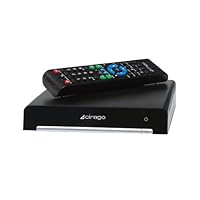
Buy CiragoTV Platinum Network HD Multimedia Center with 500 GB Hard Drive CMC3000 (Black) Now

No comments:
Post a Comment