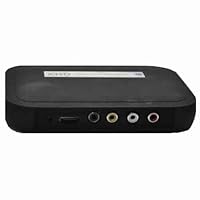
 I bought this from a site other than Amazon for about 1/3 of the price (limited discounted stock), and I have to say it was well worth more than what I paid for it. The current retail price is still a bit high since you can buy a refurbished PC that will do the same thing for about $20 more than the retail price on this thing, but still...this device is small/completely portable, light-weight (actually A LOT lighter than it looks...almost too light) and I'm sure uses a lot less electricity than a PC would (so it's technically saving you money).
I needed a good way of being able to quickly display video presentations on the go. I have a 500G 2.5" notebook harddrive in a USB adapter case where I've backed-up a lot of my music and DVDs. This media player worked flawlessly with the external USB harddrive and I was unable to find a video file that it wasn't able to play. I also tested it with a 32G SD card plugged in at the same time and it was able to handle that with no tangles/glitches (it also has an "eject" feature for your media storage devices).
I tested it using an HDTV w/ an HDMI cable and was very pleased. My only complaint is that it displays with a 1" black border around the entire frame (wouldn't expand/zoom to fill the ENTIRE 52" screen), so it was more like watching it on a 50" HDTV, which was barely noticeable considering that the quality looked SO MUCH better than when I've played the same video files on the HDTV using a PC/VGA connection. The RAW audio feature/option is also a plus if you're connecting it to a device that has its own volume control/audio processors.
I also tested it using an Optoma PK301 Pico Pocket Projector. The settings on the projector are adequate, but very basic, so having the XHD allows for more control/improvement on the picture quality because it has video control features like Zoom, Brightness/Contras/Saturation/Hue and a bunch of different aspect ratio settings as well as TV Quality settings that opened up all kinds of possibilities.
One thing I wasn't able to figure out how to do was turn off the "Playing" button that displays temporarily in the top left corner after you hit play and/or switch to a new video. I'm partially going to be using this to project a Halloween effect in my front window and unless I can figure out how to turn that off, it's going to look weird for a few seconds between clips. A fix would be to just edit all the clips together into 1 large file, so that bit doesn't bother me too much.
Combining the XHD with the notebook HDD and the PK301 allows me to basically hold a mini movie theater in one hand (minus the sound system). Take away the projector and you're still left with basically your own transportable movie collection that will play on literally any TV (also has RCA outputs). One thing it doesn't do is stream media from the internet, but for the relatively low price, I wouldn't expect it to do that.
I really like this thing.


No comments:
Post a Comment