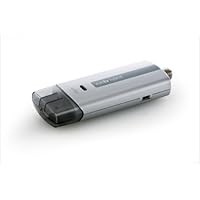
 2010 UPDATE: Elgato has a newer model of the EyeTV Hybrid that was released in 2010. My review applies to the 2009 model. One would expect the performance of the new model to have improved. My comments about the software should still be applicable because I have upgraded to the latest versions. Cheers.
ORIGINAL REVIEW:
First, I'm not a corporate shill. My other reviews are some evidence of how long I've been buying stuff from Amazon. I am a Mac person and I enjoy gadgets. I am running the EyeTV on an '08 model MacBook and using over-the-air digital broadcasts.
The new EyeTV Hybrid (2009 version with FM radio reception) is an amazing package of hardware and software. It has its flaws, notably the remote control is not intuitive. But this could be sold without the remote and it would still be a great product. Here's a quick breakdown of important information:
-Which EyeTV Hybrid is this? This model came out in January 2009. Earlier models lack the FM radio tuner. Supposedly the hardware is better than earlier models. It also ships with the latest EyeTV 3.1 software.
-Ease of use: if all you are doing is watching broadcasts, the EyeTV package is easy to use. I would not recommend it for my elderly parents, but non-techies will have it up and running in a few minutes (assuming you have an antenna feed handy). Recording broadcasts is very easy too. Where it gets a little time consuming is taking those recordings and crunching them into smaller formats (e.g., for use on a home media server or an iPod). Don't get me wrong, this is still easy to do if you are at all technically inclined, but most people aren't going to sit there and methodically compress recordings. And there is nothing to keep you from storing your programs in the EyeTV format (and accessing them entirely from the EyeTV software) except for the size of your hard drive.
-Quality of the picture: EyeTV gives you exactly what you are receiving from the broadcaster. If you already have a TV with a digital decoder, well, that's the kind of reception you will get. What you will find is that on a computer you have a better idea of the varying levels of digital broadcast. HD comes through as a huge picture that pretty much fills up a 20 inch Cinema display. The smallest broadcasts come through at 640x480. In fact, this lowest quality is quite sufficient most of the time; if I really want something in high quality, I buy the DVD, in part because I want the best sound. There is one important caveat to the question of quality: as Elgato's specifications note, if you don't have a Core 2 Duo machine, quality will suffer on the larger format (HD) broadcasts.
-Recording formats: If you do wish to convert your recorded programs from the EyeTV format to something else, EyeTV provides a good number of formats to choose from. Compression is CPU intensive and will take some amount of time depending on your hardware. In the aforementioned 640x480 size, a 1/2 hour recording compresses to just over 400 Mb using H.264 compression. HD is about four times as large.
-The software, which is a key part of the whole package, strikes a fine balance between ease-of-use and functionality. The TV Guide (one year subscription included, $20 thereafter) is easy to use: simply click on a program to have the computer place it in the recording queue. The included editor is sufficient to trim the recording of excess bits. Nothing fancy here.
-As for the hardware, there's so little of it that you'll forget it is there. The tuner is the size of a USB memory stick. It does its job very well. The remote control, as I mentioned, is merely okay. I don't find that it has the same ease-of-use as the software, nor does its layout correspond nicely to the software (as an example, even the on-screen "remote" that you click with the mouse is designed differently). But the remote is, in the end, a very minor part of the whole package.
-Broadcast Flags: Elgato hardware does not recognize broadcast flags (yay!). Broadcast flags are part of digital television (sent in the broadcast signal) that tell equipment whether the program can be recorded or whether there are restrictions (e.g., don't skip commercials). The system is voluntary and Elgato has chosen not to be a part of it. Regardless of whether you get an Elgato tuner or not, you should avoid companies that have bought into this system as it may limit what you are legally allowed to do under the Fair Use doctrine. Currently, broadcasters are largely leaving the flags off, but that does not mean they won't turn them on down the road. Windows Media Center, by the way, does listen for broadcast flags.
-Downsides? If you are recording, you can't watch other broadcasts at the same time. There is, after all, only one tuner. It does have picture-in-picture, but that works only if you are watching something you've already recorded along with a current broadcast, or if you have two EyeTVs plugged in. Also, and this is probably stating the obvious, if you've got a Mac that is shared by a number of people (with different accounts), it is only going to perform its scheduled recording if the appropriate account is open. Duh. But you might not be thinking about that before you buy.
-Cable Subscribers: please note that I am using this with over-the-air broadcasts in a large metropolitan area. If you are getting your feed from a cable service, then you may be at their mercy in terms of the number of stations you receive and whether the EyeTV can decode them (not to mention whether -the program guide -has been given up-to-date information from your cable company). If you have cable, you will have to find out what your service provides. But let's be clear, cable companies much prefer you to subscribe to their own pay-per-view services and Tivo-like boxes. Packages like EyeTV have the potential of eating into their profit model. You may find that EyeTV picks up more stations from over-the-air (if you have an antenna) than when you plug the EyeTV into your cable service. Anyway, cable subscribers beware.
-Misc. notes: in my opinion, the FM radio tuner does not add much value. Also, I have not tested the WiFi sharing features (everything I want to share goes on an NAS). Finally, I called this Tivo for the Mac above, but I should note that EyeTV does not include any software function that attempts to anticipate what kinds of programs you might like to see (as Tivo does).

I immediately substituted it in my Intel iMac Core 2 Duo setup, and confirmed that my software v3.1.1 was current. Imagine therefore my surprise and disappointment when the previously marginal NBC station was not only not stronger but worse, it could no longer be received at all! Worse, another formerly solid station (WKNO) dropped to only marginal in signal strength. Thinking there must be some error in my plugging and unplugging, I shutdown the EyeTV application and reinstalled the 2008 model and restarted the EyeTV application. Presto, the signal strengths all returned to their former higher readings, and the missing NBC station reappeared, albeit with its marginal signal strength. Further substitution tests confirmed that our PBS station is received with a 62-67% signal strength with the 2008 plugged in and with only 42-47% signal strength with the 2009 model plugged in. NBC's and the other stations results were similarly consistent and repeatable.
Conclusion, either I've received a defective product or Elgato's 2009 EyeTV Hybrid has a receiver that is markedly inferior as measured by signal strength to the one in the 2008 model, and their literature's claims comparing the 2009 model to the former 2008 concerning receiver sensitivity are false.
As other Elgato customers have complained, Elgato aggressively keeps their customers at arms length by hiding any customer service phone number and limiting its customers to communicate by their website's Inquiry system. I have submitted a report and request for a prompt and honest answer and I will update this Amazon Critique when the matter is resolved, either by receiving a 2009 model with signal strength at LEAST equal to the 2008 model or have returned this 2009 model to Amazon as a defective product.
Pending the outcome of this issue, my recommendation is to avoid the 2009 model unless FM reception is important, and then only if you have very strong signal strengths on all the HDTV and Cable stations important to you.
Bill
2/19/10 update.
I apologize that I failed to update this review in a timely manner as promised.
The short version is that Elgato, after much delay, talked me into accepting a purportedly properly functioning unit rather than returning it to Amazon. But despite their claims, the replacement unit they sent exhibited the exact same, dramatically weaker performance as the first one. Therefore my original review stands as written:
The 2009 (i.e. current) Elgato EyeTV Hybrid (with FM) receiver sensitivity is markedly weaker to the preceding 2008 model (without FM), to the point of near uselessness in my reasonably strong antenna signal environment, and I can not therefore recommend it. This is exceedingly frustrating because their EyeTV software, while far from perfect, is very good and generally a delight to use, especially now that they've added home network sharing as a wonderful new feature.
The longer version is a tale of woe reflecting very poorly on Elgato's customer service, their honesty, and their current EyeTV Hybrid 2009 version's receiver sensitivity... and yes alas on my gullibility.
Given the aforementioned lack of an Elgato Customer Service phone number, combined with their excessively slow response time to online help requests, I did not receive the replacement unit for 7 days after they received my original one (I know exactly when they received it because I Fedexed it overnight and have a delivery signature) and over 3 weeks after the original poor performing one had first arrived.
I now feel stupid that I got doubly duped by Elgato into returning it to them rather than to Amazon as I should have done in the first place. I say doubly duped because they first said mine was clearly defective because properly performing 2009 models exhibited stronger, not weaker sensitivity. Evidence now seems compelling to me that they knew this was not true. In fact in my letter that accompanied my returned unit, I specifically said to only ship me a replacement if it (the replacement unit) exhibited better receiver sensitivity... which it didn't even slightly.)
Secondly their online rep specifically directed me in writing to send in the original box with the "defective" original unit. Silly me, I acquiesced to this unusual request thinking they wanted to make sure I was the legitimate owner. But what they shipped back was just the Hybrid unit itself, without the box, thus making it impossible for me to subsequently return it to Amazon. I find it difficult to believe that they did not do this without knowing that it would prevent me from returning it to Amazon.
So I ended up not only with an essentially useless Elgato EyeTV Hybrid 2009, but it was/is unreturnable to boot. At that point, rather than endure further frustration and expense, I just wrote off the whole affair as a $150 lesson learned and put it in my electronics orphan & junk box and tried to forget my stupidity.
Bill
Buy Elgato Systems 10020974 EyeTV Hybrid TV Tuner Stick for Analog, HDTV and FM Radio Reception Now
I just got a new TV. It's the size of a USB flash drive, interfaces with my Mac, allowing me to pause, rewind, and skip ads, and allows me to record all of my favorite programs for viewing on my schedule, on my Mac or iPhone. My new TV also hooks up easily to my VCR and allows me to digitize my old VHS videotapes for archiving on DVD or posting online. My new TV, and my favorite TV so far, is an EyeTV Hybrid, powered by the amazing EyeTV 3 software.Elgato has managed to shrink a digital HDTV tuner into a stick the size of a so-called "thumb drive", which turns any USB 2.0-capable Mac (G5 and later) into the coolest TV on the block. This little USB-plug-in device feeds an HD signal into the Eye TV software, which gives you access to a control center bringing together live TV, previously recorded programs, and a TV Guide-powered listings screen.
EyeTV affords me several luxuries by bringing TV to my Mac. First off, I can relax with one of my shows in any location, anywhere my MacBook Pro can go with me. On an airplane; at a friend's house; lying in bed late at night; anywhere. Watching TV in full screen most closely replicates the traditional television viewing experience, with the added benefit of the beautiful on-screen channel navigation, program guide, and program information courtesy of EyeTV and TV Guide.
Watching television while otherwise working on my Mac is where EyeTV gets to be real fun. I can set the program window to hover over all other open windows on my screen, and watch TV no matter what else I am doing. Gotta get a spreadsheet done? Code a webpage? Write a review for AAUG? No matter what else I am doing, I can keep my favorite Red Green reruns playing to keep me amused while working the day away (Note to my boss: this is entirely theoretical. I do not endorse anyone enjoying themselves while at work).
The device itself is well-designed and well-built. On one end is a standard USB plug. The opposite end has a coaxial cable connector to hook the unit to your cable system or your rooftop antenna/rabbit ears. Any signal you can watch on a traditional TV, you can watch on EyeTV. HDTV, analog TV, cable, VCR. A clever little jack on the side of the stick, combined with an included RCA (red, yellow, white) cable pigtail, facilitates connection of VCRs and similar equipment. Without a video source, which can be as basic as a rabbit ear antenna, the EyeTV will not have a signal. So to watch live TV (and record), you need at least that much. But once your shows have been recorded, and you just want to watch recordings, the EyeTV Hybrid may safely be unplugged and the EyeTV 3 software does the rest of the work of organizing, playing, exporting, and editing your shows.
The new version of the EyeTV software sports some quite impressive features, such as instant export of shows to iPod, iPhone, and Apple TV compatible formats. Even cooler, is the ability to stream your shows over the internet to any web browser, from your Mac. So even if you forgot to load the latest episode of Bizarre Foods onto your iPhone, access to wi-fi combined with EyeTV sharing and its built in web server will keep fresh servings of TV coming your way.
The scheduler lets me set what TiVo users and iTunes buyers will know as a "season pass": record every new episode of a given program, with the need to only set up the recording once. Even better is that EyeTV can wake up or turn on your Mac when needed to catch your show. I told you this was the coolest TV on the block. Oh, but wait. It gets better. Taking advantage of the "smart" frameworks built into OS X, such as Smart Playlists, Smart Mailboxes, and Smart Folders, EyeTV offers Smart Guides. Pick an actor, a director, or any of a host of criteria, and allow EyeTV to build playlists of shows meeting your criteria.
One of my favorite uses for EyeTV has become burning DVDs of children's programming for use in the car. I don't really like to hand my iPhone to the small people who ride in the back of my car, but we do have an in-vehicle DVD system. EyeTV's built-in editor lets me cut out commercials, credits, and all the rest of the fluff that just annoys the kids, and then the included light version of Toast 9 lets me burn their shows into a DVD that will keep them happy the entire time we're out and about. The editor is so simple to use that no manual or explanation was necessary to get started. Opening the edit window reveals a timeline, some grabble playheads (much like in QuickTime Player), and a few simple and self-explanatory buttons. Within a minute you'll chop out commercials and cut off the lead-ins and tail-ends and produce a leaner recording ready for archiving or burning to DVD.
I realize, and Apple sort of agrees, that burning DVDs is becoming less popular with each passing day, and Elgato knows this too. I suppose this might have something to do with allowing you to export EyeTV programming to over a dozen formats. Simple preset exporting options like "for email" and "for iWeb" are a welcome addition to the capabilities of EyeTV. Whether it's a brief clip from the news or a home video you've digitized, getting your material to your intended destination could not be easier. Want to send your clips to iMovie or iMovie HD for post-processing, or DVD Studio Pro? Easy. of course sending your clips to an iPod, iPhone, Apple TV, or iTunes is just as simple with one-click ease.
I experienced only one odd behavior while reviewing the EyeTV Hybrid, and it happened on all three Macs on which I tried the device. The first time the EyeTV was plugged in on each Mac, I received an error message instructing me to ensure the device was plugged into a USB 2 port. Well, all of my Macs only have USB 2 ports. Unplugging and replugging the EyeTV right back into the same port each time made the error go away, never to be seen again. Weird. But hardly a big deal. A little bug, nothing more, I assumed.
I'm also the owner of a TiVo DVR, and I find that EyeTV has become my favorite DVR device. Those who currently use TiVo or a cable company's DVR will surely that find they enjoy EyeTV's greater flexibility and lack of on-screen ads, and that the ability to edit recordings gives EyeTV the clear advantage over other DVR products on the market today.
As a user of a previous (analog) EyeTV tuner, much of the hardware and software was very familiar to me right away. And the improvements in version 3 of the software are impressive in their own right. But combined with the latest EyeTV hardware, the EyeTV Hybrid, I am certain that anyone who likes to watch TV will be tickled to add an EyeTV to their Mac. Five stars, all the way.
Yes, this is one of the better items that we have gotten for our Mac. A great product.I bought this directly from Elgato when it first came out and was disappointed at first. This is because every time I restarted my mac I would have to reconnect the eyeTV usb stick. This is no longer a problem because they fixed this issue with a software update.
My setup: I am using this on an early 2008 20" iMac (320gb, 2.66gHz, 2gb RAM). I am recording TV from comcast cable so I'm able to pick up ABC, CBS, PBS, FOX, NBC, My 30, and the CW network all in HD. With cable you can pick up all the unscrambled digital channels (both SD and HD). This eyeTV is plugged into a belkin 7 port usb hub that also has a 1 TB and a 500 GB hard drive attached to it. The 500 gb is used for time machine back ups, and the 1 TB WD mybook is used for storing all recorded TV.
Features that I like most:
-You can record a single show or and entire season (including all reruns or you can tell it to record new episodes only).
-You can search your entire library of recorded shows using the search box in the top right. Along those same lines you can create smart playlist (like in iTunes) using any criteria you want (show title, HD only, specific network, date aired, etc.) They have a few built in to get you started.
-The eyeTV software can wake your mac up and even turn your mac on before the start of a show.
-The quality of the recording is excellent. It really depends on the display you are using to view the content.
-Easy exporting of recorded TV to iTunes in an iPhone/iPod friendly format.
-Easy burning to CD/DVD using Toast 9 basic (included).
-Edit commercials out or create a clip using the easy editing features.
-Instantly view the incoming bandwidth of the channel you are viewing.
I record all content using an iMac and external hard drive, but regularly copy the TV file to my macbook for viewing on my HDTV. I installed the software on my iMac and macbook, and I am able to use my logitech 880 remote to control my macbook just like the apple remote. However, the apple remote will work with the eyeTV software (play/pause, skip forward, and back/replay). So you don't have to use the included remote if you don't want too.
Finer details: As others have noted, you will need to set your mac up so that it will log in to an account on every start up. This needs to be the account where you manage the eyeTV software. This is because the eyeTV can wake up your mac and even turn it on. It does this when you have set up the program guide and selected single shows or a season of a show for recording. If your mac is off, the eyeTV software will turn your mac on 2 minutes before the start of the show and automatically start recording at the set time. This is why you need to set up your mac so that it logs into the same account on each start up.
The eyeTV software will allow you to reformat the show in many different ways. You can send it to iDVD, quicktime, iTunes, and even format it as an H.264 file to name a few.
An hour of HD ranges from 6-8 GB. After commercials are cut the file is about 4-6 GB.


No comments:
Post a Comment