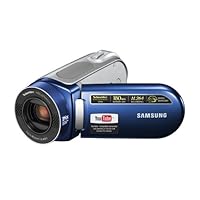
 I have used various kinds of camcorders over the years, VHS, mini-dv, dv, never flash.
The major reason I wanted this camera was because of the amazing ability to record video, and take it off your camera, being able to use it, right then, no editing, no having to capture the video using premiere or final cut, just boom, plug in camera, instantly watchable video.
If your an amateur filmmaker (or aspiring) this is HUGE. You do not need to worry about tape. The flash card will NOT get damaged and eventually need to be replace. Film is now "free" meaning you can shoot what you want, whenever, all day, and not have to worry about the "cost". This alone makes this camera very valuable. The fact that it uses open formats such as h.264 and mp4, ensures 20 years from now, you will have no problem opening and playing the videos this camera produces (unlike other cameras which capture in formats other than open formats).
This camera does do that. You shoot your video (which is so very easy) and it saves each file as a h.264 compressed mp4. This file will play on many different devices, and you can take that mp4 and put it on dvd, post it on the web, whatever, the possibilities are endless. The audio mic does a great job, it has a wind mic feature which solves some of the problems from using the camera outside in the wind.
It has an anti shake feature (image stabilization) so the video appears more steady. Overall this is a very good camera, and I'm happy with it. There is however, a few flaws, one of them (for me) is very major. I got this camera so I could do some fun things with it, without having to spend countless hours editing the footage, making it better.
I do some 3d animation, occasional acting, and give lectures. One thing I was looking forward to was setting up the camcorder, and reading lines, and or acting. Hooking up the camera, and seeing the video, taking notes on what I need to improve on, to become better. You can do this (maybe I'm just vain) but to do this, you need to shoot in 4:3 mode, or the new YouTube mode. If your a singer and you want to capture your performance, it could not be easier than with this camera. Everything is perfect, pre-formatted, and ready for the web. The "problem" is you cannot do ANY of this in widescreen. The camera forgets to set the 16x9 flag, and as such your video comes out squished. (when shooting in "non 16x9 mode" everything works as it should, the video is fantastic, and works out of the box the way it should, simple solution, use 4:3, or import your footage in another program and export it back out corrected (which you will likely do anyway for anything important, such as color correction, adding titles, creating fun transitions, etc))
I have a mac, and as such, this cameras software is not compatible with it (says so on the box, I'm not complaining). When I import the video footage into iMovie, it recognizes the video should be widescreen and fixes it. This is still quicker than shooting on mini-dv, but it is an additional step. Maybe the software included will do that on windows, but I cannot say for certain (I also had problems importing the video into Adobe Premiere CS3)
Lets go over what I call, the good, the bad, and the ugly.
The Good:
-This camera looks like a camera.
-It is very stylish, and looks stunning in real life.
-It is very small, you can keep it in your pocket, carry it in your car, throw it in a bag, the possibilities are endless (it is very discreet)
-3 hour long battery life, wow, just wow.
-Shoots to SD card opposed to mini-dv (you do not loose much if any real quality, and you gain so much more as discussed above)
-Manual ability to close the lens cover (some people are complaining about it, but since I had a camera that automatically did it which had a malfunction and no longer works, I highly enjoy doing it manually)
-Quality (as with everything on this camera) is very high.
-You get a nice bag to put the camera in (it is more a pouch, which protects it from dust, and lets you carry it by the handles)
-The grip swivels so you can hold the camera in different ways.
-The LCD swivels, you can view yourself on camera while capturing video, and you can flip it and reverse it to see the video on the camera (opposed to leaving it open)
The Bad.
-The Manual comes on PDF (this is not bad for me, as it is environmentally friendly, but for people who like to read the book before messing with the camera, will need to print it out)
-Does not include software for the mac (though this could be considered a pro (one less thing to install and learn), as we have imovie, and it is more than capable of working with this camera, that makes this a non issue, just listing it)
The Ugly
Widescreen mode does not work the way it should. And this is HUGE.
Unfortunately for this camera, today, youtube now runs in widescreen. This camera is set to do everything in full screen (for youtube), and the widescreen flag is never set when your shooting in widescreen mode. As I mentioned above, you can fix this, but it does not work out of the box.
I'm hoping this gets fixed with a firmware upgrade (none has been made yet) if enough people complain about it, I'm sure they will fix it.
Another great feature is one I saved for last. This goes back to those who would like to be filmmakers, and for those who would love to make professional quality videos.
I'm a photographer, and one of the most important things you learn in photography, is how to composite your images in interesting ways. One of the most important and powerful ways is the rule of thirds. This is the one key, the one element, that can change your images (or video) from rank amateur, to high end amateur or pro.
With this camcorder, samsung (much to everyone's surprise) includes this amazing feature I see no-one here talking about, called grid mode. In it it sets up the lcd and shows a visual diagram in the form of a grid (think horizontal tic tac toe board). you can position your subject into those grids using the rule of thirds (upper right grid, lower left, upper left, lower right, just not in the middle). This makes everything you shoot, look professional and high end, without even thinking about it.
This is huge. My mom can use this camera due to its simplicity, and after I explained to her the rule of thirds, even she can make fantastic amazing looking video. I already bought one of these for her, and my grandparents. This is a truly amazing camera.
The only reason it does not get 5 stars from me, is the widescreen issue. If this gets fixed during a firmware upgrade, they get a 5.
Out of all the cameras in this price range, this should be a no-brainer, don't even think about checking the others out.

While you won't get DV quality video, you will get acceptable quality as long as you understand that you're shooting in a highly compressed H264. Editing your footage on your Mac is virtually impossible unless you convert it all to DV and edit it in iMovieHD (or use that iMovie'08 abomination). Personally, I use MPEG Streamclip to convert to DV, drop those conversions into iMovieHD, do my editing, and convert the "reference movie" using MPEG Streamclip so I get a nice H264 for my iPod or AppleTV.
I would have given this camcorder 4 stars but there is a flaw in the firmware that neglects to give any of the better quality settings (the 16:9 footage that's better than the "YouTube" quality) the "16:9 flag" setting. So what you get is footage that's squished narrow because all the players and editing apps see this video as 4:3. (QT Player and VLC on both Macs and PCs see this problem.) As I mentioned above, I use MPEG Streamclip (it's free) to correct this problem when I export to DV I set the 16:9 flag there. This problem with the camcorder is, frankly, inexcusable and shows that at least one engineer was asleep at the switch.
If this problem were fixed (a firmware update, perhaps?), I'd go back to a 4-star rating. How could it get 5 stars? Give me an external microphone port.
REVISING MY RATING: SAMSUNG HAS ADDED CIRCUITRY TO THE MX20 THAT DISABLES THE CAMCORDER AFTER 30 SECONDS IF IT DETECTS AN AFTERMARKET BATTERY. SEND A COMPLAINING EMAIL TO SAMSUNG AT THEIR WEBSITE. (Use the "contact us" link at their website).
Buy Samsung SC-MX20 Shoot & Share memory camcorder w/34x Optical Zoom (Blue) Now
I now love this camcorder, its light, easy to use and the video after being converted on my computer with the right software makes the quality wide screen and crystal clear. First the software that comes with it is called Cyberlink Mediashow and it seems pretty sweet but it won't allow a 16:9 aspect ratio even when selected. I went through Samsung's tech support through their level 2 guys who were stumped and I found free software at download.com, "Free Video Converter v 1.3 which updates automatically after installing to v1.4" and by selecting avi with Xvid 624x352 with 16:9, I got wide screen and great quality, I could have chosen up to 1920x1080 but on my 43" plasma 624x352 is sweet. I've got my 8 and 11 year olds using this camera like pro's and the videos are worth much more than the camera cost.Hopefully Cyberlink Mediashow will come up with a patch for their software as it has the potential to be great if they would just fix the aspect ratio issue.
GREAT NEWS as of Nov 24, 2008 the patch for Mediashow has been released and it fixes the problem with the wide screen, kudos to Cyberlink for the quick fix.
Read Best Reviews of Samsung SC-MX20 Shoot & Share memory camcorder w/34x Optical Zoom (Blue) Here
There is a market for simplicity of design and this camera caters to that crowd. If you are a user that would like to just turn on the camera and start taking movies, this camcorder will make a happy consumer. This first generation of Flash memory camcorders is a nice step for allowing users to interchange media between cameras and camcorders in a very portable form of media.The camera features a 2.7" LCD screen, 34x optical zoom, a swivel handle and a rotating LCD screen. This particular model operates utilizing a SDHC (high capacity HD card) or MMC (multimedia card) plus. A flexible option is to record in 16:9 widescreen or 4:3 standard options.
WHAT IS IN THE BOX?
AC power adaptor
Audio/video cable
USB cable
Software CD (Cyberlink Media Show)
User manual CD, quick start guide (hard copy)
Cloth pouch (for the carrying case)
Unfortunately, to read the manual in detail, you have to load the disk and access the PDF on computer. A quick start guide gets you up and running very easily so you don't really need to read the manual given the simplicity of the camera. But the manual decodes some of the subtle features.
THE SOFTWARE
The software is a simple product with limited capabilities. Fine tuning allows brightness, contrast, color saturation, and white balance. You can trim out sections of a video clip for deletion or extract an interval of the video. Additionally there are general fixes for a shaky video, background noise and fixing lighting. The video can also be rotated. You can add annotations but no music or sound to existing video clips.
The software's system requirements are below:
RAM: 1 GB recommended
3 GHZ Pentium 4
OS: Windows Vista or XP
RESOLUTION: 800x600
MEDIA Supported: DVD+/RW or DVD-/RW
DESIGN/CONSTRUCTION:
My biggest requirement for a camera is a battery life indicator. You can see this when the unit is in video mode or if you hold the iCheck button down. While taking videos, I love seeing how much recording time I have left (hours,minutes,seconds) and approximately how much battery life I have left in minutes.
The housing is hard plastic in a silver and blue combination. A switch operates the built-in lens cover. I find a built-in cover to be convenient since it is hard to keep track of something that can be easily taken off. A novel feature is the ability to rotate the handle with the built-in vinyl strap 180 degrees. The handle allows the user to record in almost any up-down angle. The most useful configuration is holding the camera like a pistol. You will not have to hold your camera up to your face (or on your shoulder) or have your elbow at a constant 90 degree angle (which is really hard for many people), like old camcorders had the user have to do.
The LCD screen opens out and also swivels 180 degrees so you can film yourself talking. A tripod mount is in the underside of the unit and the unit does sit flat when set onto a counter despite the fact that this is shaped like a bullet.
A small door in the back of the unit contains ports for the A/V cable, USB cable and AC power supply. The underside of the unit contains a battery door with a slot next to the battery for a memory card.
There are not too many buttons on this unit to simplify the operation. There is a record button, playback and video button, and an on-off switch in the back. The body houses only 3 buttons: an icheck button for the LCD display, LCD contrast button and an Easy button that makes this a point and shoot camcorder.
On the LCD frame, there is a menu button, 4 way directional button with central enter button, and a record button.
The top of the unit has a zoom/wide angle button. This button does not have fine control so it should be set and video should be taken at that setting. Otherwise the audience watching the video could get sick.
Now, practically speaking the record button in the back of the unit is hard to access when your hand is in the strap. The button on the LCD frame is easier to access, but is more for 2 handed operation.
There is a tiny speaker in the body of the camera that serves the purpose of just hearing sound. Quality of the audio playback from the camera is limited. A volume control toggle, fast forward, reverse, play and pause button are utilized with the 4 button directional keys, during playback.
OPERATION:
Before you can use this camera, you need an SDMC. There is no internal memory.
It takes about 8 seconds from the time you push the power button to getting ready to take videos. The toggle switch for video and playback seamlessly allows the user to take video and quickly select the clip that he or she wants to review.
Playback mode utilizes the directional keys to select the video clip of interest to review. The menu button during playback allows the user to have play options, delete clips, format the card, lock/protect a clip. With digital media, you don't have to worry about rewinding or fast-forwarding as you would would Mini-DV, 8 mm or VHS.
Taking videos is easy with the EasyQ button. Camera shake is activated, white balance, color, shutter speed, etc. are set. All you have to do is adjust your zoom and push record. This is the best feature for a simple person like myself who wants a foolproof method of capturing a moment in time.
For more advanced users, turn off the EasyQ button and you can access the Menu. There are 10 iScene buttons for various situations: Auto, Sports, Portrait, Spotlight, Beach, Snow, Manual, High speed, Waterfall and Food. You can toggle Digital Zoom off (which I recommend since there is too much pixelation with digital zoom) 34x is more than enough for many practical situations. Guide lines are available to frame your video in 3 modes: Off, Cross, Grid and Safety Zone. Resolution can be set for Superfine to Youtube mode.
You can set the fader to on or off.
Intervals for the length of a clip can be customized.
Backlight for objects in front of a light source can be turned on and off.
My favorite custom feature on this camera is the Digital Effect function where you can set Black and White, Sepia, Negative, Art, Emboss, Mosaic, Cosmetic, Pastel, and Stepprinting can be set for a more artsy touch.
INTERFACE:
The A/V cable allows me to connect to my Plasma using a RCA input. What you see on the LCD (good or bad) is the same image you get on the television. You can watch video clips or record while attached. The LCD flips out and inverts so you can have the camcorder shut with the LCD menu out to watch your videos. No remote is available with the unit which is a negative.
PICTURE/SOUND QUALITY:
My house has soft light and image quality under lower light conditions is grainy. High intensity light (Fluoresent) and outdoors gives better picture clarity through better color balance, intensity of brightness and less graininess. Candlelight darkness, renders this camera nonfunctional for good color picture quality. Low light for sepia and black and white is actually better for contrast.
My perception of color saturation is that the camera does not handle lower light conditions well.
A trial of video recording a TV commercial showed a slight graininess also but was also limited by a lag in the sound. The microphone seemed to capture video but there was a latency between the lips moving and sound output (equivalent to watching a dubbed movie, if you get my drift). Live recording of sound and video is more in sync and sound quality is very good, despite the compact size of this camera. It is quite robust.
With faster motion, there is slight pixelation. Occassionally, the autofocus comes out of focus despite a more stationary video subject.
The anti-shake features decreases motion slightly but does not minimize severe motion. The difference is barely perceptible. This is exacerbated when on 34x zoom. Practically speaking, you will need a monopod or small tripod to keep the motion down to a minimum.
PRACTICAL MATTERS:
Overall, its use is better as an outdoor camera than an indoor camera. Birthday party videos at home would be a limited application.
This camera accepts SDHC cards by Panasonic, Toshiba, and SanDisk (if you're buying this camera with memory cards, as you read this). A write speed of 2 megabytes per second is recommended for video. The card I used for this test is a Transcend SDHC 8 GB card that performs at 6 MB/Second.
Transcend 8 GB SDHC SD Class 6 Flash Memory Card TS8GSDHC6E [Amazon Frustration-Free Packaging]
I suggest the following to transfer video to your computer, instead of the USB cable:
15-In-1 Memory Card Reader
Charging can only be performed by plugging in the unit as opposed to many digital cameras that have dedicated battery chargers. You need a spare battery. I ordered the following:
Samsung BP85 Lithium Ion Battery for SC-HMX10,SC-HMX20 and SC-MX10
PROS:
Compact and light
34x optical zoom
Simplicity of design and operation
One media between cameras and camcorders: Flash memory (SDHC) which can be interchanged with digital cameras
Intuitive menu system
Robust sound quality for a camera of this size
Excellent battery life
CONS:
Limited by low light
Negligible effect of the Anti-shake feature
No still camera features, nor can you can extract a still from a video clip
Average image quality but not quite the resolution attainable on Mini-DV
Software not MAC compatible
No internal flash memory
VERDICT:
Good entry level camera for a student or a person who wants a point and shoot camcorder.
This is above average in performance for a person wanting a camera capable of uploading to Youtube.
Great budget camcorder for analyzing your golf swing.
Not recommended for a Prosumer, intermediate or advanced videographer given the limitations in low light.
For the price, simplicity and portability, this camera deserves 4 out of 5 stars for this category of camcorders. Two thumbs up!
RECOMMENDED ACCESSORIES:
A real camera case instead of the drawstring sack.
Backup battery when on the road.
NOTE (I have both the SC-HMX20 and the SC-MX20):
I also have the Samsung SC-HMX20 1080p HD camcorder/6.4 MP digital camera Samsung SC-HMX20C 8GB High Definition Camcorder with 10x Optical Zoom with pop up flash and 8 MB of built-in RAM. It is an excellent camcorder, heavier in weight with excellent resolution especially in lower light. If you want something for HD and low light, consider this camera (SC-HMX20). However, there is about a $400 price difference that may not be worth it to you.
However, if you are a Youtube or other online video publisher, this SC-MX20 is a better option. It is lighter and more comfortable to take around trips to the park, picnics and the beach.
UPDATE:
This camera is so light and easy to handle that my 8 year old can use this camcorder without any problems. It is a great tool to help a child stimulate their imagination and make their own videos.
This camera captures my golf swing very easily. It's only drawback is the absence of a remote control. Otherwise, this would be a perfect item to use for analyzing the golf swing for a training aid.
Want Samsung SC-MX20 Shoot & Share memory camcorder w/34x Optical Zoom (Blue) Discount?
This is a great little camera. Took a video, connected to my laptop, which looked at the camcorder as a USB storage device, opened it in a new window and just copied the MP4 to my desktop. I can play it as an MP4 from my desktop, but I opened Adobe Premier Elements and changed it to a Quicktime video (conversion took about a minute) which I can email to friends. I had no problem with video lag and I am wondering if the other reviewer may have inadvertantly put the camera in its time-lapse mode. I would say that the video is comparable to my Sony Handycam (for which I spent considerably more).

No comments:
Post a Comment