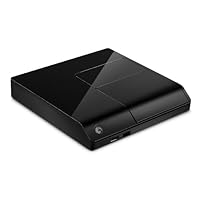
- Easily enjoy your photos, movies and music on your TV.
- HDMI connectivity and 1080p HD video playback.
- Dolby Digital and DTS audio support
- Ethernet connection or optional Theater+ wireless adapter for accessing shared content on your network.
- Windows XP, Vista, Windows 7, and Mac OS X compatible.

CONSIDERATIONS
1. The previous version only displayed 6 items on the screen and it was somewhat difficult to find things with a large number of files. I have a 1.5 TB external drive to hold my movies. Both versions allow me to keep multiple files within a folder, which is handy for a TV series. This newer model displays a whole lot more on the screen--every file on the hard drive--10 at a time. You will need to learn to use the settings available from the Menu button on the remote to view folders and files according to your taste. I have over 300 files on the drive and most of them are TV series, so the interface is somewhat of a challenge if you don't use the Menu button. The unit plays one file after another, so a series with 10 episodes will play all 10 episodes in the order of their alpha-numeric file name.
2. NO S/PDIF coaxial output. This one has an optical outlet for sound, as well as stereo outputs using an A/V mini-plug.
3. Documentation/instructions need major help.
THE GOOD NEWS
1. It plays every video file format that I use. It will play a DVD image and most other video formats, including MKV. The audio and video quality are excellent. I compared a DVD movie using a high-end DVD player, my Blu Ray player and a ripped version of the movie using the Seagate FreeAgent player. The movie looked best on the FreeAgent player. It apparently up-converts the video signal, and does a great job of it. It's like having a Blu Ray/DVD player without the delays.
2. My video source is a DLP projector displaying on a 92-inch screen. The long length of my video cables (75 feet) requires me to use component video cables, not HDMI. This unit can output video in both component and HDMI formats, so it's the major reason for me buying the Seagate versus the Western Digital equivalent.
3. Movie, picture and music folders show up 10 at a time. Individual thumbnails show up 10 at a time. Selecting a music album brings up 10 thumbnails of the songs. Click on a song and it shows the song's run time and 4 adjacent songs within the album. Use the Menu button to View List and you'll get a clearer view of the titles. You can play a music selection while viewing pictures.
4. If you have hundreds of movie/music/photo albums, you might find this interface to be a challenge. However, you can quickly scroll the list by holding down the remote up/down buttons to find what you want. Lists of your music files can be searched using the on-screen keyboard--kind of a "clunky" way to do so.
5. The remote is a standard IR type, so you can train your universal remote with its commands. Power off/on is done only via the remote, and the external drive powers off when the unit is off.
OTHER
Immediately after installation, I connected to the Internet to download the latest (26MB) firmware update. The unit did everything on its own and the process took about 15 minutes.
All cables except HDMI and optical audio are included.
Connecting to my home network was simple, once I figured out how to find the on-screen keyboard (you have to hit the remote's OK button at the Network log on screen for it to appear). I was able to play music from my network while scrolling through my pictures on the network.
Wow! This box connects directly to a number of web sites, including Netflix, your local weather forecast, CNN, Youtube, etc., etc. Even a stock market overview!
It operates similarly to a netbook without the keyboard.
Very cool device for the money!
Developer Recommendations:
1. Add a wireless keyboard (you can access an on-screen keyboard via the OK button on the remote).
2. Allow it to appear as a media server on networks.
3. Expand the Internet interface to use typed input.
4. Add coaxial.
5. Improve documentation so the buyer knows how to use it! (you can download the documentation from the Seagate website).
UPDATE 04/06/2010
After 2 months of use, the box decided it could no longer access the Internet--even though it could find other computers on my network that can access the Internet through that same network. It also decided that every time I turned it on, it wanted me to perform an Initial Setup process. It lost my audio settings and the only way I could access them was to remove the power plug from the unit before turning it on. Updates from the Seagate website were of no help in addressing the problems. I contacted Seagate and they are replacing the unit by RMA. I like the box enough that I have just purchased a second one for backup.
UPDATE 10/08/2010
FYI, I was playing all videos from a networked Windows XP laptop that has 5 external hard drives attached (8TB of space). One frequent issue I have is that the Seagate has trouble finding my XP laptop on my wired network if it's the only one on the network. If there are two or more turned on, it finds all of them. Today I installed Windows 7 on the laptop to use is as a media server. That didn't work as well as I had hoped. I finally found a fix on the Seagate blog. Simply enter the IP address of the computer that has the files on it and the Seagate will find everything on the PC! This is a great box, but it someone at Seagate needs to work on the software that operates it. I'd buy the Seagate FreeAgent GoFlex TV STAJ100 but it seems to have the same limitations that this one does.
Buy Seagate FreeAgent Theater+1080P HD Media Player STCEA201-RK Now
First the good stuff: This is a nice looking unit that does a really good job of playing videos off of an attached USB drive. I originally bought the unit so that I could rip my kids' movies onto a USB drive and break the cycle of turning all of their DVDs into scratched-up $20 coasters. The user interface on this unit was simple enough that my illeterate 4 year old son was able to easily power it up and navigate to any DVD without issues. You have to manually download the DVD cover images, but that's easy and everything works well with any type of file I could put onto my USB drive. YOu just navigate to the image of the DVD and hit play and then it looks just like you put a DVD in your regular player you have full access to all of the menus, subtitles, etc...The good:
Plays just about any file type from an attached drive
DVDs are easy enough for a 4 yr old to to play, and you can preserve the menu & subtitle functionality. (Huge advantage over the WD)
Navigation for directly attached movies is a snap. Just find the cover art and hit play.
Supports PlayOn for NetFlix streaming.
I like how a small 2.5" seagate hard drive can dock directly into the unit without wires. Makes for a cleaner looking setup and makes it much easier to remove / replace the drive.
My home movies are all raw 1080i m2t files, and this unit plays them like a charm.
The bad stuff: Streaming from the network is clunky. The interface is cumbersome when navigating to networked media and a lot of files would not play well over the network. I'm using Cat5e etherenet cabling and gigabit hardware with still not a lot of luck. I have another media extender (WD) that streams content just fine on the same hardwired connection.
The biggest complaint that I have is the unit is just not stable. One common problem that I saw was when the file system on my attached USB drive would get corrupted. This problem was pretty well documented on Seagate's user forum. When this happens the unit's internal index of media gets screwy and the usb drive becomes uneditable when attached to my PC. The only fix was to plug the drive into my PC run a disk repair utility on the drive. Also, the unit will frequently freeze up and become unresponsive to the remote. This usually requires pulling the power plug to reboot the unit.
The Bad:
Can corrupt the file system of an attached USB drive
Streaming media from my PC was inconsistent at best. Poor image quality, audio sync issues, etc...
Does not support the recorded tv format for Windows Media Center. The WD does.
No actual preview thumbnail for videos unless you take the step to download and save a corresponding image for each file. My WD extender unit will generate previews for some networked content. This is nice for my home movies.
It doesn't ignore hidden files, so all of your system and deleted files show up in the content lists.
Other stuff:
The firmware is open source and there is at least one version on Seagate's forums that provides some extra functionality for all the hardware nerds out there.
The remote is small and gets lost a lot in my home.
Bottom line this can be a good unit, but it's flaky network reliablity keep it from being an exciting addition to my home theatre. Maybe future firmware releases will address the issues I mentioned above.
Update:
Three months after returning this unit for a Western Digital TV HD Live unit, I still miss the Seagate's slick DVD interface and ability to access DVD menus.
Read Best Reviews of Seagate FreeAgent Theater+1080P HD Media Player STCEA201-RK Here
For my purposes this unit offers advantages over the Western Digital player.It plays DVD's ripped to the hard drive (menus work !)
Fast Forward and Rewind does not cause the unit to hang up as with the WD player
The remote control is sized for an adults hands unlike the very small WD remote
The remote has a volume control and mute button (missing on the WD remote)
Component output as well as HDMI and composite
Plays the new format Microsoft Windows 7 media center files
Things that could be improved
The remote control is a wimp must be pointed exactly at player
Fast forward on Media Center files is limited to 2X which is not fast enough for commerical skipping.
Want Seagate FreeAgent Theater+1080P HD Media Player STCEA201-RK Discount?
I've been waiting for this new revision of the FreeAgent Theater device for a while now. The older unit was tempting, but did not support h264, making it nearly useless for my purposes. In addition, it did not have HDMI output so you needed to use a componant connection which was not ideal.My equipment consists of:
iPod Classic 120GB
Xbox 360
Windows Home Server
I wanted a solution that would allow me to encode videos that could be placed on the Home Server, synced to the iPod, and streamed to the Xbox. I am using HandBrake to encode the videos. The combination of the three products above works for this scenario, but the Xbox is not the ideal media streaming device IMO. It's loud, consumes a fair amount of power, and you seem to have to sign in to your Xbox account to view h264 encoded videos. In addition, I find the video quality on playback to be fairly choppy with h264 files. It's not my network connection (wired gigabit).
So I purchased this new version of the FreeAgent Theater and so far it looks like a real winner. The device itself is VERY slick.
Video quality is excellent. It has HDMI and allows resolutions up to 1080p. h264 video playback is much smoother than on the Xbox 360... I don't get the same jerkiness, especially during pans. You have to be careful while comparing to make sure you are using the same files as bitrate and many other factors obviously have a large effect on this. But the FreeAgent seems to handle the files with aplomb.
Some various other concerns I was pleased to find addressed:
When one video in a folder completes, it automatically starts playing the next. This is essential IMO, expecially for TV series.
It supports multiple audio tracks. So you can encode the commentary into the same file as the main audio. The iPod is very finnicky about this... it does not play the secondary audio at all, and if the second track is not encoded at the same sampling rate and number of channels it cannot play the main track properly either (garbled). The FreeAgent was able to handle files encoded with a high bitrate main track and lower bitrate commentary with no issue.
A few drawbacks I have noticed:
Does not seem to recognize chapter stops in m4v files. iTunes and iPod work great with them, but on the FreeAgent I am pretty much stuck with fast forward.
Interface is slightly clunky IMO. Could be a bit faster. Though switching to list view improves matters.
The remote is weak signal-wise and needs to be pointed directly at the device. I think I will be using a Harmony remote to replace it.
No repeat options. Sometimes I just want to put a movie up for background noise... I like to set it to automatically repeat, but that doesn't seem to be an option here. I'm not sure why so many DVD players and Media players don't include Repeat Track and Repeat All options.
Network streaming requires a login. This one is very minor, but it does work smoother on the Xbox which does not require me to login to the server with a User account to see the streamable media. However, it will save the login and place a shortcut to the server so you don't have to type it in every time, so this is minor.
Network stremaing shows all shares, not just ones containing streamable content. Even hidden shares such as C$ are shown for some reason.
Overall, I believe the issues are minor. The fact is that this unit has excellent playback quality (much better than Xbox 360), is compact and very sleek looking, remains cool, creates no noise, and is very reasonably priced.
UPDATE 02/26/2010:
After purchasing another unit and attempting to connect it to my HDTV in my home theater through my Denon 3808 receiver, I have found that the HDMI output is spotty. It fails to sync properly and you end up with brief bursts of picture alternating with bursts of black screen. This has been reported to Seagate on their forums by other Denon receiver owners, and apparently a few other receiver brands are affected. Because of this, my second unit sits unused in the hopes that Seagate will address this with a firmware update to resolve the HDMI handshake issue (I don't want to spend another two hours rewiring for componant and optical).
Seagate DID update the unit's firmware to allow accessing media servers without a login (as opposed to browsing the computer with a login). However, I have found this method MUCH more susceptible to network traffic issues, and will encounter stuttering playback when copying a large file to the home server, fo instance. Because of this, I still use the norma network browse and login.
I have also started using mkv files and have found they generally work well, EXCEPT when attempting to use subtitles (bitmap or captions). There seems to be a bug that causes the following routine: you turn on subtitles, they work for a few seconds then stop showing up, then the video itself stops playing shortly afterwards. Luckily, this always happens shortly after turning them on, so it usually only takes 1-2 tries to start playing with subtitles, and if it stops you have to go back and start it again. Annoying, though.
Also, there are issues with the sequence files are displayed in (doesn't always seem to be alphabetical?) and it still shows all hidden files and folders (this is just silly).
The good news is Seagate has the ability to load new firmwares over the internet directly to the devices and will hopefully be addressing these shortcomings soon. I will try to update if and when these complaints are resolved.
This is still the closest I've found to what I need.

firmware 1.55, which cannot be downgraded to the 1.4x series (for the roll-your-own crowd)
Updated to 2.20 (huge numeric jump, can't tell a difference)
HDMI Raw audio out to receiver
HDMI 1080P out to receiver (same cable of course)
Wired 10/100 to the local network
What it does well:
* Plays just about everything. Except some avi files which may have faulty encoding. XBMC/mplayer handles them.
* de-interlaces well (except via DLNA streaming for some reason, unless the server does it during as a transcode)
* Subtitles work (at least srt, which is all I tried so far). Also work embedded in mkv and iso files.
* Network setup was super easy. Ubuntu box running Samba some password, some public.
* Netflix works fine, the quality is decent, but I wish Netflix had 5.1 audio. Supposed to be coming.
* It has audio/video outputs to cover just about everything.
* Works with EXT3/2 file systems via USB. indexing is reasonable. Didn't time it, but was ~10 minutes for 160GB drive, ~80% full. photos & music were in the main shortcut, but video was not.
What I wish it did well:
* "Movies", "Music", and "Pictures" on the main screen are only supported with attached USB drives and the Seagate software to fetch thumbs. You have to constantly navigate through your network paths to networked media. Kind of annoying. I may attach a drive for the kid's stuff.
* Allow searching on Netflix, not just playing from the queue. Scrolling through the queue is also slow.
* Needs a page up/down feature desperately
* More internet content would be great, like Hulu.
* Remote is silly, but works ok. It's actually intuitive to use, it's just really cheap.
* The overall response time is just a touch slow. Press, wait a second, press...
* NFS. I hate Samba, I really wish it supported NFS out of the box. Apparently it can w/ modified 1.4x firmware.
* User definable video scaling. Does not do it at all. (unless via transcode & DLNA/UPnP)
I needed something with Netflix (for the family), which can play my media library via DLNA/upnp, NFS, or Samba. There are not a lot which do both well.
I went with the FAT+ instead of the WD Live Plus because the Realtek 1073 chip supported more formats than the Sigma 8655. It's probably a draw for most purposes.
I've used this with DLNA/UPnP servers all on Fedora 12: MediaTomb, PS3 MS, TVMobili, and Vuze. It works with all of them. PS3MS is really nice, and my favorite so far except for being java.
If it were faster, with better Netflix and network support it would replace an HTPC, but my HTPC running XBMC still has it beat, except for no Netflix Linux support! That said, this did replace the HTPC, which now streams content.

No comments:
Post a Comment