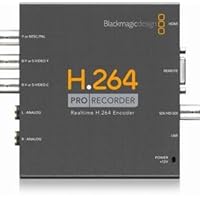
 If attempting to use this on a Mac, PLEASE be sure to read the system requirements. As of this writing you need to be running OS 10.6.8, which none of the computers at my work are running yet. So that was the first speedbump in testing out this product. We ended up installing on a Windows 7 system which seemed to go fairly smoothly after a few "Updating Software" downloads....even though we had JUST downloaded the newest software from the BlackmagicDesign website. A couple computer restarts and we were ready to go.
Note * Don't believe the documentation that came with the unit when it says where to go to download the software (there is no CD included in the box, you MUST download the software from the website) I typed in the URL and came up with the 404 page not found error. Nice. Finally ended up navigating all through the support website to find what I needed.
The next thing I noticed warranted a "Seriously...?" comment, the fact that it did not come with a USB cable. Seriously...$500 for a piece of equipment and it doesn't come with a $4 USB cable?? We dug around our facility and found what we needed. (Mini USB)
Once we plugged everything in we were able to connect our Sony EX-1 to the HD-SDI in and could start testing. There is a 3 second delay while the unit encodes the video to H.264, so what you see in the camera viewfinder shows up on the computer screen about 3 seconds later. That is to be expected, but would have been nice to know before we bought it. The software is a no frills capture/playback tool. It looks like it has machine control (RS-422) for capture/layback to a tape deck but is not necessary for our project so it is untested by me. As stated in the name, it captures only H.264 so...that's it. Don't plan on using this to capture high quality uncompressed video for editing.
You have several recording options in the "supplied" software including presets for YouTube. I was disappointed to not see a preset for Blu-ray, but for what we need to do right now it's not a big deal. For future projects it would be nice to be able to capture to a Blu-ray compliment stream in real time.
The quality is very good in our tests. Capturing at 1080p 10Mbps was more than enough for our purposes, the bitrate maxes out at 20Mbps in the customization area for capturing. We were able to capture without dropping frames even to an external USB hard drive.
We still need to test in on a Mac but overall I think this is a good unit if you need to capture H.264 files in good quality....fast.

As others have mentioned it didn't come with the usb cable. At first I didn't care much (as most people have them lying around everywhere) but we happened to grab the first one we saw. We grabbed a 6 foot un-shielded usb cable and after several weeks determined it was the source of video corruption. Our videos had lots of random H.264 corruption (green artifacts ect) and we finally figured out it was the usb cable. After switching to a 3 foot shielded usb cable all that went away. Had it come with a usb cable we could have avoided all of that.
My second complaint is that you cant capture digital video with analog audio (None of the product descriptions mention this). We intended to capture video via SDI and analog audio but there is no such option. We ended up having to convert the SDI video to component.
Lastly is also came with a disk speed test program that was obviously designed for uncompressed video rates. It's pretty misleading and tells you that you need a hard drive that can write at 180MB/s when the highest quality 1080p h.264 option is 20MB/s. We ended up upgrading our hard disks for no reason because of this tool.I've only used the H.264 Pro Recorder to capture HDMI source on Windows 7 64 bit OS so far. The video audio quality is pretty good. To use the the device though, besides the default software that comes with the H.264 Pro Recorder, you must also install Apple's Quicktime player. Apparently it uses Quicktime's codecs or something, I am not exactly sure. Its not that big of a deal but I thought I should mention it.
The unit comes with a modular power plug, so you can use it almost anywhere in the world. The unit it self is very small, not much bigger than a 2.5 inch laptop hard drive. It gets quite warm as long as it is plugged in, even when the unit is not in use. Something that kind of troubles me, as we all know the cooler a piece of electronic is, the longer the lifespan of the unit. At a MSRP of $499 USD, it only comes with a measly 1 year manufacture warranty. As another reviewer already mentioned, no USB cable is included. Make sure you have a USB A to USB mini cable.
The software is really straight forward. It literally is a "for-dummies" type of device. Open up Blackmagic Media Express and click the capture button to start recording. The H.264 Pro Recorder automatically detects your input source. It is not something you can select in the software. All you have to do is select the bit rate which you want to record at, and the destination of which the video will be stored at. The min and max bit rate you can record at is 2 and 20 mbps, respectively. There is no hot-key outside of the program, so you must start capturing before you switch to another program. I have recorded an extended session of video in excess of 2 hours and the video and audio stayed in sync throughout the recording.
It will down convert your 1080p video to 720p at the same time as you are recording. Thus no post processing is needed if you want to save some hard drive space. This device can capture at 1080P at 60 FPS. There aren't a lot of capturing devices which can do this at this price range. The manufacture's page states 12 bit HDMI color precision, but the videos are encoded at 8 bit.
Enough about the pros, and lets talk about the cons.
First, because the H.264 Pro recorder automatically detects your input source, you cannot record video with HDMI input and audio with analog input. Their support personnel have indicated that it is not a hardware limitation but software restricted.
Second, there aren't a whole lot of software that will work with the H.264 Pro recorder. As far as I know, there are only 3 software compatible with the H.264 Pro recorder at the time of this writing. 1st being Blackmagic Design's Media Express that shipped with the unit. 2nd is the Livestream's streaming software. 3rd being MxLight, an ambitious 3rd party software with streaming features and increased max bit rate of recording to 30 mbps. However, it only works 1/4 of the time and it crashes a lot in my experiences.
I know I am just rambling on now, so I'll stop here. let me know if you have any questions in the comments below.
PS
I highly recommend that you have a separate, dedicated hard drive for capturing your video. Not just for this device, but for any video capturing devices and applications.We use Ustream & come out of a Sony Anycast into a laptop with a usb port. The Blackmagic software would see the video input but our flash encoder would not recognize the device. Would not work with other players we tried. After research we found that it will only work with 2 encoders neither of which we could use with our existing service. Very Limited when it comes to Live streaming video over the web.The Blackmagic Design H.264 Pro works great. It was a plug and play solution. I have only used the SDI input so can't comment on any of the other inputs yet. The image quality from the SDI input is fantastic. We are using it with the included Blackmagic Design software. The software could use a few improvements but considering it is included free I'm quite happy with it.
We are simply converting live video over SDI to video clips and then transferring them to a playback device.
If you are looking to convert or encode video to H.264 format this is the device to get.
Save 5% Off

No comments:
Post a Comment