 ONCE YOU FIGURE IT OUT (that is, IF you figure it out) the camera can be useful. But getting there can be frustrating.
PROS -
I. The video isn't bad and is in color. Keep in mind you need sufficient lighting.
II. Will pivot from a straight up view (lying flat) to 135 degrees from flat. So with 90 degrees perpendicular to the table top, you can look down (or up) to some extent.
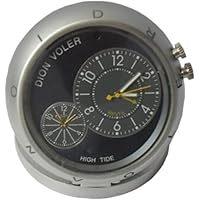
III. Covert. Appears to be a tech-ish desk clock. The lens is very difficult to see. Even if you examine it, the lens looks like a fastener.
IV. The 90 minute run time is better than many cordless DVR-style security cams.
V. Also has audio (however, see item 3 below).
CONS and a mini tutorial...
1. I've tried a few Encore products, the user's manual is always both sketchy and only somewhat helpful. Much of the camera's secrets must be unlocked by your own persistance. If you insist on Plug-n-Play look elsewhere (although see below for tutorial).
2. While the clock does work the GMT dial next to it does not. Not even sure why it's there. To set the clock pull the knob that protrudes more (of the two). GMT can't be set.
3. More on the clock aspect the camera audio picks up a constant TICK TICK TICK. Very prominent and can make dialogue difficult to monitor.
4. Camera operation you didn't buy it for the clock is VERY confusing (with the manual giving you little help).
>>>>> Here's what I discovered via trail and error...
++NOTE++ Charge until red light on clock face is solid (blue light stops flashing). Note that it doesn't hold a charge long so charge immediately before use. Fully charged it will record nonstop for about 90 minutes. Video will be broken into clips of equal length.
A. Press the power button above the memory slot camera boots and a red light on the front of the clock face becomes solid red. It's ready for use.
B. Photos: Press the camera button just above the USB once (briefly) and it takes a JPEG photo.
C. Vid (Motion): Press and hold the same camera button and the red light flashes SIX times then goes out. I learned that means you are now in motion detection mode. In motion you aren't constrained by the 90 minute battery life YET while the range is supposedly 3 meters mine is less than that and takes considerable motion before it becomes aware. I can see it used for this only if the area of interest is close to the clock and the expected subject is large enough (i.e., a person, vehicle, etc.).
D. Vid (Always On): Once you've entered motion detection mode, you can then move to "always on" video. You can't go straight there. You have to do the motion thing first. Same operation press and hold the camera button until the clock face light starts to flash. When it finishes 6 flashes you are recording nonstop. So, press fast photo. Press and hold 6 flashes, motion. Press and hold 6 MORE flashes, always on.
E. When finished, press power (over memory card), the red light flashes 3 times fast and you're done.
I'm still exploring how this thing works but it's been much more tedious than I hoped. Also, my experience with Encore products has NOT been positive when trying to load their drivers or use the cameras as webcams. I've come to just pulling the memory card and using an external reader. I keep the camera away from the computer since that has more than once ended in disabling the camera completely.
THE BEST PART -- AMAZON allows return of those units that just won't cooperate. Without Amazon Buyer Protection I'd stay away from Encore cameras. With it, I keep hoping Encore figures out how to make the interface aspects better. The concept of their products is nice their design and manufacture need work.

In addition, half the time I put the micro SD card into the SD converter and popped the thing into my computer, the computer didn't even register it. Then randomly it would.
I can't say this product is bad or broken, I just couldn't figure out how to get it to work.
On the good side, the clock was nice and I contemplated keeping it just for that, but in the end I returned it.
Buy Encore ZQ-PC8008CG Small Clock Camcorder with Motion Detection 4GB TF Card Now

No comments:
Post a Comment