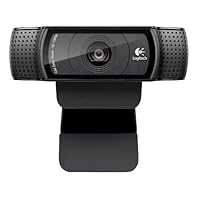
 I was able to do a direct side-by-side comparison between three Logitech webcams: the C920, C615, and C525. Here is what I found:
Right away I noticed that the C920 was a superior product as it should be, considering it is Logitech's flagship webcam at the moment. But my initial impression was that the extra features might not be worth the size and setup tradeoff. There are three things that the C920 does not have:
1) While all three models attach to your computer monitor in about the same way and all three can tilt up and down, only the C525 and C615 can turn side to side. In fact, they can turn around 360 degrees and more. The C920, however, has a threaded tripod mount, as does the C615.
2) The C920 lacks the excellent "fold-and-go" design of the other two models, which makes packing and travelling easy, while protecting the lenses. In contrast, the C920 is much larger and stationary.
3) The C615 comes with a shorter USB cable AND an extension for more versatility. The C920 like the C525 comes with only a full length cable (~6'). My wish for all three models is that they come with a detachable USB cable, which would make them all much more portable and easy to carry around, especially in this age when most people travel with at least one or two USB cables.
But when I actually sat down to do some serious comparisons, I realized just how much more advanced the C920 is, most notably in its use of H.264 compression and its autofocus feature.
H.264 is a standard being utilized more and more for video of all sorts, and it makes a huge difference here. Having used all three webcams on the same computer and with the same software, the C920 compresses 1080p video completely while recording and takes about 49MB per 1 minute of recording on the highest settings (720p for one minute takes about 31MB). That uses *.mp4 format.
Meanwhile, the C615 and C525 use *.wmv format and take 99MB and 44MB for one minute of video at 1080p and 720p, respectively. The real problem, though, is that you then have to sit and wait for the video to compress if you are working in 1080.
If you're interested, The C920 has 1 zoom level at 1080 and 4 levels at 720. The C615 has 0 zoom levels at 1080 and about 10 at 720. The C525 has about 10 at 720. All can be used during recording, but the quality involved with the C920 is again far superior.
Also, the autofocus is much better on the C920, with less flickering and light change. You can really get up close and show off your pores and beard growth.
In conclusion, the optics and hardware of the C920 are obviously superior to the others, which are already high quality. If I am using the webcam while highly mobile, then I may opt for one of the others I might even just settle for the C525 because it's a tiny bit smaller than the C615 and I believe you cannot use the C615 to make 1080p video calling, even if your hotel's Internet service could keep up with the data rate. However, if I am using a webcam at a stationary computer, or am really a videophile, then I definitely want the bigger workhorse.

Buy Logitech HD Pro Webcam C920, 1080p Widescreen Video Calling and Recording (960-000764) Now
This is an awesome Webcam for use with Skype(I have not used it with other Video Conference Software).The new mount is better than the C910(Not that I had a problem with that one anyway). It now has a tripod mount. I found it works very well on a 25" LCD Monitor, Laptop and a 42" rear Projection TV.
Bandwidth usage Information(tested on Skype 5.8 with an i5-2500K Desktop and Lenovo T410 i5 Vpro laptop with 1Gb/s Lan connectivity)
1980 by 1080 by 30 FPS peaked out at about 8Mb/s (C920 on Desktop and C920 on laptop)
1280 by 720 by 30 FPS peaked out at about 3-4Mb/s
640 by 480 by 30 FPS peaked out at about 1.4Mb/s(I also got this usage when testing a STD laptop camera on a Lenovo T410)
The C920 does seem to use a lot less CPU than the C910. 640 by 480 on a core 2 Duo HP laptop was up to 80% CPU. With the 920C this dropped to 45% at 1280 by 920 by 30FPS.
I also found that 640 by 480 utilises VP80(or VP60 in order versions of Skype). It changes to H.264 for 720P and 1080P.
The C920 hardware H.264 encoding does not seem to be supported on Skype for Linux 2.2.
Note HD/HQ Skype access requires the latest software (Skype and Webcam drivers), dual core or higher CPUs, a supported camera and bandwidth. Skype will ramp up to HD/HQ if the previous is satisfied and their is available bandwidth AND CPU. It can take 2-5 minutes to ramp up to 1080P even on a local 1Gb/s LAN. Also, Skype will NOT ramp up to HD/HQ speeds unless the Camera is supported at these speeds.
Please disregard my "Spanglish" accent in the video review.
I have to admit I was delighted to hear that Logitech had come out with a newer version of C910. I could not wait to try it and post a review. I knew this review would not compare to the video review I did for the C910 since there was no way my dogs were going to come in on "my" own terms. If you have no clue what I am talking about you need to see the video for yourself at this link: Logitech HD Pro Webcam C910 (I had dark brown hair back then). When I did the video review for the C910 I just talked about the picture, lighting and sound quality. Pretty much all of that stayed the same with a few minor enhancements. So this time around I wanted to show the some of the fun "extras" the webcam comes with like avatars, fun fillers and video mask effects.
I understand that with time you need to upgrade and make improvements, but I wanted to understand and "dissect" the changes Logitech made with the C920. First thing I noticed was that the C920 is quite smaller in size. I posted several pictures on the product page so you can see the size difference. I wondered if the size variation would interfere with the dimension of the image that is captured or the quality of the sound because housing around the lens and speakers is smaller and more condensed. To my surprise, the picture and sound looked and sounded great. I was pleased it has a 6-foot long cable great for a desktop computer, not so great for laptops. The cord is actually a foot longer than the C910. The camera sits perfectly on my 23-inch screen. The C920 has a "new" tab located underneath the front of the webcam. This allows the camera to sit more securely in place without worrying it will fall backwards or slide forwards Another great feature the C910 did not have is that it is tripod mountable.
The C920 has 15 MP compared to 10MP on the C910. Let's talk about mega pixels a little bit. The resolution of a picture/image is represented by its mega pixels aka MP. The higher MP the larger you are able to view or print an image. Typically an 8MP resolution allows you to make an 8x11 photo quality print. If you try to make it large, your image quality will start to get worse and become blurry. In general smaller MP are great for Internet postings because most of the time you crop and edit pictures to make them even smaller. So how important is that the C920 is 15MP compared to 10MP? I guess it depends on what you are using it for. If you need to post or print a 15x20 or larger picture than 15MP will be great for you. This is not important to me since I do not use the webcam to print out or post HUGE pictures. The only pictures I might post using the webcam are silly looking "duck face" pictures on social sites. If I need to take photos, I will just use my digital camera. This webcam is primarily used to video chat with friends and my family.
Please be aware in order to get 15MP quality pictures you must use the enhanced software Photo Capture which is included in the download just like it is with the C910.
Now lets talk about Full HD 1080p with H.264. I have heard of 1080p but what is H.264? I did some research. There are three different types of high definition modes: 720p, 1080i and 1080p. The 1080p is the only full HD. It is able to display a native resolution of a least 1080 lines, the higher the number of lines the sharper the image. The "p" means that the screen display images very quickly by completely refreshing the screen with every frame. This allows quick movements to display in sharp detail. Now let me explain H.264. The H.264 is best known as being the codec standards for Blu-ray discs. It is widely used by video streaming sources such as YouTube, Vivmeo, iTunes, Amazon and web software such as Adobe Flash Player and Apple QuickTime. So what does this all mean it allows you to be viewed in 1080p in a clearer, faster, smoother and high definition (as long as the "viewer" has good quality equipment as well). The C920 does video processing in the webcam as opposed to the C910 using the computer's central processing unit. This means less lagging and hesitation on your system since everything is going on in the webcam that makes a very big difference in framerates in HD quality.
Installation was simple. I am using it in a Windows 7 Home Edition 64-bit OS environment. This webcam does NOT come with an installation CD. You must go to Logitech's website and download the software. The web address can be found in the instructional booklet. It only took less than 1 minute to download the file and about 2 minutes to install the software. The webcam was up and running in less than 3 minutes!
The image is clear and the movement and response time is fast and smooth. Sound is heard loud and clear. It comes with all the extras the C910 comes with such as motion detection, follow me, face recognition, avatar, video mask features, RightLight, but this time the C920 comes with RightLight2 and RightSound. Sadly the video effects are still not available for Mac OS.
2-year limited warranty.
Overall terrific upgrade from the C910. EXTREMELY easy to use. I have always considered Logitech a dependable brand I could continuously trust and rely on. :-)Film grain is very apparent on this webcam. Even in a well lit room, you can see the grains compared to the C910. Also, the focusing on this camera is worse than in the C910. On the C910, my room whole room would appear crisp and in focus.
Mic still picks up too much background noise. The C910 wasn't any better in this regard. Disappointing that this isn't fixed on the C920 by at least increasing the resistance a little or have it done in software.
It has come to my attention (from comments below) that this webcam actually has a 3 megapixel sensor and Logitech gets its 15 megapixels by using software! That explains the worse image quality.
Pros: The C920 has a standard tripod mount. This is useful for mounting to mini-tripods that can be placed anywhere on your desk. On board video encoder means it will reduce CPU usage (but still wasn't enough to use on G+ Hangouts with anymore people in the room than with the C910 on a laptop running with AMD C-50, 2GB ram)
Cons: Worse image quality than the C910. This might be due to the fact that it uses a 3 MP sensor versus the 5 MP on the C910. Tests were done subjectively in Skype, Google Hangouts, and from recorded video via Logitech's own software at 720P and 1080P. Running on an AMD 965 BE quad core 3.4 Ghz, 4 GB Ram, Windows 7 64 Bit. Honestly, its hard to tell if there's any CPU reduction on a desktop like mine since it doesn't tax my system enough.
Save 26% Off

No comments:
Post a Comment