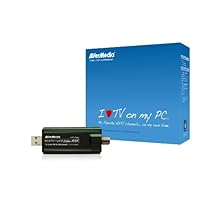
 I've been using Media Center on a WinXP tower since 2004. My HP unit came with a built in tuner which could only receive analog channels and the 2004 version of MC that came with it only supported standard def TV. As the years passed, I was eagerly anticipating for a release of Media center that supported HD programming. Once that happened on Windows 7 (and perhaps Vista), I needed to find a tuner card that would work with it.
Over the years I would check release info on new products and read about one sad experience after another regarding the failure of available HD tuner cards on the market and issues regarding firmware, drivers, configuration settings, etc.
Knowing that most new technology needs a few years to get the bugs out, I didn't buy and waited. The last few months had me itching to try and finally set up a HTPC (Home Theater PC) system. When it comes to video quality, my assumption was that I'd get better performance from a PCI internal tuner card in a tower. Thing is, I don't have a new Windows tower but I do have an inexpensive netbook running Windows 7 Home Premium. As there's no way to install an internal tuner card I'm limited to using an external USB tuner. After reading the reviews on Amazon, I decided the Volar Max was my best bet (and at $55 I figured I could only go so wrong).
I remember going through error and configuration issues with Vista and XP in the past, the idea that this little flashdrive-sized gizmo was going to allow me to tune in analog channels, digital channels as well as actual hi res HD seemed suspect at the very least. I was dreading the thought of experiencing the usual whole night investment of getting a new peripheral up and running on Windows only to have it not work well.
I plugged the Avertv in the USB slot and it found & installed its driver automatically and quickly. It then gave me the option of installing it's own tuner/viewer software. I declined in favor of Media Center.
Now I can't say how this thing works with any other OS's but, with Windows 7 Home Premium, the Avertv Volar Max blew my mind. My laptop is connected to an LCDTVI fired up Media Center, which found the Avertv right away. I selected it, went through the channel scan (like any tv) and was watching great quality analog & digital HD tv within minutes. It WORKED! And not only that, it worked without my having to do any manual installations or configurations. Windows media center rocks (and IMHO blows away Apple in this particular area). The picture and sound seems as good as any HDTV tuner I've seen built into HD televisions. I hooked up my HP Media Center IR remote and can now flip through channels, set DVR recordings, play music, etc. from my couch.
Maybe this shows my age, but I thought any kind of decent resolution tuner hardware needed to be relatively big in size. That this tiny unit does so much, so well and so easily is immensely impressive.
The age of HTPC's is definitely here.
**Update 12/26/2012**
Recently I've discovered Windows Media Center no longer picks up a lot of stations it used toeven if they are not scrambled or encrypted. Plus many stations in the TV guide listings come off as misidentified (Media Center says its CBS but it shows up as NBC). There are stations that my tv tuner can pick up but that Media Center cannot, I'm not sure if this is a function of the Volar Max or Media Center. It's possible that with software other than Media Center the Volar Max can still tune in all unscrambled stations. I noticed Media Center asking a new question during setup regarding protection of "premium" content. Not sure, but I have a sneaking suspicion this might have something to do with it. Right now, I only get about a third of the channels I used to with the Volar Max/Media Center combo as opposed to my TV tuner that still manages to tune in all my unencrypted channels. The TV signals are there, I just can't seem to have them show up in Media Center any longer.

The install with Win7 was pretty effortless. Plug into a USB port, plug my TV cable into it, and Win7 installed the driver (no software comes with it, and it's not needed). I opened Windows Media Center, it saw the 2nd tuner, I set up my channel guide listings, and now I can record 2 shows at the same time, with one of them in hi-def. It's fantastic. I rarely watch a TV show when it's actually on, and have gotten used to shows recorded in SD...it's such a treat to watch things in HD now!
I was a little irritated when I saw the recent price drop, but dug around and found that a rebate was available if you look on the list of sellers, and go down to Amazon.com being the seller. So now I'm only a buck behind. Now I'm very happy with the price, the product, and the ease of the install!
Buy Avertv Hybrid Volar Max TV Tuner Kit for Windows MTVHVMXSK Now
I purchased this product expecting it to be something I would use to avoid arguments over the TV. I figured the picture would be just OK. I was wrong. I don't even bother with the television anymore. I have 2 displays on my PC, so I can watch TV on one while doing stuff on the other. I can record shows when I'm away or too busy with life. It's great. The quality of the picture is incredible. I think I'm going to buy another, so I can have true DVR functionality on my PC! When it arrived all I had to do was attach the cable feed and plug it into a USB port. Windows 7 installed the drivers and when I opened media center, media center walked me through the rest. media center took about 15 minutes to scan through all the stations I get and setup, but then it was done (and that includes downloading a 2 week program guide for my cable provider.) I was actually impressed, even amazed at the simplicity and quality of this product. Highly recommended!Read Best Reviews of Avertv Hybrid Volar Max TV Tuner Kit for Windows MTVHVMXSK Here
I have owned one of these for over a year now. The tuner and picture are excellent. I even have it working on a Linux netbook. I like to watch TV in a little window on my screen while I'm waiting for my opponent to finish his turn in our internet games.There are two caveats you need to know before you get this device. The included software for XP boxes is not very good. It works, but the interface is annoying and not very intuitive. If you use MS Media Center (comes with Windows 7) you won't have any issues.
The second thing is over the air reception. You can buy a tiny telescoping antenna for the tuner (this version does not include the antenna in the box.) It works fine for the UHF frequencies (even at 50 miles in my case), but even after the digital conversion many stations still broadcast in the VHF frequency range even though their signals have been converted to digital HD. This is important because it requires a much longer antenna to receive VHF properly. For these stations the little included antenna simply won't work unless you are very close to the transmitter. If you can hook the receiver to a rooftop antenna or a big set of rabbit ears you will be fine. If you don't have either of those go out on the web and look at some instructions on how to build a dipole or folded dipole antenna yourself. It's simple and only takes about $5 in parts from any electronics store. That's what I did. I live 50 miles from the transmitters and I can get all the VHF and UHF stations in my area without any trouble using my home built antenna.
Want Avertv Hybrid Volar Max TV Tuner Kit for Windows MTVHVMXSK Discount?
I received my tuner five days after I placed the order. It was packaged well and arrived in perfect condition via U.S. mail. My computer system is a Lenovo W510 running Windows 7 Ultimate 64-bit (i7 820QM processor; 8GB memory; 128GB SSD), and I use an external HDD for data storage (Western Digital Elements 2TB).The "Installation Guide" provided with the tuner is quite basic, but it accurately guided me through the steps to install the tuner using Windows Media Center. Since there is no additional software required (no CD or other media needed) to operate the tuner with Windows 7 and Media Center, the installation was quite simple. It involved attaching the tuner to a USB port on the computer (a seven-inch USB extension cable is provided); connecting a coaxial cable (not provided) between the F-Type coaxial connector on the tuner and the cable TV outlet on the wall (no cable box is needed, even for HDTV); allowing Windows to configure and install the necessary device driver when the TV tuner was recognized; starting Windows Media Center and proceeding through the remaining configuration and setup process for the TV tuner.
The entire process of installing and setting up the TV tuner with Windows Media Center required around 30 minutes, and much of that time was spent waiting for the channel scans of cable TV signals to complete. There were a couple ambiguous areas in setting up correct Media Center options, but that is unrelated to the TV tuner. Since this was my first experience with any PC TV tuner, as well as with Media Center, I had to learn several new things simultaneously. (My own "neural network computer" does not operate as efficiently as it once did -since I am 68 years old. However, it proves that if an old guy as I am can install and use this device so easily, it should require little effort for the young tech-savvy generation.)
I have used the tuner only with cable TV, so I cannot verify how it performs with a regular TV antenna for over-the-air digital TV broadcasts.
The TV tuner has performed flawlessly. All of the problems that I have experienced relate to setup within Windows Media Center. Again, that is independent of the particular TV tuner being used. For example, I had to enable several digital cable channels by going into Tasks--Settings--TV--Guide--Edit Channels. For some reason, even though the channels were in the list, some of them did not show a "check mark" to enable them. (There were equivalent analog channels for most of the "missing" digital channels, and perhaps that is the way Media Center functions.) There were also a few digital, as well as analog, channels that were not found. Perhaps that is a function of how Mediacom (our cable TV operator) works since all of the "unrecognized" digital channels were in a contiguous group. It was a simple process to add those channels in Media Manager by selecting Tasks--Settings--TV--Guide--Add Missing Channels.
The Program Guide that was downloaded automatically during the installation process is great. It makes it very simple to set up recording schedules for programs, and it is also easy to update. For those missing digital channels, which I enabled, it was a simple process to map an equivalent analog channel's program schedule to the corresponding digital channel. (That was done in the "Edit Channels" by selecting "Edit Listings.") After that editing, both the analog and the digital channels were displayed in the Program Guide with the correct program times and descriptions. (If a person did not want both analog and digital channels shown in the Program Guide, either one could be deactivated by clearing the "check mark" described in the paragraph above.)
Bottom line -I highly recommend this tuner with Windows 7 and Media Center!
UPDATE: I have been using the tuner for several days now, and it continues to perform perfectly. The area around the F-type coaxial connector on the tuner gets very warm (hot) at times, and I have been concerned that this may affect the longevity of the tuner. Hopefully, there is not enough heat buildup to damage the device.
I have recorded several TV programs for later viewing. Using a Displayport to HDMI adapter Premium Black DisplayPort Male to HDMI Female Adapter, which I also purchased from Amazon, I am able to view the recorded programs on my Toshiba HDTV. This combination has provided an inexpensive multimedia HDTV DVR system that functions in almost every way as I had envisioned.
UPDATE (August 31, 2011): I have now used this tuner for over seven months, and I have experienced NO problems whatsoever. The heat buildup around the F-type coaxial connector has proven to be a non-issue. I have used the tuner continuously for hours recording HD TV broadcasts, and I have nearly filled a Western Digital Elements 2 TB external hard drive with data.
Since my first review, I have had the opportunity to use the tuner with analog over-the-air TV broadcasts (received from a translator in the mountains of western Montana). I can now report that this tuner works well with those "ancient" signals, using a 75-ohm coaxial lead-in from an outdoor antenna. I simply had Windows Media Center scan for TV signals, and it found all the channels that we are able to receive on our television set. One issue (unrelated to the tuner) is that the analog translator broadcasts do not provide the "Program Guide" for Windows Media Center, so any scheduled recording of programs must be set up manually. This tuner still proves to be an EXCELLENT product (for both cable TV and over-the-air broadcasts)!
Save 17% Off

No comments:
Post a Comment