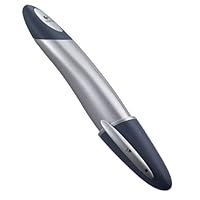
 I was an early, frustrated adopter of the A.T. Cross-Pad. The concept was intriguing, and the engineering was an interesting combination of traditional paper, special ink and handwriting recognition software. Where that product fell short, in my opinion, was the painful and frustrating sessions in which you attempted to train the software to recognize your handwriting. A second barrier was the serial interface (USB was on the horizon at the time, but not mainstream). I wrote off the technology (no pun intended) at the time after failing to find a use for the technology, so when Logitech introduced the Personal Digital Pen it seemed time to give technology another chance.
 The Logitech Personal Digital Pen makes no claims to transform handwriting into text, which was a major selling point for me. I wanted to scribble notes and get them into a computer in the easiest possible manner. The USB interface that is included makes this easy merely set the pen in the holder and everything you wrote on your pad is quickly in your computer and faithfully reproduced (in my case, near-illegible handwriting and all). The pen has 2 MB or RAM and can hold approximately 40 pages of notes before you have to upload it to your computer.
Up to this point I was pleased with the device, but did some quick math and discovered that the cost of owning the pen was high it only works with special electronic pads that are relatively expensive. Currently there are two manufacturers for the paper (3M for the PostIt Notes and Mead for the writing pad). Logitech does claim that any electronic pad that is marked with an "Anoto functionality" logo will work.
The show-stoppers for me, and the reasons why I returned the product were: (1) the pen's software required Internet Explorer (I have it completely removed from my system for security reasons), and (2) also mandates the use of Microsoft's .NET framework (I have privacy and security concerns about that). However, if you use Internet Explorer and are already using the .NET framework with applications such as Hotmail, MSN, etc. you shouldn't have the same issues as I with this aspect of the product. If you can live with the total cost of ownership that is imposed by the requirement for special electronic paper, you will find the Personal Digital Pen to be a handy tool and a great value.

I purchased my pen in December 2002 and have interviewed or 40 candidates, all of my notes have been stored and saved as word documents.
This pen has saved me countless of hours in transferring notes not to mention the savings measured in dollars.
I would highly recommend this product if you can print ledge ably (although it can recognize my hand writing as well) and have a need to recall documents for future use.
The cost associated with refills of electronic paper pales in comparison to the time it has saved me in transferring my notes from pad to document!
Happy in Atlanta, GA
Buy Logitech io Personal Digital Pen Now
While waiting for bugs to work themselves out of the Tablet PC, (and for prices to start coming down) this seemed like an excellent substitute. Installation is easy to achieve, and use of the pen is equally easy to master.The software leaves a little to be desired. There are no features available for editing elements of what has been written or drawn, and Cut/Copy functions are something less than intuitive.
The pen itself, having the cross section of a hot dog, is a little clumsy to handle, and one should not expect to get the most legible handwwriting or clean looking drrawings, but for general note taking and low resolution drawing, it is more than adequate.
Having it in a shirt pocket is a great attention attractor for those who thrive on such stuff. All in all, I am quite satisfied with the product, with one exception. It is devilishly hard to find addtional notebooks and Post-It notes. You can't run down to your favorite major office supply retailer and ask for it, because the sales personnel don't know what you are talking about. In fact, Logitech's online store is out of replacement paper!
Read Best Reviews of Logitech io Personal Digital Pen Here
The idea of capturing what you write, as you write it, for transfer to a computer later is clever. But this device is INFLEXIBLE and EXPENSIVE. I have no argument with the goals of the IO device, but this particular implementation is off-base for several reasons.Reasons to not buy the IO --
1. The pen is big. Does not feel natural in your hand.
2. You have to write on special paper.
3. The paper is relatively expensive.
4. The paper is not commonly available -if you are travelling and run out of paper, you are pretty much out of luck.
I have always wanted a device that could do what the IO sets out to do (but in my opinion doesn't achieve). I tried the Cross Pad which was also not very useful for completely different reasons. Folks, you need to look beyond the marketing and think about the implications of using the IO -special paper, can't scan notes you write on pre-existing documents, memory fills up etc. It is a nice idea but has too many downsides.
Try the DocuPen instead. This tiny portable scanner works with any paper. You can scan pre-printed documents. You can store 50+ pages before having to download; and as a practical matter, you will never run out of memory because you can keep your paper until you're ready to scan it.
The DocuPen is less gee-whiz than the IO but it works and doesn't have these non-obvious downsides.
Want Logitech io Personal Digital Pen Discount?
For the price I find the "io" to be a good value. It is great for quickly capturing your notes and drawings. However, it does not perform character recognition (except for specific fields such as subject, email address and dates) and it does not have levels of sensitivity (all lines look pretty much the same you can't capture different line qualities).Before you buy this pen, I recommend evaluating what you want/need to accomplish with it. I need to quickly capture rough sketches and notes. Scanning pages from a notebook/sketchbook takes time that I don't have. The io downloads pages directly to my pc and allows basic options (email, save/open as a Word doc, export as .jpg, etc.) which is all I need at this point. I can easily share meeting notes and sketches with several people in a few seconds no copies, no scanning just clicking an option in the io interface.
It has already been worth the amount I've paid for it and I have only had it 2 weeks.
If you are looking for character recognition and more high-tech options then I recommend going with a TabletPC (which will cost you considerably more). If you are looking for a basic capture of notes/drawings then the pen is a great tool.


No comments:
Post a Comment