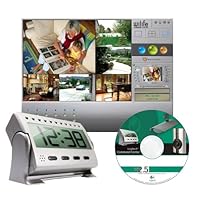
 There are three sets that are nearly identical, and differ only in the type of camera: this one (hidden camera), the outdoor starter kit, and the indoor starter kid. for more comprehensive reviews, look at those other kits as well.
As for my opinion, this set does what it says it does in a pretty seamless fashion: you install the software, plug the camera into the wall, plug a USB adapter into the wall and your computer, make some minor configuration changes and you are all set. I have no doubt we could have gotten a better system cheaper but not one as seamlessly integrated.
We looked at many different systems and bought this one instead because:
most spy cams broadcast for TV...you then need a TV/VCR to record, or a separately purchased adapter to make it work with your computer, and we weren't technically confident enough to want to buy different pieces and figure out how to get them working together
some spy cams are self-recording (they contain memory internally) but these tend to be pricey AND they limit how much you can record; they will fill up if you don't clear them out regularly, and for our purposes that wasn't practical
most "wireless" spy cams work on a WiFi wireless network, which is great if you have one, but we wanted this for use in a place we didn't have wifi; this one works by transmitting over your home or office electrical system.
the cost of the system includes a website you can set up to view your camera remotely (although if you have a firewall you'll only be able to watch 3 minute pieces; if the system can connect directly, which might require configuring your router which some people will find daunting, you can watch constantly).
So, that said, here are some cons:
only works on PCs, not macs
95% of the configuration is a piece of cake, but some aspects are confusing, like how to schedule alerts, and setting up for emailing alerts
the program has many features that are in the program but you can't click on them -they are there as advertisements for a "platinum" version of the software that costs $80 a year. It's annoying to have a screen full of buttons you aren't able to click, and to have advertising be such a prevalent portion of the interface
this one is kind of petty, but it would be nice of the clock that hides the camera had an alarm, since we had to remove a "real" clock in place of this one
the camera is fine for security, but the image is kind of strange it appears to be infrared? Which means the colors are bizarre. Reds turn yellow, greens and blues turn white. Which is probably fine for security purposes, but don't be expecting to get a high quality video out of it

I've also had to replace two cameras after a year. WARRANTY is only good for a year on these and they are expense! I have 5 cams in total. The customer service staff is very helpful but they only have a handful of tricks up their sleeves (reboot, restart, unplug). So few, I know them by heart. My newest camera hasn't worked right since I bought it here 3 weeks ago and now I'm thinking about junking the entire set up. That stinks since I've invested so much time and money.
Word of advice--just don't think it will be maintenance free. It's a lot of work to keep it working, and you'll sometimes have to live with not every cam working properly (especially the spy cams--they give me the most trouble).
Buy Logitech WiLife Digital Video Security--Hidden Master System Camera Now
Logitech makes some cool things and the Logitech WiLife Digital Video Security Hidden Master System Camera is one of those very cool things.According to the documentation and marketing, it takes only 15 minutes to set one of these up. That's not exactly true however--if you count how long it took to unpack the system, set up the software then the hardware in a suitable location, be prepared to spend at least an hour.
That said, the entire process is simple and should not present much difficulty beyond thinking about where to place and focus the camera. The package I got came with a camera, two transmitter/receivers: one connects via USB to the computer and the other via Ethernet to the camera, a CD of drivers and software and an assortment of bits of hardware chiefly for mounting the camera.
Installation of the software was straightforward and easy. Setting up the hardware was also straightforward; the included Quick Start guides and other pieces of documentation was clear and easy to follow, complete with color illustrations. I was soon up and functional. The bad news soon followed.
I have a wish list for Logitech: Would that there was a way for the camera to be completely wireless. Even with the 8-feet-long Ethernet cable, the camera requires a power outlet and is thus limited to being within 8-feet or so of said outlet. The best place I could think of putting a camera (the package came with only one; more can be obtained for an average cost of $200) was near the top of my living room which, of course, doesn't have any outlets close-by. With several different ways of mounting (on the wall using an included apparatus with wall screws and such, on a pane of glass with suckers, or on a desk with a stand), I guess there are several options, but it seems there was none I was satisfied with.
The other thing I wish for is that the features that a prospective user would find most useful (such as remotely controlling pan and zoom; setting an automatic schedule for recording, etc.) are only available by subscribing to an $80 a year subscription to something called WiLife Platinum. All of these `non-features' contribute to my thinking of this product simply as `neat' but not very practical. I guess if I really needed such a camera system, perhaps I'd spring for it, but it is a downside.
The camera itself, without the Premium subscription, requires a manual focusing. Which is just great because two people are required for such a procedure: one looking at the WiLife command console and shouting to the person who most likely is precariously perched on a rickety ladder tweaking the lens. I can tell you that the picture quality is pretty good and the ability to record several levels of quality is also quite nice. I could, for example, choose to record at 15 frames per second or less; I could record at VGA or QVGA (640x480 with VGA or 320x240 for QVGA); I could define `zones' which means I could focus recording only on a specific, defined region. It is also possible to have the system contact the user via email and mobile (PDA, etc.) alerts.
To top it off, all of this is viewable online using the WiLife site. However, as I stated earlier, in order to get the more juicy (and, in my opinion, more practical) features, the user will need to subscribe to WiLife Platinum. The maddening thing about it is that WiLife command console is filled with references to Platinum-only features. The front of the WiLife command console has a `zoom and pan' feature that figuratively screams "buy Platinum, dude!" every time the program opens up, which is on logon if you choose the default settings.
There are definitely some very cool uses for such a package but for the "average" user, I don't see this product fitting the bill unless as one of those "cool" things to have although it could still have some very useful security applications.
4 stars out of 5.
Read Best Reviews of Logitech WiLife Digital Video Security--Hidden Master System Camera Here
At first glance, wanted to give this a 5 star rating, but there's some sorely lacking features. Is it a working camera? Yes, it does it's job decently, but it could of been so much more. With this hefty price tag, it should of been so much more.#1 At log in, it's not password encrypted. So anyone can stumble to your computer, click on it and they would discover the camera which would ruin the purpose of Hidden camera.
#2 No alarm clock at $250, I would think they can afford to put an alarm function. It would make the clock a lot more real, hard to imagine a digital clock this big, this heavy, yet no alarm?
#3 The extra Platinum service This is the real sucker here. Functions that should have been included pan, focus, password entry, it's there, but you have to pay more for it, as if $250 for a camera isn't enough.
#4 Must plug into wall It's a wireless camera, but it must be plugged into the wall, making it no longer wireless.
#5 Vista users don't bother. It does not work out of the box, I couldn't figure it out. Fortunately I have several computers at home, hooked it up to XP, setup is a breeze.
#6 Logitech sticker at the bottom of the camera hard to remove. Anyone with any knowledge of the brand Logitech would immediately sense something wrong here, when did Logitech start making cheapy clocks with no alarm?
Would I recommend this camera? Yes, only because there isn't anything else on the market to the general public. If you have XP, setup is a breeze, pic. quality is decent, the hidden camera is well made, no matter how you look at it, it's a clock, though sorely lacking the alarm feature. If they added those features mentioned, even at $300 it would be worth it, but without it, it just feels like an incomplete product.
Want Logitech WiLife Digital Video Security--Hidden Master System Camera Discount?
We bought this product as my in-laws live at an assisted living facility and were concerned with bruises and soreness that could not be explained.I ordered one of these units and when I received and put it together, I noticed the connection for the power cable on the clock to be very loose. We thought we'd try it anyway and found that the slightest movement or brushing against the power cable would disconnect the power to the click easily. After going to check on my in-laws and finding the power off on the unit regularly, with the power cable still attached, we drew the conclusion that our initial assessment was correct and sent the unit back for a replacement. We had the same problem with the replacement as well and sent it back for a refund.
The unit does not operate well under low light, so I would recommend the IR light for support if you need it for low light / dark situations.
When we sent the unit back as defective, we were disappointed with Amazon for holding back a portion and quoting their refund policy. We understand that in cases that related to a reason like, "I just didn't like it ..." why they would do that, but where we received two defective units, we just expected ...... perhaps I guess a bit to much, like doing the right thing.
The unit was fairly easy to setup and connect, but had a very limited field of view.
All in all, we were not happy with the product and hope they do further work on quality control in design and QC inspection before shipping.


No comments:
Post a Comment