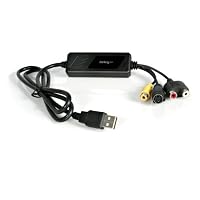
 While this product is actually pretty good for a simple USB capture device, you HAVE TO, HAVE TO, HAVE TO get the most *current* drivers for it to work optimally. I understand the pain that 99.9% of users have with installing and using this product and I partly blame StarTech and the Chinese / Taiwanese hardware industry.
Guess what, if you get updated drivers from StarTech's site, they're old. "What? But StarTech makes this thing, they'll have the newest drivers. Right?" Wrong. In fact, this device is really just a re-branded product call the GrabBeeX+deluxe made by VideoHome of Taiwan. The drivers on StarTech's site are newer-ish but since the Taiwanese company that makes the GrabBeeX+deluxe (a.k.a StarTech SVID2USB2) is still around and have WAY newer drivers than what StarTech offers, go to their web site and get the latest drivers (look for the GrabBeeX+deluxe). Unless you really know computer's and how to read driver properties, you'd NEVER figure it out. It's no surprise this product gets a bad rap. Also, you can and should upgrade the GrabBee video capture software to version 1.0.9.3 if you go to VideoHome's site (see link info below). Startech's GrabBee video capture software (bundled or on their support site) is the WAY old version 1.0.7.6. The newer 1.0.9.3 version has updated codecs (read more below).
Having 21+ years in IT to track down who makes these obscure hardware components has become a refined skill and I can say that the chipset that is in the device is made by eMpia and it's the 28xx series. But don't go to eMpia's site to get newer drivers, go to the makers of the GrabBee hardware / software (VideoHome): . tw and look for the product called GrabBeeX+Deluxe (USB Grabber). Under the "Driver" and "AP" section you can find the newest drivers and version of the GrabBee capture software. By the way, the newer GrabBee capture software has capture software and codecs as new as Feb of 2011 and supports formats like XVid and has a far newer MPEG encoder than even the 1.0.7.3 version. These newer codecs will yield far better results and are more optimized to take advantage of modern CPU features like SSE2/SSE3/SSE4 (which help in video / audio / multimedia processing) that the older codec versions were not as well optimized to use.
Do yourself and others a favor and get the newer drivers and GrabBee software and THEN review this product. What comes out of the box is ancient as far as drivers and capture software go and you WILL HAVE PROBLEMS, especially if you have Vista or Windows 7. By the way, the latest drivers do work on Windows 7 64-bit.
One other issue some people might have and not realize is that your computer may only have USB 1.1 ports. For this device to work well, you have to know if you have USB 1.1, USB 2.0, or USB 3.0 ports for it to plug into. You should also try and figure out if you have the chipset drivers for your motherboard installed already as they can help immensely. Also, if you're not tech minded, you may not know that in your computer's BIOS, your USB settings may be, by default, set to not fully utilize the max speed of you USB 2.0 ports which is called HighSpeed. USB 1.1 uses FullSpeed and USB 3.0 uses SuperSpeed. Theoretically, a USB 1.1 port has just enough bandwidth to capture *compressed* MPEG1 video stream but not raw, uncompressed video streams which is why you need USB 2.0 or faster. Also, having a slower speed IDE or SATA hard drive that spins at 5400RPM or less may impede writing to the hard drive fast enough and cause drop-outs and other anomalies. Always defragment your hard drive!
It's no surprise people get frustrated with this nifty device. I hope posting the below link directly to the GrabBeeX+deluxe will help some of you. Everything you need for updated drivers and GrabBee capture software is there (copy and paste to your browser and just remove the spaces): and if it doesn't work, go to VideoHome's site and click on Products > USB Grabber > and find the GrabBeeX+deluxe at the bottom of the list and click More Details. The Driver and AP sections are what you want to download from. Have fun!
UPDATE 6/27/2011: GrabBee software 1.0.9.6 is now available on the .
UPDATE 8/9/2011: Well, it seems VideoHome has retired the GrabBeeX+Deluxe from it's products page in place of new hardware and as such have made it a bit tougher to easily find the driver. You can now find it here: go to VideoHome's site and choose Technical Support > Download, change Product Name to USB Grabber, then scroll down to the bottom of the page and go to page 2 or click Next >>. Have fun.
UPDATE: 8/15/2011: Amazon has removed the links to the drivers so follow the directions I have up on my 8/9/2011 update.
UPDATE: 10/4/2011: It seems eMpia has updated their drivers for this device around 8/23/2011 even though it seems VideoHome has stopped updating them. Just do a search for BDA_082311_UAC and that should get you to the eeti . com web site. If not, try and remove the spaces. Updated my driver to one from 8/23/11.
UPDATE: 1/30/2012: Don't use the eMpia driver from eeti . com. It seems others have been having issues with the eMpia drivers from 8/23/2011 so it seems you might be best to stick with the drivers dated 4/22/2011 from Videohome's web site.
UPDATE: 10/5/2012: Although I have not tried them yet, eMpia has updated their drivers in February 2012 (WDM_Media_D020412_EMPAudio.rar & WDM_Media_D020412_UAC.rar). Do a Google search for WDM_Media_D020412_EMPAudio (you'll need Winzip to open the RAR files) and it should be the first hit pointing to home dot eeti dot com dot tw / web20 / ic_suppot dot html. I know some of you had issues with the August 2011 driver so these might be a bit better. Don't know yet if they work on Windows 8.
UPDATE: 1/29/2013: The videohome site (videohome dot com dot tw) has newer "official" drivers for Windows 8 support (dated 2011) and also GrabBee 2.0 (do a Google search for GrabBee_V2.0.0.0.zip, it should be the only hit that comes up).

Using this product you can copy VHS tapes to an external hard drive and make your entire collection of VHS tapes portable. Of course instead you can copy them to your internal hard drive and then burn them to a CD. This product is terrific BUT instructions included in the package are very very limited( as in almost nonexistent). Do not use the included software Cd for installation instead go to company web site and down load software from there. Tech support also rates 5 stars. No long wait and they know their stuff. I have recommended this product to all of my friends.
This is NOT a planted review. Having used this product to copy many hours of tape I can honestly say I would have paid double the price and still thought it was terrific. If you want to copy VHS tapes undoubtedly this is the way to do itStarTech SVID2USB2 USB 2.0 Video Capture Cable
Works great but do not load the driver & software that comes with it in Vista. It will crash your computer. Call StarTech and they will give you a direct link to download of the correct Vista driver software. You can then edit in Windows Movie Maker and record in Windows DVD Maker. Once you get it connected it is a snap to convert from analog devices.1) Don't use the GrabBee software. It automatically turned off Windows 7's User Account Control (a safety feature). The reviews that call GrabBee spyware may be right. I used Microsoft's free Windows Media Encoder.
2) Download the driver from StarTech's website. It's newer and better than the one on the disk.
3) Buffer the video to a temp file if the software lets you. Even though my laptop was new, it dropped frames like raindrops without it. That may be why so many reviews complained about getting out of sync.
The physical box is fine, and now that I've figured out the software, using it is routine. Best of success.Don't waste your money on Dazzle Pinnacle, if you want to convert your old home VHS's into computer files and DVDs, get StarTech! Remember to install your software BEFORE you plug in your hardware.
Save 41% Off

No comments:
Post a Comment