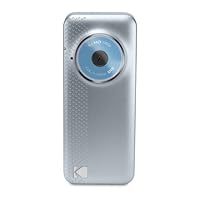
 First, let's consider this is a 99 dollar camcorder that's also one of the smallest capable of 1080-30p video and five megapixel stills. As such, it is an amazing piece of technology that does what it was designed to do, and does it quite well, I might add.
Compared to the FLIP, the Kodak has many advantages. In addition to the silky smooth 720-60p video setting (same as FLIP) it offers three other video settings (1080-30p, 720-30p and 480-30p) and one still setting (5 megapixel) that the FLIP does not. It is smaller than the FLIP. It allows up to 6 hours of shooting at 1080p and 13 hours at 480p (which is DVD quality video). The MP4 format is very Mac and PC friendly, and works well in Final Cut Pro 7 without needing to transcode to Quicktime first. It also plays well in Sony Vegas 11.
The built in lithium battery runs nearly two hours on a full charge, but it can not be removed or replaced. When it's discharged, you're done shooting until you recharge it. The good news is you can charge it from a wall charger, a car's lighter plug or a computer USB port. Yes, it has a flip-out USB connector that appears flimsy, but actually is quite ingenious since it minimizes the torque strain the FLIP puts on your computer's USB port as it hangs out fully extended. I broke a USB port charging a FLIP on my PC this way.
The small size is amazing. It's much smaller than the FLIP, but on the down side, so is the LCD. If you need reading glasses, you won't be able to see this LCD well without them.
The lens is very sharp considering it's only about 1/16th of an inch in diameter. In fact, I can see no edge softness or chromatic aboration in the stills or in the video images. Of course, it's a fixed focus, prime lens, so your creativity is limited to wide angle shots. Don't bother using the digital zoom, as this only makes the image look pixelated. You're better off zooming in during post production and leaving the total image intact on the memory card.
In bright sunlight or hazy outdoor light, the Playful delivers a razor sharp image at 1080p. It does display small compression artifacting that some people mistake for grain. It is not predominant, and most users will never notice it sitting at a normal distance from their TV screen. I should also like to note that playing the memory card through my BluRay player's SD card port yields a cleaner looking image than playing the same card through the camera's HDMI port. Same with playing the card on an iMac using it's own SD slot. I suspect the playback circuitry in the camera adds a little grain itself, but it does not matter once you import the files into your editing software.
In bright indoor conditions, such as a daylit room or normal office lighting, the image is still very clean. The color is very accurate, with skin tones having that rich, filmy look. In dimly lit rooms, the grain does indeed show up, but it looks more filmatic than electronic, creating sort of a 16mm film look. Regardless, the sharpness and color are much better than the FLIP, and the grain is not as much as the FLIP under similar lighting. Exposure seems to be more accurate than any other camcorder this size. While the FLIP tends to overexpose many outdoor scenes, the Kodak always seems to be spot-on. Naturally, there are no manual controls over the color or exposure. Luckily, the camera seems to do a good job of this automatically under varying lighting conditions. There is no focus control. Focus is fixed from 4 feet to infinity. You can get in a little closer in bright light, but less than three feet and the focus becomes too soft.
Still images look sharp from corner to corner, but seem to lack the higher contrast that is evident in the videos. You can easily fix this in any photo editing software. Five megapixels is impressive for a camera this small. Yes, you can capture stills from video, and even at the two megapixel limitation of 1080 video, they still look pretty good.
There is electronic stabilization, but don't count on it to remove the jitters in one's extended arm holding the camera one handed. You need two hands cupped strategically around the camera so as not to block the lens or microphone in order to maintain a steady image.
The sound is mono, but has much more punch in the bottom end than the FLIP. But the FLIP's better directional mikes work better picking up individual voices in a room filled with party guests. Wind noise can be annoying, and there's no way to monitor the audio as you shoot. There is also no external mike input. Then remember, this is a shirt pocket 99 dollar camcorder.
This is a simple camcorder to use, and it offers a few setups that FLIP doesn't, including audio level controls and a few video effects. But if you're not interested in changing the settings, you can use it as it comes. Just be aware the factory preset is the middle video quality of 720-30p.
Some early models had locking up problems, but Kodak has a free firmware download that solves this problem. Most recent batches already have the newer firmware installed.
While some users complain of graininess in low light, I think this is one of the best in it's class and size as far as image quality goes. The Kodak Play Sport model offers slightly better imaging in low light, a bigger viewfinder and is also waterproof. Most other features are similar enough to make it hard to distinguish the images between the PlayFul and the PlaySport.
Rick Bennette

I did have the Sanyo VPC-CG102, the resolution on playback was grainy, in addition the layout on that unit is very bad. Not easy and doesn't fit in your hand in a way you would want to hold for an hour taking video.. NO GO
I had the Kodak ZI8, great unit, and is the best $100 device small form factor there is. But, not the latest and greatest
I had the Panasonic TA-1, great size, but video was Baaaad. The quality looked very bad for me, plus no 60fps 720 setting. Not good
After going through all this I knew Kodak, from my earlier ZI8 I happened to loose somewhere, took high quality video, so I went with this new Playful. CES2011 gave some positive remarks on it, worth a shot.
So far, so good. I have taken several 720 60fps and 18080 videos, all seem to sync with your setting. 1080 does look to be the smoothest and best quality video. I like the construction, outside feels solid, the side access doors do seem a little flimsy, but the connectors that go into the device are rubber, so much better than plastic in terms of longevity.
Zoom is okay, but will kill the overall resolution. Has a very good lens aperture, when you hold it, even directly in front of you your getting a great angle of view.
Quality 4 out of 5
Video quality 4.5 out of 5
sound 4 out of 5
Overall Purchase 4.5 out of 5
Buy Kodak PlayFull HD Video Camera - BlueSilver Now
You might give it 2-stars or 5-stars. No matter what you compare it to, this thing is better and worse.Compare it to a smart-phone that has a good still+video camera and it's always with you, or an iPod Touch that shoots video at 720p and does 1000 other things. Compare it to a real camera that has a flash, shooting options, protected lens, etc.
These PROs and CONSs may help you decide if it's for you.
PROs:
* True HD video 1920 x 1080p
* Also has 720p @ 60 frames per second
* 5 megapixel stills (wide frame 3072 x 1728)
* Small and Light (3.95" x 1.6" x .7") amazing!
* Very easy to use
* Clean, simple interface. (Note 1)
* Ergonomic. Easy one handed operation.
Boot-to-Shoot is under 2 seconds. Few missed shots.
Easily clip out bad footage from video
Easily grab 2-megapixel stills from video
HDMI output directly to HDTV
Can mount to a tripod
Stands on edge (any table is a tripod)
Removable/upgradable memory (unlike iPhone or iPod Touch) (up to 32 GB SDHC) (but not included with camera)
Not part of your phone. You can loan it, use it while your phone is in use, it doesn't wear down your phone battery.
Built-in USB male connector (nice! See notes with uploaded photo)
Charge from wall or computer USB
Share utilities easier than with most cameras, but much harder than from a smart-phone.
CONs:
* No flash (but it does pretty well in low light)
* Fixed focus, no auto focus
* Very few photographic options or settings, no optical zoom, etc.
* Display is small, low res. (1.5" diag. see Note 2)
The Kodak Share software is icky. Skip it, use explorer. (see Note 3)
Battery is not user replaceable
You won't always have it with you (vs a smart-phone)
Note 1: It's not iPhone elegant, but the interface makes a lot of sense. Simple, very few layers, all the right buttons. Easy to learn, hard to forget. Few missed shots.
Note 2: The screen displays images in a 1.2" x .67" space with information bands above and below. Small, but adequate for evaluation and editing. The whole screen looks to be about 180 x 135 pixels. Zooms (2x, 4x, 8x) use the whole screen.
Note 3: I found the Kodak Share Button software lame and annoying at every turn. I only used it to auto upload pics & vids to my PC. It changes the date/time stamps (created, modified, etc.) of every file to when you UPLOADED it. You can't pick a default location for videos separate from pics. Etc., etc., etc. Better to move files manually with Windows Explorer.
26-page User Manual (posted at Kodak's site) has more specs and info.
Summary: Full HD video; small, easy-to-use package; no missed shots; affordable. Probably 5-stars if these are your buttons.
Read Best Reviews of Kodak PlayFull HD Video Camera - BlueSilver Here
I really like cameras and this one sounded really great. I have tried the Flip minoHD, Sony Bloggie, and this one now. This one is the smallest of the 3 and records in 1080p the same as the Bloggie. The Flip records in 720p.The camera is very easy to use but does not come with any internal memory you have to buy an Sd card. It can take upto a 32 GB. I bought an 8GB and it will hold about 1 1/2 hrs of 1080p video or 5500 pictures (it has a 5Mp camera). This can be a good thing or a bad thing I really like when they include the memory as it very handy to already have it onbard but this gives you the option to upgrade and hold more video. (This wasnt a deal breaker for me.) The camer also comes with an USb cord that plugs into the side as well as into the included AC adapter.
The cons for me where the size of the display screen. It is very tiny and hard to see things. Also the Usb that comes out of the top is very flexible and doesnt really open enough to hook into your USb slot with out an adapter. I almost broke off the USB adapter first thing it bends so much and is very cheaply made. Also I plugged the USB/AC adapter into the side of camera and hooked to my computer and I couldnt figure out why the preinstalled software wasnt downloading then I realized this is only for charging and you have to use the USB arm to install the software.
A decent camera which is a little better than the sony bloggie which I had problems with(you can check out my review for it) but the Flip is still easier to use and setup then both of these it just doesnt record in 1080p.
Want Kodak PlayFull HD Video Camera - BlueSilver Discount?
Six months ago I purchased a Kodak PlayTouch HD. I paid more for it than the cost of this Kodak PlayFull. I now also have this Kodak PlayFull and in comparing the two, this PlayFull takes MUCH better pictures.PlayTouch vs PlayFull
Appearance:
The PlayTouch is the nicer looking of the two. It has a beautiful shape and touch screen that resembles an iPhone. It's sleek and expensive looking. The PlayFull simpler looking. When you look at the two cameras, you would most likely always chose the PlayTouch because the appearance of it makes it seem like it would be a better camera. This however is not the case.
Size:
The Kodak PlayFull is only about half the size of the PlayTouch. It's very small and can easily be carried in a pants pocket. It's actually smaller than my cell phone. While at first I wasn't sure I would like something this small, I have found I end up taking it with me more and using it mush more because of it's compact design.
Screen:
When it comes to screen size, the PlayTouch wins hands down. It's almost entirely screen, so it has a huge display that is fully touch screen. The PlayFull's screen is very tiny, about the size of 2 postage stamps, so sometimes you have a hard time knowing if you got the picture you were trying to get. Not good if you have any difficulties at all with your vision.
Still photos:
The PlayFull takes much better pictures than the PlayTouch. Neither of the two Kodak cameras offer a flash (a mistake I feel), but at least this PlayFull can still take a nice picture indoors and low light environments. The PlayTouch is almost useless to use for still photos unless your outside or somewhere with fluorescent lighting. This PlayFull can also take a nice picture without blurring, while over 50% of my pictures with the PlayTouch are blurry.
Video:
Both the PlayTouch and and PlayFull take a nice video. In the end, I feel the video I have shot with the PlayFull has come out brighter and better quality.
Ease of use:
While the PlayTouch is beautiful to look at, this PlayFull is much easier to use. Dedicated buttons on the camera make using it much simpler than using the PlayTouch that requires navigating through several touch screen menus to use many of the cameras functions.
Conclusion:
While I loved the looks of my beautiful Kodak PlayTouch, I could never get a decent picture with it. Maybe if it had been equipped with a flash, things would have been different. While this Kodak PlayFull may seem small, don't underestimate it. The end result of the pictures and video it takes will surprise you, as it more than makes up for the small screen.
I have learned to love this little camera, and find I use it all the time now and take it everywhere I go.
Save 46% Off

No comments:
Post a Comment