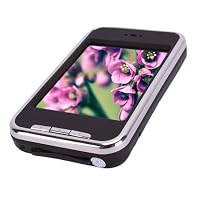
 I debated between 4 or 5 stars because there are quite a few things that could have been done much better, but I can't believe all the features they crammed into this for just $28 (including shipping).
If you're looking for a high quality device, this might not be right for you, but if you want a cheap device that does one or more of these functions adequately, it could be quite the deal. While there are a few usability annoyances, most of the features do appear to be at least useable. I've encountered a lot of ultra-cheap devices that have a log checklist of features, but they are implemented so poorly that they can't be used. While the cheap hardware does put limits on the function and some of the interfaces could be improved, most do seem usable.
Here are a few features and specs that aren't mentioned in the product description:
The ear-buds are white. This is a genuine iPod wana-be.
The camera takes pictures up to 1280x960 resolution (defaults to 1024x768, but can be adjusted up or down). It appears to only save images as very low quality .jpg's. A 1024x768 image was 100kB, a 1280x960 was 150kB.
Video recording 320x240 resolution with audio.
Comes with stylus (but no good place to store it).
Can operate as a USB PC camera (not tested)
Built in speaker (not high quality sound, but handy on occasion).
Switch to lock out the touch screen.
Other Apps included:
Calculator (simple, not scientific)
stopwatch
calendar: just displays a calendar with a few major holidays. This is not a planner.
Games: Go, Chinese Chess, "road" (shuffling blocks to get the big block to the exit), Minesweeper
Notebook (A simple text editor). This has an on screen keyboard and handwriting recognition of English and simplified Chinese. The English recognition doesn't seem to work very well, but it appears that with some practice one could find the way to write each letter so it would be recognized. The keyboard has a bug where pressing the shift key prompts to "Clear all text", so I haven't found a way to make capital letters except with handwriting recognition. Trying to make a capital C can be difficult. One way to work around this was to "return" to Chinese character entry mode and select "all" instead of simplified Chinese. then when you draw a character, it will display a large number of characters it thinks you might have typed (both Chinese and English), and you can select the one you want. For some reason however, when entered this way, the characters have spaces between them that can't be deleted. The notepad application has locked up on me twice, requiring resetting the device. Reset can be done by poking the stylus in a well-marked hole in the side of the case. It reboots in less than 15 seconds. So this app appears to not be too useful, but looked impressive at first.
Touch screen:
The touch screen is pressure sensitive (not capacitive), so don't expect it to work like an iPhone. With the included stylus, it works pretty well. Some operations can be done with finger touch, but the accuracy isn't good enough for a lot of the small buttons, or buttons near the edge. This could be an annoyance. Since there is no slot to hold the stylus, I probably won't bring it with me, so I'll need to improvise. The ear-bud plug can be used in a pinch.
Manual:
The printed manual appears to have been based on a different version of the software than is on the device. It comes with a CD that might have more info, but I haven't gotten around to looking at it yet since it is a small CD which I can't put into my CD drive without tipping my PC on its side. The most important part is the instructions is to hold the power button for three seconds to turn it on, which I might not have guessed without the manual, but it doesn't mention that it's a slider, not a button, and you have to slide it the correct direction. Sliding the other direction is to lock out the touchscreen.
The Display is adequate. It looks like 320x240 resolution. The viewing angle is pretty bad (only one person can really look at it). I haven't tried it in daylight yet.
Quality:
lightweight
It arrived with the Mini-SD card slot cover detached. I was able to put it back on, but it seems to fall off when I open it. The SD slot cover is hard to open.
The case has a slight misalignment, but it doesn't look too bad.
I noticed a lot of static on the radio as I was listening to the radio in the background and doing other things. I'm not sure if it's whenever the screen updates or when the processor is working.
Quirks:
Up down arrows. to increase a number, press the down arrow. To decrease, press up.
The play/pause/stop button shows the current state, not what will happen if you press the button, which is different than most apps I'm used to.

Buy New 4gb 2.8-inch Touch Screen Mp4 Player with Camera Black Now
The product arrived on time and was exactly as described! My son got this for his birthday and loves it. The instructions were very easy and he was able to download music, videos, and pics, by himself.Read Best Reviews of New 4gb 2.8-inch Touch Screen Mp4 Player with Camera Black Here
I received mine 2 weeks ago. It is perfect for me, was able to download music easily, and pretty fast. The only thing I can not figure out is how to download my TXT file books on it? I have books to add to it, but I can not figure it out, seeing that the user manual does not give details. If anyone knows how I download games, and e-books onto the MP4, can you please share? Thank you in advance :)Want New 4gb 2.8-inch Touch Screen Mp4 Player with Camera Black Discount?
It is cheap plastic and you have to bang the crap out of it to get the touch screen to work

No comments:
Post a Comment