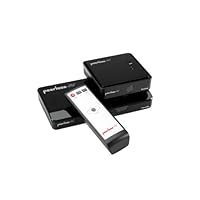
- Stream Full HD 1080p and 3D content wirelessly up to 100ft (30m)
- Zero latency (<1ms) enables instant gaming response
- USB Gaming/PC Port wirelessly connects computer to gaming controller, keyboard or mouse
- Connects up to 2 HDMI devices such as Blu-ray player, set-top box, gaming console
- HDMI pass-through feature allows hard-wired connection to a second HDTV

-------------------------------------------------------------------------------
Update 11/26/12: I contacted Justin from Peerless support on the issues I was haivng this weekend watching a football game two rooms away. Because this partcular device is sending uncompressed high definition video the distance is limited. Justin said that while the maximum distance is 100 feet, the best performance is through a single wall. Even though I was able to get it to work through two walls including a kitchen, my expectations are a bit high for this particular device. Next year Peerless is releasing a device that supports composite and component video for those of us who have need the greater distance but not the higher definition. If you have the need to send high definition video with remote control to the next room or connect another display to your video game this device does work great. And they do have great support!
----------------------------------------------------------------
Wireless Multimedia system
I have an older home that I have been remodeling which of course has included snaking cabling everywhere: network, TV, security cams and other devices. Although some of our networked devices work wirelessly it still isn't as efficient as wired. But I have dreamed of wireless media connections for some of my entertainment devices. The Peerless HDS-WHDI100 Wireless HD Multimedia System has started to fulfill that dream.
Multimedia System?
I was skeptical at first when I read this was a wireless multimedia system. The description also contained the word "gaming" which I haven't been into for years. So I really had no idea what I was getting myself into with this system. Multimedia to me has always meant the vast array of devices: cable TV, satellite TV, DVD, DVR, digital media, USB cards, old VCRs, etc, etc. My first hope was to use this with my security system but this is HDMI only and my security system video out is composite. So keep in mind this particular model is for high end media only (see support below).
Installation
Plugging everything together is easy, getting it all to work is another thing altogether. I tried this with my HD cable box, ROKU, and a digital media player. Everything is in our "entertainment room" so where to put the receiver? The stated 100 feet is line of sight only. I found I was limited to the living room about 40 feet through two walls. Our kitchen is between the entertainment room and living room. Our bedroom is about 60 feet away (direct line) and it did not work (although I will try experimenting with placement of the wireless devices never give up...).
Working the system
While a bit slow initially turning on, it did transmit the video and sound clearly. First problem was getting the correct format/aspect. With the combination of player, transmission and TV on the receiving end this can be a chore to get right. I also found standby time is short so if you happen to be in setup and not doing anything it will disappear and takes, to me, an unreasonably long time to come back.
The most difficult part was setting up the IR so that you can have the remote with you at the receiving end. First, you have to stick these adhesive backed little black half inch by quarter inch pieces on a wire over the IR on your device. Not only does that look tacky but you have to find exactly where the little IR receiver is on your device through those black windows isn't easy. And the wire connecting these to the transmitter is a bit short. Then you have to adjust the frequency on the receiving end. You have basically three settings. I ran through all of them on all three devices and couldn't get it to work frustrating because too many variables. Then when I was about to give up it magically started to work! Yes, we were watching and controlling the device located in our entertainment room in a completely different room of the house now that is awesome! Obviously there is no way to have two people controlling the device in two different rooms so if someone happens to be watching it in the other room they may think there's a ghost...
Other features
You can connect two devices to the transmitter also having to stick the IR receivers to. The Peerless Wireless Multimedia System comes with a simple remote control that allows you to switch between the two devices and also change the IR frequency. Switching devices has a slight lag but does work. One drawback is if you have to use the HDMI pass through your main display will be limited to what is being watched by the remote.
Connecting to a computer to me is old school for streaming media. But if you do, on the receiver you can connect a mouse or keyboard (or both if you have something like the Logitech connection) via USB so you can control it remotely. It was easy to connect to and control our Macbook Pro. That would allow you to add your computer to your multimedia system as another device. As Justin, my support contact stated, another useful feature would be in a presentation situation where you want to control the computer with the screen you are looking at. Another option of connecting to an Xbox or WII should give you the added benefit of two players having their own display.
Support
I called the 800 support number and spoke to Justin who was very helpful and willing to give me time to answer my questions. One thing he did mention was that it is uncompressed wireless signal giving it the capability of handling active 3D. Which is also why this is HDMI only, it is the advanced wireless version. There is expected to be a newer version of their older wireless system next year that allows you to connect all types of video including component and composite. But it is compressed wireless which shouldn't be a problem for those types of video signal.
Summary
My hopes and dreams of not having to crawl around in the attic and drill holes in the walls are becoming a reality. While the distance is limited and I had a little frustration setting it up, I rated it 5 stars because it does work within the advertised specifications. I love the system and it is awesome to be able to use a device in two different rooms and control it without wires!
Buy Peerless HDSWHDI100 Wireless HD Multimedia System Now
I needed this device to send the 1080p output of my now obsolete Toshiba HD-DVD player to my HDTV across the room. I wasn't prepared to test the cable length limits of HDMI so going wireless seemed the best choice in this case.Build quality is nice on this unit but physical/aesthetic design may or may not be to your liking. Personally I didn't care, I just wanted it to work! Had it out of the box and working in less than 20 minutes without consulting the instructions.
With a houseful of wireless devices running off a Fios network, plus cell phones, Kindles. iPads and what not going all at once I was a bit worried the signal might be disrupted and show a few video glitches now and then. Nope! Sends the 1080p perfectly although I do have a clear line of sight and my HDTV and HD-DVD player are only about 50 feet from each other.
The weakest link in this product will most likely prove to be the AC adapters so have a couple of spares on hand for that eventuality. (this unit uses two different varieties) I know it saves space and money to locate the power supply externally, but it also creates a frustrating situation when one or more of them burns out. (and as we all know THEY DO)
If you need to send one or two HDMI sources across a room without cabling, the Peerless HDS system works fine. If you used a video processor as a front end you could send everything that way and not be limited to just two HDMI inputs.
Bottom line: This thing works, sets up quickly and has so far given me no grief!
Read Best Reviews of Peerless HDSWHDI100 Wireless HD Multimedia System Here
Wow, we were really impressed with this device. We wanted to replicate our TV (media) signal in the kitchen on a 24" LCD monitor and this delivered with flying colors.What we like:
Extremely clear signal.
Easy Setup! (EASY, Under 10 mins for even non tech types)
Smallish/unobtrusive.
DOESN'T HOG OR IMPEDE WIFI SIGNAL (I can't stress this one enough)
Room for improvement:
Signal occasionally cuts out a bit, and that's only from one room away. Could be worse from farther apart.
Kind of cheesy looking, design features were meh.
Could use an IR repeater/blaster in the back since it can block signals from the DVR/Cable remote.
Short power cord.
4.5 Stars, rounding down since there's still room for a bit of improvement. Highly recommended.
Want Peerless HDSWHDI100 Wireless HD Multimedia System Discount?
The picture quality that this little gadget gets on the TV is great. I don't, however, understand that why when I plug certain devices in, it tells me that it's using 480p instead of 720 or 1080. The picture quality still looks great but whatever they're using to display the quality doesn't seem to be working quite right.For the rest of the product: for the most part, it's great. The source input flipping takes a little longer than I expected, but the signals goes across my entire house. Setup is easy, and it comes with everything you need out of box. (Speaking of out of box: it comes with 2 power adapter that are identical EXCEPT for the connection. Since the same company created both boxes (receiver and transmitter), why is there a need for a mini-USB power connector and a little circle one?
Overall video quality is great (regardless that is says 480p): so if you find yourself in the need of some wireless HDMI, I wouldn't hesitate to buy this. In fact, my biggest hesitation would come from what problem this device is solving. For the price (you could guy 3 BluRay players for cheaper), the overall gain of having this device is diminished, at least for my purposes.
Would recommend, but depending on your needs, be sure to explore other options (buying another player!)
Save 15% Off
When I initially ordered this thing, I was not sure what it was. What it is is a multimedia transmitter/receiver that transmits the audio/video of 2 devices to a receiver located (up to) 100 ft away. It is very easy to set up, just plug your 2 components into the transmitter, plug the transmitter into your primary TV, and then you plug the receiver into your secondary TV.My goal was to get my DVR and my PS3 (located in my basement) to transmit upstairs to my family room. Right now, my family room TV is only hooked to a DVD player because I'm too cheap to get a 2nd DVR. This solution seemed perfect, as it would allow me to both watch all my stuff upstairs in HD with this device.
In the end, I can tell you that it works very well, but not as I had liked.
Below are some pros and cons.
Pros:
The audio/video quality is flawless. There is no latency despite the fact it is transmitting through walls. The transmitter are separated by about 2 walls and 1 floor (a linear distance of about 25 ft) and a walking distance of approximately 55 ft.
The setup is extremely easy. It took me no time at all I just had to put this box in between the media and the TV, that's it!
Cons:
My setup did not go as I had planned. The transmitter has 2 HDMI in ports, but only 1 HDMI out port. This means that it doubles as a SWITCHING ADAPTER. I didn't need this my devices are all plugged into an A/V receiver, I don't need another switching device.
You can only watch 1 device on both TVs at a time. You don't have the option to pass-through the DVR on TV1 and transmit the PS3 on TV2. This thing was designed to have the transmitter in the same room (or adjacent room) as the receiver if they are so close to each other, why would I want to watch the same source on both TVs?
This was designed to be used within line of sight between transmitter and receiver. As I have utilized it in a different way, I can't use my IR remote to change the DVR channel (in my basement) from my family room.
In the end, I did not get the setup I wanted. The complexity with connecting both the DVR and the PS3 into the transmitter, and then connecting the transmitter to my Home Theater receiver created the need for me to use another remote control for the Peerless Wireless HD switching device. Furthermore, it would mess up my audio setup. Like many more of you who know your audio, each device requires different settings. I have programmed my receiver to customize the audio settings for it's HDMI1 (DVR) and HDMI2 (PS3) ports. If both of these devices are plugged into this product, I would be forced to have only 1 audio setting for the two.
I have a universal remote, so I could have made it work by adding this product's IR codes into it. However I don't want to be forced to switch between one device or the other on BOTH of my TVs I want to be able to mix and match my devices with my TVs. The goal was to be able to still play my games upstairs while my family hijacked the home theater for a kids movie or show on the DVR. Or vice versa, if they want to hijack the PS3 to watch Tinkerbell on Blu-Ray, I could watch Burn Notice on the DVR. In the end, I decided use this product with only my PS3, and it works great I can use my PS3 both upstairs and downstairs. I can now get my Netflix, Amazon Video, and can play my games upstairs, which is a lot more than I could do before, and all without any extra work or setup. All I have to do differently is keep one of my PS3 controllers upstairs!
IMO, this product should include 2 transmitters, each with 1 HDMI-in and 1 HDMI-out port. This way they would simply be a simple in-line box between the multimedia device and the TV. Then the receiver can receive both transmissions, and then you could switch FROM THE RECEIVER BOX which transmitter you wanted to watch from.
If any of this doesn't make sense to you or if you have any questions, please feel free to post a comment. I had a lot of questions about this product when I first ordered it and I could not find much reading material on this from any online sources. I have since figured out a lot of them and can help you out if you are considering buying this.

No comments:
Post a Comment