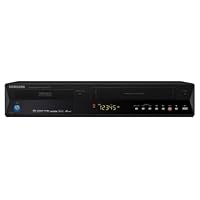
- Multi Format DVD/VHS Recorder
- VHS HiFi Player
- HDMI Upconversion
- One Touch - 2 Way Dubbing
- DivX Compatible

In comparison to Toshiba 650, LG 797, Sony 555 (these are the ones I have tried so far), this one is the cheapest, by a significant amount of money and better than all of the others in one way or another. The LG797 is best but it is so sensitive to copyright there are TV shows (Mad Men on AMC), even cartoons (Stuart Little), Sometimes even Lifetime Movies that it will not record from a DVR or straight from Satellite. Samsung is not sensitive.
Samsung has three drawbacks that are almost dealbreakers except that the other combos are so much worse in so many areasnot enough connections and it is slower than the others in editing features. It records RAM but not Double Layer discs. I have never had a combo that records RAM or DL until now so I would like it to record both like the LG does.
If you research all of your components and maybe even get an adapter when needed, the hookups is no problem. The speed for deleting a portion of a dvd or dividing, is slower than the others. Since I do lots of dividing and deleting on my +RW's, this would normally be enough to send it back. But it beats the others in so many other areas, it's still close to the best.
I have been transferring 24 hours a day from VHS to DVD or DVR to DVD and it has only frozen once (the others have several times). It is not sensitive to copyright so I can tape a movie and watch it later. I only make dvd's for myself to watch and I pay for the tv stations so I should be able to watch them and Samsung gives me that opportunity at my convenience.
The video quality from VHS to DVD or DVR to DVD is ridiculously better than the Toshiba and the Sony (Both over $240 each). It records every format it claims to record (unlike Panasonic which has great difficulty with +R and +RW). I am a +RW fan if you haven't tried it because you think it is no different than -RW you are sorely mistaken. Not having to finalize and "make compatible" or unfinalize to add something saves time and the discs still play on all of my DVD players. Not to mention more editing ability and reusing the beginning of the disc while there are shows still on the end (I have not figured this out on the Samsung yet my previous LiteOn's did this quite easily and from all the features with +RW Samsung allows, I think it will do this also). I have used 8 different brands of DVD's (and have tried +R/+RW/-R/-RW/RAM and every single one has recorded and played back without a problem. From high end discs down to office depot generics. This is rare. In +RW mode it has the lovely feature called "Divide" also available on Sony and LG (not Toshiba). If you are transferring or recording and you let it run long or fall asleep you can divide at the end of your show and delete the part you don't want. You can do this with all the commercials also if you wanted to take the time. You get to use variable recording speed so if you are recording in SP but the last show you are adding to the disc is a bit longer, you can record the last show in LP so it fits. When you press Record mode to set SP SLP etc, it shows on the screen how much time you would have left on the disc for recording if you used that speed. So you don't have to open up the title list or figure it out yourself. There is much more and as I continue to use the Samsung, if there is anything important, I will add to my review. This combo is not perfect there are more things I would change if the DVD makers would let me creat my own machine with every feature I want but so far this is surprisingly better than the Sony or Toshiba and beats the LG if you tend to record show or movies to watch on DVD later. I need two combos and this is good enough that if I can't find something that has the LG797 positives and the Samsung's positives I will actually buy another one. I am very picky with my media and especially because the combos out there generally do not do what they say they do and that's heartbreaking when you are spending anywhere from $170 $400. My three others were Liteon's and JVC and all three broke in less than 3 years.
IF you have right hookups and this combo has the features you are looking for, I can certainly say, it is excellent compared to the others I have tried.
Buy Samsung DVD-VR357 Tunerless DVD Recorder and VCR Combo Now
UPDATE 8/2008: After 18 months, it stopped working, giving a series of software errors, a message says "turn off/on" but the errors return. So today i would rate it much lower. The very first one i got was dead-in-box and an instant return, and this second one went kaput after 18 months of ordinary use. Amazon lets me edit this text but Amazon does not change my five star rating.#######################
We delayed several years buying a DVD-R because so many models had mixed good/bad reviews. Finally when our DVD player died we moved up to this DVD/VHS double recorder. It doesn't have a 'tuner' it expects some form of cable/dish tv input but we haven't used an antenna in 10-15 years, so that didn't matter to us at all.
1) Ease of use. There are multiple types of DVD (DVD+R, -R, -RW, +RW etc). There are extra steps with most, to "initialize" the disk and to "finalize" the disk. But the VR357 will do most of these steps automatically if you want to. It will also make automatic chapter titles every 5 minutes.
2) Works with hard disk recorder. We have a hard disk recorder with our cable system and I've heard some DVD-R are extremely finicky about recorder. This one seems to record anything so far that is on the hard disk recorder of the cable system.
3) Compatibility with older equipment. We've tried both DVD+R and -R and they have always played on our DVD-PC, and most have played on a four year old plain DVD player in the house. Apparently no recorder generates a home DVD disk that plays on every machine always. This one seems pretty good.
4. Advantages of DVD-R. Obviously, the DVDs are vastly smaller than VHS and you can use them in portable players, laptops on airplanes, etc. There are four record fidelities. 1 HR, 2 HR, 4 HR, and 6or8 HR. (Double each if you use more expensive double layer DVDs). We have a routine old TV set, and the 1 HR and 2 HR modes are visually the same. 4 HR is a little fuzzy, and 6/8 HR is noticeably fuzzy, but better than 6 hr VHS for sure. At best it's probably not quite as good as commercial DVDs but neither were home recorded VHS tapes. It does take a while to recognize any DVD (commercial or home-made, maybe 20-30 seconds; apparently it has more to "think" about than a regular old dvd player).
5. In/Out cables. It has a wide array of input/output cable types, including HD cable output (but it is *not* an HD recorder).
6. Bells and whistles. When you are finishing a disk, for example, it will have 2 one hour shows on it. The DVD will open with two little pictures of the first image of each show. You can get into a menu with 26 letters and scroll around and pick out a title for each track, if you want. Tedious but possible. There is one-button copy between DVD and VHS, assuming it is not a commercial and copy protected DVD or tape source.
7. Disappointment. The box says "plays MP4" and the manual "plays .AVI video." We could not get any home videos in these formats to play. Would be great to solidify this feature in a later model. Does play standard audio CDs and MP3s-on-CD.
7. Summary. The world of DVD-R is a little more complicated than VHS recording but this model automates most of the options if you want it to, like auto-initialize and auto-finalize. DVD-Rs are compact, take on airplane etc, and cost as little as a quarter for blanks if you buy a large spindle. We're quite happy with the visual quality but we have a routine old tv and routine cables, we are not video experts or HD people.
Read Best Reviews of Samsung DVD-VR357 Tunerless DVD Recorder and VCR Combo Here
Firstly the "Consumer Alert" about pending obsolescence is utter and total nonsense, it was posted by an idiot. This device does not have a tuner, it does have both analog and digital inputs and outputs so it is compatible with the old TV standard ( current NTSC standard circa 1939 ) and the new digital standard starting in February 2009 ( ATSC digital TV ). I needed to replace a failed 10 year old VCR. We own a large collection of Tape and DVD media. This single box solution replaced not one, but two boxes on our media shelf, and outperformed both. We are very happy, as it is not very expensive. The only warning I have is that this runs a bit hotter than the DVD and VCR it replaced make certain you don't block the air vent, I add two small sticks under the unit to aid ventilation. It is very easy to dub old VHS tapes the DVD with the push of a single button. We like the thing.Want Samsung DVD-VR357 Tunerless DVD Recorder and VCR Combo Discount?
This device has worked for me pretty much as expected. I have recorded only onto DVD-R media, from programs recorded by a DirecTivo and from VHS tapes. I purchased a movie (Ratatouille) from DirecTv and recorded it from the Tivo onto DVD. The machine did this correctly, no DRM problems. When recording normal programs from Tivo, you can use the pause/play button on the recorder's remote to effectively edit out commercials or other material. I have checked the finalized DVDs by playing them back in a different DVD player (Denon) and in a Macbook laptop.If you buy this machine here are a couple of usage hints. Buried in the manual is the fact that you can adjust the VHS tracking using the remote. Look very carefully for a tiny gray label "tracking." This can make a huge difference in the quality of recording from VHS. Each time you are recording and press Stop, the DVR creates a video segment it calls a "title." When you finalize the DVD, it creates a DVD "Top Menu" which lists each Title in sequence, with a thumbnail made from its opening frame. You can turn on a "chapter creator" and when you end a long (15+ minute) Title, the DVR creates chapter markers at equal 5-minute intervals through that segment. When you finalize the DVD, it creates a Menu (not the Top) menu listing each chapter with a thumbnail.
I am only giving 3 stars because of two shortcomings. First is the cheesy remote, which has rubber keys that you have to mash unmercifully to get a result. This is made worse in that sometimes the DVR responds slowly, or if it is in the wrong "mode," not at all, to a remote command. So you mash and grind on the flimsy rubber button until you get a response or give up.
The second problem is an awkward, poorly designed user interface that shows up in two places: recording from VHS and editing names of Titles. To record from VHS you are given a "copy list" menu that shows the VHS tape in a small window. You use the VHS play/ff/stop/rew controls (the pause doesn't work for some reason) to cue up the start of the segment you want, and press Enter. The starting tape position is noted. Then you have to locate the end point and press enter. When you tell it to copy this segment, the DVR rewinds (slowly) to the start point, plays and records one Title, and exits the menu completely.
The stupid thing is that the copy list menu has positions for up to 6 start/stop segments. I thought, "Great, a job-list!" However, you can only use one of them. As soon as you tell it to copy one segment, it does and completely forgets any other start/stop points you have tediously entered. It looks as if the interface was shipped half-finished, or they cut back on device memory at the last minute, or something.
The other interface issue is in renaming the Disk or any of the Titles. You do this with an on-screen virtual keyboard that is horrible to use, especially when the remote is so balky and uncomfortable. But if you don't name the Titles, they have default names of the date and time, meaningless. You can name the Disk as well. However this name only appears on the Top Menu. If you put the finalized disk in a PC, its volume name is generic, not the disk name you tediously entered.
In short, this device works but the remote and on-screen interface make it somewhat painful to use.
Later: after more use I have found that the main problem with the remote is a very weak and directional IR emitter. It needs to be close to, and pointed directly at, the machine. When you point it carefully, the buttons are responsive, you don't have to "mash" them as I described. The other issues remain annoying.


No comments:
Post a Comment