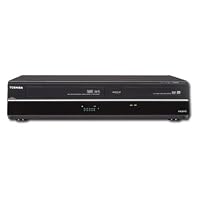
 Got this at COSTCO for $150 and it works well. (The DKVR60KU model does NOT have a digital tuner in case you want to do more than just copy old tapes.) I copied VHS tapes, a VHS-C cassette adapter, and used the DV front panel connector for my old digital video camera to copy home movies onto DVD-Rs. A few words of advice: some old, dusty tapes are very dirty so have a head cleaning cassette ready (moisten the pads with rubbing alcohol if you don't have any more of the liquid). A noisy audio track or a snowy video is a sign that the head may need to be cleaned. Don't forget to finalize the DVD-R and don't forget to create titles for each segment before finalizing. A new segment is created every time the DVD record function is stopped, either at the end of the tape or whenever you push STOP on the remote. I don't recommend activating the auto finalize feature because if you didn't create the titles yet it will be too late. The only negative about this product (and similar products) is that entering title information via the remote is clunky and error prone, and if you accidentally push some other button on the remote it may discard all of your hard work and so you have to start over. Read pps. 76 and 77 carefully. In particular note that when selecting character sets (caps, lower case, numbers, special chars), if you push ENTER but the selection highlighted already has the checkmark next to it then it will exit the title entry process and go to step 6, "Select Yes or No". If you do this select Yes and then re-enter the Edit Title Name process to pick up where you left off. If you select No then all of your work will be lost. Good luck.
We also have a Panasonic DMR-EZ485V DVR DVD/VHS recorder that works well with nice results but it has even more cumbersome controls and requires many steps to accomplish most tasks.
The Toshiba DKVR60 takes longer to load blank or prerecorded discs and finalize but otherwise has many simplified controls compared to the Panasonic DMR-EZ485V.
We use both to record favorite TV series for watching until the series are available in DVD sets from Amazon or elsewhere.
Both DVRs could use simpler instruction manuals with the most common things up front after the basic setup instructions.
The Toshiba DKVR60 works with two different Comcast digital set top boxes so far. The Panasonic DMR-EZ485V does not work with the newest Comcast digital set top box.
The VHS to DVD dubbing has proved handy for our own old VHS tapes (non-copy protected) and some tapes from friends.
We would recommend the The Toshiba DKVR60 over the Panasonic DMR-EZ485V.
Buy Toshiba DKVR60 DVD/VCR Player Combo Now
We purchased one of these units recently. After just a few months and only a dozen or so uses, it began randomly shutting off in the middle of dubbing or playing a video, and then refused to start again. When I described the problems to the Toshiba tech in India, he knew right away what was wrong a defective power control board on the unit indicating that they have had this problem frequently. However, he also informed me that Toshiba did not warranty the unit and would not repair or replace it. Fortunately, I had not had it very long and could return it to the retail store, but I am very disappointed with Toshiba for not standing behind their products, especially when they have so many defective units.Read Best Reviews of Toshiba DKVR60 DVD/VCR Player Combo Here
It works great! Easy to use. Good for converting old tapes and home videos. HDMI is a nice feature. Plenty of inputs.Want Toshiba DKVR60 DVD/VCR Player Combo Discount?
I know that VCR's are disappearing, so I must be the next to last guy to still want one. I have thousands of VHS recordings that I now must cherry pick for conversion to DVD. This is the fourth machine I got from our friends at Amazon recently (and the first decent one) and I hope they have a few left. This Toshiba deck acts like VCR's did when they were the only game in town. The RF in and out are gone but the record and playback quality are easily as good as some other machines I once owned. Can't complain about the slower rewind and fast forward as compared to the earlier generations of VHS decks because we're at the stage where quality playback of any recordings is the most important issue. Toshiba seems to remember that people want to be able to USE their products--not just BUY them.So far, I have only used the Toshiba DKVR60 to record to VHS, to record directly from my cable box to DVD, but not yet for any dubbing. But I am thrilled to have a machine that's not as finicky and downright dangerous as the two Magnavox decks I got first, which would chew tapes or stop completely during playback or recording on VHS, or the Sylvania deck that only records and plays VHS mono audio. DVD functions, to be fair, were OK on all machines--except no recording on the Sylvania
Back to the Toshiba-It sends VHS through its HDMI outs and plays back HiFi audio, basic at this point, but essential, and with good picture quality. I hope it lasts awhile and I hope I can get another one before YOU buy the last one!
Save $0.04 Off

No comments:
Post a Comment