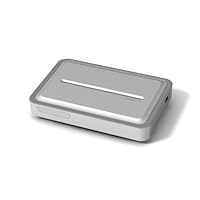
 OK, first here's what the Archos TV+ will NOT do (as there is a lot of confusion out there)
1. It will not surf the Internet. This requires an additional $30 plug-in.
2. It will not play surround sound encoded movies. It's not that you just don't get the surround sound, it won't play the movie period. This requires another $20 plug-in.
3. It will not play H.264 (.mov or .mv4) movies. This will run you yet another $20 for the plug-in.
4. It will not record TV shows. It does not have a built in tuner, so you need to attempt a Rube Goldberg type setup where the Archos TV+ controls a real recording device (VCR, DVD Recorder) to turn it on, change the channel, etc... (Didn't work with my 2 year old DVD recorder.)
So, it will cost you another $70 to realize the potential of the Archos TV+. (Plus the as yet defined cost of the 'TV Program Guide' that is only free for one year.)
Without the additional money, any attempt to play a movie other than a MPEG-4 .AVI with (only) Stero sound will bring up message that you cannot play the file and need to purchase one of the various plug-ins, with a convenient button that lets you 'buy it now'. There is little doubt about their strategy to make more money here.
The Archos TV+ also has this weird Bright White top to it (check out my photo in the product images). All of the Archos photos for the TV+ show a distinctly silver top, and in multiple calls to Archos they were even confused about the color. I got stories that a few had white tops, that there were many different colors of tops out there, then finally as I went up the chain (I really wanted the silver), that ALL of them had a white top despite what the Archos photos show. The white top really sticks out like a sore thumb amid the rest of the A/V equipment.
Now that the random, things you wouldn't expect are out of the way, the reason I got the Archos TV+ was to get beyond the piles of DVD's that my kids watch. The DVD's get misplaced, or left out and scratched, etc... and the TV+ does a great job in storing them! It is also easy for my kids (Hi Kat and Maddy; ages 5 and 8) to browse the videos and select what they want to watch. Let me be clear, it is worth the price just for that. It is also fanless, so no extra noise.
Connecting through a home WiFi network was fairly painless (just set up a home network workgroup and share out a folder on your PC), although even with a strong signal from my router (about 20 ft away), it will still drop the connection about 20% of the time, and I will need to re-start the transfer.
So, I really like the TV+ to keep the kids shows on, and once I got my conversion workflow set up to avoid all of the annoying 'can't play this file buy the plug-in' messages, using it has really smoothed out.
You don't get HD quality, the Archos customer service is totally lacking (policy appears to be to tell you anything just to get you off the phone vs. get you a real answer), but if you can control your video file conversion to align to it's strict spec's, it's a nice little addition to your home entertainment system. (Except that white top!)

The first thing I had to do was to update the firmware. This was a REAL pain the rear. The device has an "auto-update" feature, but it doesn't seem to work without the latest version of the firmware. ACK. Newer buyers might have a newer version pre-installed.
Once I finally got the latest version of the firmware and had purchased a couple of the plugins, I must say it's a really cool machine.
My main purpose was to put all of my kids DVDs on it this seems to be a common theme :)
I won't go over the specs, but here are few things you should know before you buy (in no particular order).
This device is NOT rock solid. Overall, it's stable "enough", but about once a week I run into a situation where I need to reboot the device. Personally, that's acceptable.
The dual USB mode is awesome. I can either attach it to my PC and copy stuff over (I use the mode where it looks like an external HD, but it also has "media player 11 support" whatever that is) OR I can attach an external HD to it and copy stuff over via the interface on my TV.
The main functions in the interface are easy to use and pretty intuitive, but some of the more advanced stuff took me a while to figure out. The manual wasn't always that helpful either. Still, this is just a one time thing.
The remote sucks big time. I understand they wanted something with a keyboard for web browsing (and file administration which is nice), but I really don't like the "feel" of it. 99% of the time there are just 8 buttons you'll be using. I've considered getting a learning remote to use most of the time.
It's great that it can play .vob files (these are the raw video files on DVDs) but I REALLY wish it could have played a directory with all of the DVD files as if it were a DVD. lots of video players on my PC can do this.
The TV recording function is "nice" but only useful if you know exactly what time and channel the program is in advance. The TV listing is purely an online TV guide you can browse and set to record something. On the other hand, it's nice to have a real time digital recorder to convert old VHS tapes or just record what I'm watching now (if I have to leave in the middle).
If you're recoding something from TV, the IR transmitter is on the front of the device. There is no "extender" like the tivo has. This means you need to either (a) change the channel in advance (b) have the tv+ facing your cable box (c) have something in front of the tv+ that will reflect the IR signal back to your cable box. As I said earlier, the recording functionality is "nice" but don't think this will replace a tivo.
The browser is surprisingly usable. I was able to do just about everything including 99% of the flash based sites I tried.
I wish it directly supported streaming audio (Internet Radio) like shoutcast.com. It DOES support flash through the browser, including sound. I tried to use pandora.com (it uses streaming audio via flash) but it never fully loaded the page.
If you only have composite video (just a single "standard" connector) then the Apple TV isn't even an option! My TV is 7 years old and composite is the only video connector I have. Apple TV does NOT have composite (which is one of the reasons I didn't get it).
When you're browsing your video files, it shows a thumbnail for the video (nice) but the really cool thing is that the thumbnail will show about 10 seconds from the video when you "hover" over it. This is VERY helpful for my 4 year old daughter.
My final thoughts would be that if you're a bit technical and want the ultimate flexibility get the archos TV.
Buy Archos TV+ 250 GB (Silver) Now
I was a huge archos fan after I picked up a portable unit from them a few years ago. It was great. So I bought this as soon as it was available. Its horrible. I only was ever interested in playing back video with it. Not playing music or not recording, so I dont know if those actually even work. Probably not. First I had to buy a plugin to actually play my videos. Thats so ridiculous, but I did it anyway. It did play my videos, but way way worse than my pc ever did. The unit just doesnt have enough horsepower to play them without them being choppy (these are big mpeg2 files) The ui is horrendous! fast forward and rewind are just plain unusable, as is the bookmark feature. I also tried the websurfing plugin. Unusable! The mouse is horrible, the keyboard is too delayed to do anything useful. good luck trying to type an email!I waited and tried all the latest firmwares, but nothing made this pos any better. And then it was too late to return it.
Please run, dont walk, away from this nightmare!
Read Best Reviews of Archos TV+ 250 GB (Silver) Here
This is a digital media player for your home entertainment center. It has the same operating system as the Archos portable video players (like the 605 wifi). It has all of the formats of AV inputs that you would need but you can only use one at a time which can be a pain if you want to switch. It can play a wide variety of file formats as well (just like the 605). You will need to buy two plugins in order to play MPEG2 with AC3 audio and H264 files. Yes it does play XVID/DIVX.For me, the main selling point for this unit is the network connectablity. I plugged in an Ethernet cable (it has wifi as well, but that's slower) and it lets me browse the other computers on my network just like the explorer in windows. I can then play any media file I find videos, music, or pictures. You can also use the media sharing feature of Windows Media Player 11 and share network files that way as well. This lets me us this unit as my own on demand system. I can dump all the videos we want to watch over the next few months and have them in neatly organized folders. The kids can have their movies all in one place and watch all the SpongeBob they want. I plan to have all our Christmas movies dumped and on the unit so we don't have to hunt for them next year.
Archos TV can record form an external sources as well, but I already have a PVR for that, so I won't be using it. It uses an IR blaster type setup to control the cable/satellite box for recording. You get one year of free program guides when you register.
Notes:
You will need to update to the latest firmware before you do anything else. I couldn't get the auto update to work the first time so you may have to download the firmware via a computer and move it over to the unit.
I had trouble getting a thumb drive to work in the USB port. I think it pulled too much power. My Archos 504 hooked up no problem. I'm sure any powered USB drive will work fine.
When you browse your network for the first time, it will take a long time for it to find other computers on the network. Just let it search. Mine took about 30 minutes. After that, it finds them instantly.
Just like the 605 you have to bookmark videos manually in order to come back and resume were you left off. It will do just one video automatically. This will be lost when you play another video though. I requested an auto-bookmark feature but who knows if they will look into it.
You can copy files to the unit through the network connection, or by using a USB cable. The unit shows up on your computer as a Drive.
It can play VOB files from DVDs you own. If you hook up the SPDIF cable, you will get Dolby Digital AC3 sound.
This is a new unit and they are working on fixing bugs as they are found. It's not going to be perfect for a little while. It is very cool though.
Want Archos TV+ 250 GB (Silver) Discount?
This is the worse product ever. It works fine physically and you can watch movies that you convert, download, etc as long as they are of a certain format but if you would like to use it as a DVR and record TV you are out of luck.The worse one is that they advertise on their site that you can record using a local directory. You know pick a directory, hit record and it put's in everything for you. Well that is not working and has not been working for months. The reply from their tech support is "I have been told the service will be unavailable for a while. I'm sorry for the inconvenience.". Translation for Archos of a while is usually 2-6 months.
Originally when I bought it I was stuck without a directory for 2 months, they finally got it going. I then switched providers last month and for a month I get the same reply back, in fact that option has been removed from the user options on their web page.
The other thing is that this device does not control certain devices. What I mean is that it will not turn on certain devices in particularly the Motorola devices from Verizon FIOS. Which means you either leave your cable box on all the time or you are stuck with a dust magnet sitting in your entertainment center.
DO NOT BUY!


No comments:
Post a Comment