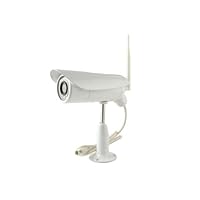
 I purchased several of the TriVision NC-107W (appears to be similar to the Sharx Security SCNC2607), TriVision NC-107WF (similar to the Sharx Security SCNC2700), and TriVision NC-306W (this unit, appears to be similar to the Sharx Security SCNC3605N) wireless IP security cameras over the course of the last month. All three TriVision camera models provided very good first impressions, but of the three models, this is the only camera that worked without issue (once assigned a static IP address).
Positives:
* Very well written manual, the same manual supplied with the other cameras.
* Very stable in operation cameras recently survived a day of 96F heat with some of the cameras in direct sunlight.
* 640 x 480 resolution at 30 frames per second is likely higher resolution than old style CCTV type DVRs solutions (the resolution may be set to a lower value and the sound quality is adjustable).
* Video is recorded in Apple QuickTime standard format, which is viewable by the Windows 7 Windows Media Player (but not the Vista version of that program) and the video format is compatible with the Windows Live Movie Maker application (free from Microsoft).
* Includes MultiLive software that allows simultaneous connection to as many as 36 TriVision cameras per computer. The MultiLive software features motion detection, with automatic recording to a specified file location (this capability was tested for a week with a single camera, motion detection works but was slower to activate than the motion detection built into the camera, and the Windows 7 color scheme automatically changed to Basic when the MultiLive software was running).
* Includes an automatically downloaded ActiveX control that allows viewing live video from a camera.
* Includes a NC Setup utility which quickly locates Trivision cameras on the network (all cameras send a full broadcast packet to port 22330 roughly every 3 seconds the NC Setup utility sometimes fails to see any network attached cameras, even if a Wireshark packet capture shows the full broadcast packets).
* Integrated storage of video on MicroSDHC cards (all cameras tested with SanDisk 32 GB MicroSDHC cards).
* Automatic upload of video and still frames to FTP servers (tested with Microsoft Windows 2003 Server's FTP service and a Synology DiskStation DS212+), a feature which seems to require the additional cost memory card.
* Compatible with Synology DiskStation Surveillance Station (TriVision cameras are not listed in the Surveillance Station, but recording seems to work OK when Y-cam is selected for the camera type).
* Automatic sending of still frames to email (not yet fully tested, did not seem to be successful in sending to an onsite Microsoft Exchange server or to the Synology DiskStation email server).
* Allows remote viewing of camera video from outside the network (not yet attempted, but there seems to be no reason why this would not work once the network firewall was configured to permit connections and port forwarding was enabled on the firewall, should be a nearly automatic process with a router that supports universal plug and play (uPNP)).
* Connects wirelessly to 802.11b/g/n WEP and WPA2 encrypted networks even when the network SSID is not being broadcast (tested with multiple Cisco Linksys E2000 routers acting as access points, and industrial class Cisco Aironet 1252 and 1262 access points), and wired through a 10/100 Ethernet port.
* Automatic light intensity adjustment, automatically switching to black and white night vision if the automatic infrared lights are enabled.
* Two-level user access security to the camera for administrators and regular users.
* Allows download of video from the optional integrated storage media, so that the video may be played back on a connected computer once the download completes.
* Allows defining four motion detection sensitivity areas on the camera so that motion in one or more areas of the camera picture does not trigger video capture.
* Allows periodic (for example once every 30 minutes) of the camera picture to an FTP server or email.
* Recorded video may be broken up into 60 second intervals (configurable between 10 and 600 seconds) to make certain that the video is transferred quickly to a FTP server recording will continue for a user specified duration after motion detection ends. Continuous recording is also possible, but only to the optional internal memory card.
* Supports mobile devices (iPad, Android, BlackBerry) through third party software, as outlined in the manual (tested to work OK with the "IP Cam Basic" app on a Motorola Xoom when setting the camera manufacturer to Sharx).
* The mounting stand, with a three inch diameter round base, works well for mounting the camera to the sides of buildings. Overhead mounting is also possible with the included male-female extender nut (one of these nuts snapped during installation due to over-torqueing).
* Configuration is not terribly difficult, but is a bit time consuming when multiple cameras need to be configured.
* Cameras are able to automatically synchronize with external time sources (NTP servers found on the Internet, however the time on the cameras tends to drift a bit more than what is acceptable).
* Capable to connecting to an external amplified speaker system to support two way audio (not tested).
* The power supply included with the camera has a very long cord (roughly eight to ten feet) which helps with installation. The cable extending from the back of the camera is a usable length for routing inside a building, although an extra foot of length probably would have made installation a little easier for two of the camera installations.
Negatives:
* 640 x 480 resolution is decent if the subject captured by the camera is within about 15 feet of the camera; however the need for high definition video capture is quite clear after watching several thousand video clips created by the cameras.
* While the camera probably is capable of 30 frames per second at 640 x 480 resolution, motion in recorded videos is often accompanied by several short pauses in the motion.
* Viewing the cameras using the MultiLive software seems to temporarily disable the built-in video capture and FTP uploading capability (the same is true when the Synology DiskStation Surveillance Station is connected to a camera).
* The live web-based video stream of the camera is only compatible with Internet Explorer, and the video stream does not scale down if a smaller zoom percentage is specified in Internet Explorer, although the edges of the video stream will be cropped at smaller zoom percentages. The restriction of only working with Internet Explorer means that, for instance, a Motorola Xoom tablet cannot be used to watch live streams of video from the cameras through a web browser.
* The NC Setup utility seems to be a bit unreliable, intermittently not able to see cameras from one computer, while the software works fine from another computer at the same time; the broadcast packets sent by the cameras, which is used by the NC Setup utility, cannot be disabled.
* Retrieval of video from the internal memory card is often a slow process.
* There are two options for taking still frames when motion is detected and uploading those videos to an FTP server one of those options does not honor the specified destination directory setting.
* Motion detection seems to still need a bit of development. Moving an object (a person or a car, for instance) directly toward the camera may not trigger motion detection until the object is within 10 to 15 feet of the camera. Motion detection seems to work well when the object is moving from one side of the picture to the other side, often triggering in a second or less. On a windy day with a couple of cameras pointed through windows, it is not uncommon to see 500+ one minute videos of tree branches swaying in the wind during a 10 hour time period.
* The cable extending from the camera does not route through the stand, so that cable will be directly exposed to tampering. The end of the cable is roughly 5/8 inches in diameter, while the cable itself is about 3/8 inches in diameter that makes for a somewhat sloppy installation. A nearly waterproof enclosure is included for connecting the camera to the power cable, optional network cable and third party alarm system.
* Long term durability of the cameras is still a significant unknown, but at the $300 offering price the camera is a good value even if it fails after a couple of years.
Description of the Attached Video:
The video shows several video clips that were triggered by the cameras' motion capture capabilities; a variety of day and nighttime clips are included so that image quality and sound capture capabilities may be judged appropriately. The video clips were imported into the Windows Live Movie Maker application where subtitles were added, and the video was output as a 640 x 480 resolution WMV video file with no apparent video or sound quality loss the occasional pauses in the video were present in the MOV files recorded by the cameras. The timestamp at the top-left of the video was added automatically by the cameras during recording.
------------
Update December 30, 2012
All of the NC-306W cameras continue to function well, although the falling snow and rain contribute to excessive motion detection recordings. The cameras have provided police with video evidence on two occasions.
That said, I ordered two additional TriVision NC-306W cameras on December 11, 2012 to give to a family member as a Christmas gift. The seller, ATC LLC, sent two TriVision NC-316W cameras rather than the model that I ordered. The NC-316W cameras shipped with firmware version 5.26 (build 20121110). While the cameras appear to be physically identical to the NC-306W cameras, the configuration interface for managing video recording and uploading is very different; a new user reading the manual likely will not have much difficulty setting up the cameras, but the changes are significant enough to cause confusion for people who have worked with the older TriVision NC-306W, TriVision NC-107W, and TriVision NC-107WF cameras.
Specific problems with the NC-316W cameras:
* On two occasions the cameras automatically set their clocks to a date in 1970. Disabling the NTP (network time protocol) auto-time adjustment stopped this behavior.
* Both cameras have a tendency to stop uploading video to a Synology FTP server after 2 to 5.5 hours. When the cameras stop uploading video, they also stop recording video to the installed memory card. Rebooting the camera will allow it to start recording video again and send that video to the FTP server for an additional 2 to 5.5 hours; all video that should have been recorded during the problem period is lost.
* When it was determined that FTP transfers were problematic (after trying various FTP keep-alive settings), the cameras were reconfigured to write to a Synology NAS share. Both of the cameras stopped writing to the NAS after 4 to 5.5 hours, requiring the cameras to be rebooted again to correct.
* Shortly before one of the cameras completely stops recording to the FTP server or NAS, the camera recorded video clips contain only audio, with no picture. This audio without picture recording seems to always happen just before (possibly a half hour before) the camera stops transmitting the recorded video clips to the FTP server or NAS.
The included MultiLive software works fine with the cameras, even when the cameras fail to record video to their memory cards, the FTP server, or NAS share. Motion detection on the NC-316W cameras seems to be as accurate as the motion detection on the NC-306W.
While the NC-306W camera deserves a 5 out of 5 rating, the NC-316W currently deserves a 2 out of 5 rating due to the problems mentioned above.
------------
There is essentially one supplier of the Trivision security camera, ATC LLC, so I thought that I would also provide a comment on the supplier in this review. Individual orders of the NC-107W and NC-107WF security cameras shipped quickly through U.S. mail, with the camera enclosed in a thin cardboard box inside a large plastic mailing envelope. A larger order of four NC-107WF and NC-306W cameras shipped by FedEx, arriving the day after shipment except that the four NC-306W cameras were not included in the box and no packing material was included in the larger box to prevent the smaller boxes from shifting position in the larger box. At 6 AM the morning after the package arrived, I received a somewhat frantic email from the supplier stating that they mistakenly shipped eight of the NC-306W cameras, rather than the four that were ordered due to a "system's issue", with a request that I either return the four extra cameras (prepaid return shipping was offered) or pay a discounted rate for the extra four cameras (thoughts of toner pirates were dancing through my head as I read the email). An hour after the supplier's email was sent I returned a replying email requesting tracking numbers for the eight NC-306W cameras, since none were included in the package that was received. 24 hours after the original email I received a response from the supplier stating that due to a "system bug", none of the NC-306W cameras shipped four of the NC-306W cameras arrived the next day. While this shipment resulted in a bit of panic, I am willing to consider this problem to be caused by a computer glitch and not a case of a supplier attempting to over-ship a product and then expect the recipient to pay for the over-shipment (one of the methods employed by a toner pirate). In all orders, the cameras were shipped without shipping charges.
Save 26% Off

No comments:
Post a Comment