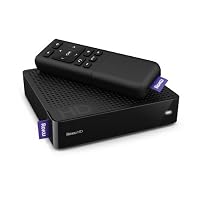
- Start watching movies on your TV in seconds using your high-speed Internet connection
- Featuring the largest collection of instant streaming movies and TV shows, from Netflix, Amazon VOD, and more
- Built-in wireless (Wi-Fi) and wired Internet connectivity.
- Plays High Definition as well as DVD-quality video. Works with any TV.
- Sets up in 5 minutes. Simply connect to your TV and to your high-speed Internet service. Does not require PC for streaming.
- Built-in wireless (Wi-Fi) and wired Internet connectivity
- Plays High Definition as well as DVD-quality video

1.The Roku has both composite and HDMI outputs; only composite cables are furnished. You'll have to buy an HDMI cable if you want to use the HDMI output. If you use the composite output, the image will be degraded vs HDMI. HDMI cables are much cheaper from amazon than a local store where they tend to be pricey.
2. You now must register the Roku at it's site before moving along to register the device with Netflix or other channels.
3. Before you can register, Roku also now also demands your credit card information in case you purchase other pay channels from them.
Comment: Those that have given bad reviews based on Roku's service support; well, they are right. The support is outsourced to Mumbai or somewhere in India, and support on warranty is just awful. Dealing with them may drive you nuts. There is no way of contacting Roku headquarters in the US to complain or get help. The phone number given on their website doesn't work. If you buy this device and it fails, you may possibly have to treat it as a throwaway. It pays to get it from Amazon or another supplier that has return privileges for at least a month in case it fails. As with most electronic devices, the majority of failures will happen within the first several days.
INITIAL REVIEW AS FOLLOWS;
OUT OF THE BOX;
Comes with the basic unit, Composite cables (pretty useless), power supply, remote, a very minimal setup guide, and batteries for the remote.
WIRELES SETUP:
Wired ethernet is also an option.
1. There is some plastic film to peel off. Plug the unit in and connect your HDMI cable, composite cabling (or component cables-older Roku's) to your TV or HD AMP. Turn your TV and amp on and set the correct inputs. The unit will display the first screen on TV and immediately ask what kind of connection you would like. I used wireless, which I suspect will be most popular.
2. Wireless networks in range with SSID broadcast on will be displayed. Choose your network and click Ok. The next screen has alphanumeric input to supply your network password if your router is set to WEP or WPA protection. If you have MAC filtering on, turn off your MAC filter or add the MAC device ID to your router. The ROKU's MAC is displayed if you seek help from a help menu button on the password screen.
3. If the following sounds a bit complicated, it's not really. The setup proceedure will lead you through it well. The unit will connect and do a rather lengthy download of a "software" update. If this is successful, the home screen will be displayed with options of what service you want to link to the ROKU. If any step fails, back to the first setup screen. Thankfully it remembers your net password. You will also have to choose a display size configuration and resolution. The unit will then display a code to link to the ROKU site. You can ignore it or link to the ROKU site and choose your service from there. I picked 1080P HD, and chose Netflix directly from the ROKU menu. Be careful here! If your TV can't display HD, the screen will scramble requiring a hard Roku reset and start from scratch. (button on the bottom of the unit). This might damage the Roku, so choose the right TV resolution. A new Netflix specific code will be displayed. Then I went to my computer to pull up the Netflix site, migrate to streaming access, pick the ROKU out of a menu of devices (it's "other") and input the Netflix code.
4. Thats it! The ROKU will now be ready and will display a nice Netflix menu to choose what you want to stream and play. The Computer menu is a bit easier to browse when choosing a DVD or show to watch than the ROKU screen, but the latter is perfectly serviceable, especially if you know what you want to watch.
Some caveats/suggestions/musings. When I started the setup routine, the device kept rebooting and loosing network connectivity. It was position. It is VERY sensitive to it's placement. Don't put it in between a large amp and a DVD player, or in a deep cabinet, say. Have it positioned out in the open. If you don't have a gigabit 802.11 "n" router, get one. There's lots of info downloading and streaming to this device through your router. Some reviews have criticized the ROKU's remote. I found it worked just fine. If you are wedded to the idea of streaming media, this device is great at present. But, there is an increasing selection of BluRay DVD players with this capability already built in. They are much more expensive at this time, but prices will come down. If you are almost ready to upgrade to a Blu-Ray player, maybe good to wait a bit and pick one when prices fall in the near future.
AFTER SETUP;
Great. video quality and sound are terrific at 720p. 1080p and surround sound to probably come from Netflix next year, I hear. Wasn't disappointed at all. Terrific buy.
Buy Roku HD Streaming Player Now
I purchased a Roku HD Player from Amazon.com on June 3, 2010. After five months of use, the unit began malfunctioning. It would not stream movies. I contacted Roku's technical support people. They walked me through several tests (both of the unit and my wireless router), and they decided that the unit was defective. I shipped the unit via UPS per Roku's return protocol on December 23, 2010. It was insured for $100. Roku claimed it did not receive the unit. I provided them with a copy of the Proof of Delivery slip that I obtained from UPS. I have contacted Roku's support center more than three times about this issue, and I still have not received a replacement unit.I began to do some research on Roku, and I discovered that many other customers have had the exact same problem. They tell the customer that the defective unit was not received. When proof of delivery is provided, they refuse to give a firm date as to when the replacement unit will be sent out. Roku also makes the customer pay the shipping costs to return the defective unit.
If Amazon.com provides a buyer protection plan, I suggest you purchase it because you WILL have problems obtaining a replacement directly from Roku. My unit is still under warranty, and Roku has not fulfilled its obligation as stated under its warranty agreement.
Read Best Reviews of Roku HD Streaming Player Here
I bought this Roku player and it completely died 35 days after I received it. It's easier to pass a kidney stone than deal with Roku's outsourced customer service. If you can get past spelling your name 10 times, you're told that you have to send the box back before they will send you a replacement...BUT..when they send you the RMA email (with the number you have to put on the box), they tell you they are first sending the replacement along with a pre-paid label to then send the broken box back. You wait three days for FedEX to deliver the replacement and when it doesn't come you call for a tracking number. After repeating your name another 10 times and the RMA number about 5 times,(seriously lots of folks in India speak perfect English but not the ones hired by Roku) you're put on hold for 10 minutes only to be told that you're supposed to send the box first before the replacement is sent. But of course, you wouldn't want to do that because the RMA email says they are sending the replacement first. If you had sent the broken player back first, they will no doubt tell you that you must have already received the replacement BECAUSE THAT'S WHAT THEIR STUPID RMA EMAIL SAYS.Fortunately for me, Amazon's stellar customer service came through and agreed to let me return the device.
When the thing works, it's pretty cool but if it breaks good luck. I'm going to look for an alternative I don't trust a company who's product fails in 30 days and doesn't provide the decent customer service necessary to rectify a pretty simple problem. LET THE BUYER BEWARE.
UPDATE 5 days after I started dealing with Roku support and they sent me the erroneous RMA, I got an email from their Indian support center telling me that they would not accept the email receipt from Amazon that I forwarded to them as proof of purchase. They need it faxed. Only the fools running Roku support would know the difference between email and fax. They just went from the Worst Customer Service Ever to the VERY WORST Customer Service Ever.
Want Roku HD Streaming Player Discount?
I bought a Roku HD less than a year ago. About a month ago, the Wi-Fi stopped working. I searched around the forums and realized that it was a known issue, so I called Roku for a replacement.After repeated rounds of helping them debug the problem, they decided I was worthy of a replacement. The replacement came and... surprise!... the device did not work in HD mode.
I called them again to get support, and got a total runaround. Every support person I spoke to advised the same tricks again and again. When I would call back, I would get the same script over and over. I then tried their email support, and it was even worse. They appear to have a very hard time tracking the same conversation between emails, because each email was like I was talking to a new person.
Finally, I called and asked to talk to a manager. I was told the manager would call me back in 30 minutes, but no luck. Over two hours later, I called back and got run through the same scripts as before. Eventually, they tried transfer me to a manager, but instead they disconnected me. (FYI call quality to their call centers is absolutely terrible. They appear to be using the cheapest VoIP possible.) I called back and eventually talked to a manager, and he again wanted to run me through the same scripts.
He told me the problem was my TV (absolutely false, as evidence by the fact that the TV worked with the original Roku just fine), that there was no problem at all, that I should just use composite cables instead of HDMI. Then, when he finally agreed to send a replacement, he asked if the Roku was still under warranty... long story short, the warranty had expired since the replacement was sent, so he was going to deny me replacement of the faulty replacement!
Eventually he agreed to send a replacement, but what an absolute pain the whole experience was. With the time I've wasted I could have easily just bought a new Roku, which is probably their intention. If the replacement they've sent doesn't work I'm definitely going to buy something, anything, other than one of their products.

The channels it has programmed are wonderful, an incredible mix of everything, movies, TV, music, sports, talk radio-it was worth it for the new websites we've been introduced to by the Roku.
Amazon is listed, and to get access to our video download library we just had to go to the amazon site (www.amazon.com/roku) and enter the code the Roku gave us, and our videos were instantly accessible!
I just finished joining netflix for the first time, just so I can access the streaming stuff on the Roku box. I usually watch streaming video at a favorite user-contributed video website, but I got a horrible virus there last week, and I think I'd better move to safer viewing habits. (It's not one of the name sites you'd instantly know, it's a little more off the beaten path. I should have known better!)
This is wonderful, I can't wait until it has a link to Hulu (coming soon!) and I'm planning on buying more amazon video on demand, since this lets me watch it on the big screen instead of my computer monitor.
We son't watch TV, per se, we got rid of our cable and I hate commercials with a passion, but we do follow certain shows online, so since our computer is responsible for most of our entertainment, this was just what we needed!
It was easy to set up, it only took a few minutes, even though my darling husband usually needs three trips to Lowes just to plug something into an outlet, he pretty much just hooked up a few wires and it was good to go. Navigation is easy, the picture is good (not great) even if you're not using the HDMI hook up, and it looks like it's loaded with enough viewing options to keep us watching for quite awhile!
So far, I highly recommend it.

No comments:
Post a Comment