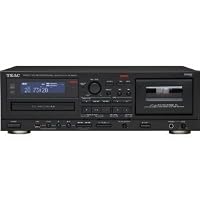
- CD Recording from Cassette, USB, Digital-In, AUX
- Supports CD, CD-R/RW and MP3 Disc
- USB Audio Output from CD, Cassette, Digital-In, AUX, USB to PC
- MP3 Playback from USB Memory
- Auto Reverse Cassette Deck

I have not tried the CD recorder because -it requires blank music or "digital audio" CD media! Do you have lots of spindles of 'regular' blank data CDs? Too bad. This unit will refuse to record on them. Keep in mind that this is not a 'technical' problem but a licensing one. With Digital Audio blank media, you are paying a kind of tax because it is assumed that you will be recording copyrighted music onto the disk. Digital Audio disks are just like computer data disks except for a digital signature written to the Digital Audio disk. If this unit doesn't see that signature, it will refuse to record on it. I had originally planned on copying all my cassettes to CD first and then later rip the CDs on my computer to iTunes. But with a drawer full of perfectly good blank data CDs (which work just fine as music media when written from a computer), I refuse to be forced to go out and buy a whole bunch of new blank media. Fortunately you can copy directly from a cassette to a USB thumb drive, saving as an MP3 file, but...
The cassette --> CD recording method has a feature where the unit will try to determine track breaks on its own, automatically breaking the cassette up into separate tracks on the CD. But for cassette --> USB recording there is no such automatic feature. You can, if you want to, manually mark the tracks. But I wanted unattended copying from my cassettes, so this does me little good. The unit does have a auto-reverse cassette deck, so you can do both sides at a go. But I prefer to do each side of the tape as a separate session to keep the MP3 file sizes a bit more manageable. Remember that if you recorded most of your own tapes, a cassette is typically 30 or 45 minutes a side, so your MP3 files will be that long. That's a good sized file. And recording a side of a tape that is empty creates the same size file as one full of music.
The USB recorder doesn't always start and stop when you press the front panel buttons, or when the cassette player stops. I don't believe this is a defect in this particular unit, but rather some sort of artifact of how the built-in computer is polling for 'events'. To record from cassette --> USB, you select the output (tape), load the tape, and press the RECORD USB button. Usually this works, but sometimes it ignores the button press. Sometimes 2-3 times in a row. An annoyance. But more annoying is that the USB recording is suppose to automatically stop when the tape ends. It usually does, but like the button presses, sometimes it doesn't. When it doesn't, the USB continues to record dead air. This can make for a pretty darn big MP3 file by the time you notice that the tape has stopped but the USB recorder hasn't. Again, not ideal for unattended recording. Ignored button presses can be seen in all the controls I've used so far -for example sometimes it takes pressing the stop or rewind button a couple of times for the unit to pay attention to you.
Sometimes when loading a cassette, the take-up reel does not engage the hub. You have to eject and reload the cassette. Over the years I have owned literally dozens of cassette desks, both cheap and expensive, and I don't believe I've ever had one with this quirk.
There is no light behind the cassette window, so you can see the tape packs. A common feature on any good cassette deck.
The head stays in contact with the tape during fast forward and rewind. This is a common feature for decks that allow you to automatically scan for the blanks between songs. But this unit doesn't have that feature, so this just adds a bit of unneeded wear to the heads.
There is no choice on the sampling rate from cassette --> USB. It is preset to 128K. That seems adequate for most cassettes, but for important original recordings it would be nice to be able to opt for higher settings.
Out of about 60 tapes transcribed so far, I had one session where two tapes were copied at 'double speed' to USB. The tape playback speed control, which I never touch, was set to normal. About 10 tapes later it has yet to repeat this little quirk.
The rewind and fast forward seem slow compared to other decks I've had. A minor issue. I have had two snapped leaders so far, but I blame that on the age of the tape, not the unit, given how non-aggressive its fast wind speeds are.
The Good News....
The transcriptions sound good. On casual listening with my old ears, the MP3s sound as good as the original tape.
Even though the deck is an auto-reverse unit, it has an intelligent auto-stop which will prevent this unit from eating your tapes. But you need to be alert. If the unit suddenly stops in the middle of a tape. Rewind the tape for a second or two, then pop it out, rap it on the table a few times, then make sure both hubs are turning freely. You can do this with your pinky finger or a pencil. If you forget to rewind the tape before ejecting, you'll find a loop of tape extending out of the cassette. Usually it should not be so much that there will be any damage. If this happens, just put a pencil in the take-up hub and wind in the loose tape. Then rap the sucker (the cassette, not the tape deck!) on the table a few times to free it up and try again. Whatever you do -don't just keep hitting play if the unit stops in the middle of the tape. You're just forcing the unit to eat the tape.
Sorry I can't report on any of the other features -I'm using this unit as a convenient way to copy all my cassettes to MP3 so I can cull them later with computer music editing software. I could have used an A-to-D converter with one of my current top-end cassette decks, connected to a computer, but I got this unit because I wanted to be able to just load a tape, press a button, and walk away. Except for the quirks described above, that approach is working pretty well so far.
Buy Teac AD-RW900 CD Recorder and Auto Reverse Cassette Deck with USB Now
I wanted to make CDs from my old mixed tapes so I bought this and it works great. I just needed to buy an amp, speakers and some blank CD-Rs and I'm making CDs (15 so far). I love it easy to use, the CDs sound great and I'm updating them to my current tastes vs. what I liked way back when I made these tapes. I'm not a computer fan so I wasn't willing to buy something that hooks up to my computer. This is so much easier. I wish I bought this 10 years ago!Read Best Reviews of Teac AD-RW900 CD Recorder and Auto Reverse Cassette Deck with USB Here
Great review. I purchased this unit from JR for the primary reason of converting analog tapes anr LPs to USB mp3. I experienced much of the same 'quirks' as you, but also experienced the problem where the mp3 created from the cassette => usb function had 'skips'; where data was actually missing. After some sleuthing it appears as if the issue is compatibility with different thumb drives. I had been using newer Corsair 3.0 and HP 2.0 (mini because its low profile fit better in my enclosed audio cabinet). The skips (missing data) was heard on both when played through the AD-RW900 or through a computer. When I used an older SANDISK thumbdrive, the mp3 was created correctly. After hours on the phone and emails between myself and TEAC CUSTOMER SUPPORT, I was told to exchange the AD-RW900. The replacement I received had the same problem. Subsequent calls and requests to TEAC in which I requested a list of compatible USB drives resulted in a response that indicated one does not exist.It is funny you ask if this is the SAME TEAC. I also have been a loyal TEAC customer for many years (3300sx reel-reel, Tascam multi-track porta studios, etc), and have been asking the same question. I told TEAC management that the quality and support of this machine is nowhere near that of machines purchased in the 70's, 80's and 90's. Quite frustrating.
For anyone who wants to spend top dollar for a poorly engineered product, and experience customer support on par with DELL at its worst, then this is the machine for you.
Want Teac AD-RW900 CD Recorder and Auto Reverse Cassette Deck with USB Discount?
You got to use MUSIC CDRs, which are becoming rare and more expensive.But I found some and it definitely turns your tapes into CDs pretty easily.
Otherwise it does what it says it is supposed to do, including playing music out of your USB stick.
Decent CD player, you know, consumer grade.
Lowdowns:
tape sound quality: sure, I compared to a relatively good UHER tape player that I was in the process of repairing (but not sure I could). After I repaired it, I could appreciate the difference in sound quality. I was not expecting such a difference coming form a teac product.
rewind/forward: cheap mechanism: the reading head don't retract and thus rewing/forward is slow and the tape rubs all the time
no separate read / write heads: you know, low end tape player.
So, if you need a CD player AND also have some tapes laying around, I would recommend.
If you are looking for audiophyle quality both for tape and CD, and also MP3, this is not it.
Save 43% Off
This machine has some temperments but overall works very well and automatically. It's complicated to operate and takes some concentration and learning curve. The sound quality is very good. Need to get the proper CD-R discs for it. Will not accept data discs. But so far it's been a great player/recorder.

No comments:
Post a Comment