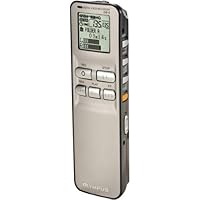
 The Olympus DS-2 Digital Voice Recorder is one of those breakthrough products that makes me want to recommend it to everyone I see.
Digital voice recorders have been around for a number of years and I have owned a few, a Sony and an older Olympus model. They have previously been very disappointing, mostly because of the poor sound quality. Comparing the DS-2 to older digital voice recorders is like comparing a high-end stereo system with a Victrola.
The DS-2 is a reasonably sized, very configurable digital voice recorder. But the term "voice recorder" is not the best description of this little gem. You will discover, as I did, that the quality of recording can be so good that you can easily record music and be quite satisfied with the incredible sound. It has a built-in stereo microphone and you can also attach an external stereo (or mono) microphone using the mini-jack mic input.
The built in speaker has decent output for its size. You can also use headphones or connect to a stereo or other audio device using the headphone output jack. I use a cassette tape adapter in my car which enables me to listen to my audio notes on my car stereo while driving.
The DS-2 has 5 different recording modes. 2 of them are Stereo (Stereo HQ-Stereo High Quality recording and Stereo SP-Stereo Standard recording) and the other 3 are mono (HQ-high quality, SP-standard recording, LP-long term recording). Olympus uses two different recording formats, WMA and DSS, depending on which recording mode you are in. WMA mode is used for all stereo recordings as well as the highest quality mono mode (HQ). The DSS format is used for the 2 lesser quality recording modes, SP and LP.
Recording time for the DS-2 can be as much as 22 Hours 20 Minutes in LP mode and as short as 1 Hour 5 Minutes in Stereo HQ mode. If you are using the DS-2 strictly for dictation or general voice reminders, you will be quite pleased with the recording quality in the lowest quality mode, LP. And remember that in this mode you can record for over 22 hours. I think that is pretty amazing. If you bump up the quality to SP, you can still record for over 10 hours. HQ mode records for over 4 hours. Stereo SP mode records for over 2 hours and Stereo HQ mode records for just over 1 hour.
You can alternate recording modes and your total time will adjust according to whatever mode you happen to be in.
The DS-2 display is small but more than adequate. The text is sharp and clear, while the back-lighting makes visibility excellent during daylight or in dark situations. There is contrast adjustment
The unit uses 2-AAA batteries. You can also use NIMH batteries if you want to be able to recharge batteries. Battery life is pretty good averaging about 10-12 hour while recording or 8-10 hours of playback.
The unit also comes with a USB docking station and software which works on both Macs and PCs. This enables you to upload audio files to your computer where you can then listen to them or just store them
Here are some of the other features of this device...
-5 folders which can hold 199 files each for a maximum of 995 recordings. You can also name your folders something other than the default "Folder A, Folder B", etc. There are also some pre-set folder names available such as ""Meeting", "Memo", "Note", and so on. Although it is tedious to change folder names on the player itself, using the DSS software and making the changes via the computer is a breeze.
-VCVA (variable control voice actuator). A fancy phrase that simply means you can set the device to only record when a certain loudness threshold has been reached. This enables you to avoid recording silence thus effectively extending the total recording time. This feature is very adjustable and you can adjust it to compensate for ambient background noise.
-Mic sensitivity can be adjusted for either "Dictation" which is lower sensitivity or "Conference" which is high sensitivity.
-Timer record function lets you set the recorder to begin recording at a specified time.
-File Comments: You can enter up to 100 characters to name a file. There are also 10 pre-set comments such as "Important", "Confidential", "Priority" and so on. Although it is tedious to add file comments on the player itself, using the DSS software and making the changes via the computer is a breeze.
-Noise Cancel Function: The recorder has a feature to reduce background noise during playback. This can be useful if the recording was made in an environment with a lot of background noise.
-Alarm: You can specify a time for an alarm to sound and you can also attach a specific file to play after the alarm is turned off. This is a great feature for giving you audio reminders at specified times.
-Variable playback speed: You can vary the playback speed in intervals up to 2x. This is great for listening to long recordings in half the time.
-Index Marks: You can "mark" files during recording or playback with up to 16 index marks per file. This is handy for quickly accessing specific parts of a long lecture, for instance.
-Files can be moved from one folder to another.
-The device can also be used as external memory for your computer...for the transport of files to another computer for instance.
The features are numerous, but easily accessed via an intuitive menu system.
I absolutely love this little device. It is an excellent performer with great features at a very good price. It is an excellent value overall.

Buy Olympus DS-2 Digital Voice Recorder Now
The Olympus DS-2 has become my memory, and my safety net at work. I can't imagine working without it.So why would I only give it 4 stars? It's not perfect. Let me give a few reasons and caveats:
First, the bad...
It's 64MB. I knew the recording time going in, and I'm not complaining -it's just a touch expensive given the memory size in my opinion. Wish it were 128 for this price.
There is no on-off; just a "hold" that essentially turns it off, sort of. Not a big deal, but you wouldn't know it unless you read the instructions thoroughly.
Finally, the menus. I really would suggest reading the manual about the recording lengths and qualities. Within the menu structure, it doesn't say whether you're recording as .wma or .dss, just hi-quality, super hi-quality, etc. etc.
Now the good...
It records in .wma file format. This is key for me. I did not, and will not be installing the software that comes with the product. I'm sure it's fine, but a great selling point for me was that the recorder acts as a mass storage device under Windows XP. What's that mean? You plug it in, and it's recognized as a drive. You open it, and it has a matching 5 folders the same 5 folders that are available on the menu. Open them, and you see the .wma files. Drag them on your desktop. Double click, and they play. Windows Media Player goes to work without any conversions or proprietary software. Also, Ctrl-Shift-G speeds up the recording to 1.5 times. Even better! Read the manual to be sure that you have the device in Mass Storage Class mode.
The microphone is excellent! You'll notice the frequency response on the specs. It's pretty darn wide. Nothing below 100hz, but that's fine for voice. I don't think I'd try hi-fi recording, but the .wma at 128 is pretty darn crisp, even if you only get 1 hour of that. If you're picky, it has a mic port on a 1/8" on top.
Oh yes, the mic plug port. My lifesaver! (Follow all of your local laws here, of course.) I record business calls. Find a $7 phone mic (your local RShack) and you can keep a phone record of conversations, too. How many foreign dialects have you heard that you wish you could go back and listen to again?
It's USB. Very important to me. I don't have to do anything special to move files. The little dock is nice, but totally unnecessary. I generally just take the included cable.
I wish I had this in college. I could have slept a whole lot more.
Read Best Reviews of Olympus DS-2 Digital Voice Recorder Here
I just got my DS-2 the other day and I have been putting it through its paces before I take it out to the real world. Here is what I have learned:Recording is fairly simple. There are some features & options associated with recording, and it's a little annoying at first figuring out how to manipulate those features. But once you get past that initial learning stage, it's pretty easy. And the recording quality is good, no complaints there, even at the lower quality levels.
The main reason that initial learning curve exists is because manual that comes with the product sucks. Clearly, it was written by people for whom English is not their first language. In addition, key steps are often omitted from the instructions. This becomes especially apparent when you try to plug your device into your computer and go forward from that.
But now that I've gotten past the various technical hurdles, I think I'll really like using this recorder. I've decided my favorite recording level is HQ mode, which provides a high level of clarity, and it still gives me over 4 hours of recording time. A higher quality level would trim back my recording time too much for my needs. The playback is very clear, and lots of aspects of the playback are adjustable.
For transcription purposes, the DSS player software allows as much functionality as a cassette transcription machine with foot pedal. Instead of using a foot pedal, you can stop, rewind, raise the volume, or make other adjustments using the function keys, or other keys you customize. You can set it to auto-rewind back 0 seconds or up to 5 seconds, you can slow the playback, reduce background noise, or raise the volume, all on the fly. And once you've got the keystrokes down, you don't have to tab back & forth between screens as you're typing, either. For a speedy typist like me, this is a huge benefit.
If you're using the DS-2 to record music, you can also access your files through another media system like Windows Media Player, or simply from your Explore menu, which would probably be better for your purposes. But because I'm transcribing interviews, the DSS Player software is a very key part of this device's functionality for me. And so far, after I got past the very annoying technical issues associated with start-up, I think this is going to make cassette transcription a thing of the past.
Plus, I purchased my DS-2 through Amazon, and at $98 plus shipping, it was cheaper than every cassette transcription machine available.
For those of you who've already purchased the DS-2 and want some extra help, or for those of you who love detail, I've provided a few tips that Olympus doesn't provide, or doesn't do so very clearly, in their manual. Hope this helps you get your machine working to its fullest extent faster than I did.
ON THE RECORDER ITSELF
To get to the Menu screen from which all other options become available, press and hold down the button on the side labeled DISPLAY. Navigate among the options using the INDEX (UP) key or FOLDER/REPEAT (DOWN) key. To select an option, hit the middle DISPLAY button again.
If you're in Conference mode (the preferred mode -sorry, dictators), your recordings will be saved in files within folders. The folders are named A, B, C, D, E. You can only scroll down through the folders, you can't go backwards. You can re-name the folders, but you can't name the files. The files are named as numbers. For example, if you had made 4 recordings in folder A, the screen would show you a little A in a black box, and in big numbers the number 04 to designate the number of files in the folder, followed by a slash and another number to designate which file you're in. If you've been recording, pressed stop, and press recording again, it will automatically record in a new file.
You can choose one of 5 modes in which to record, of varying levels of quality. The first 2 (LP & SP) record as DSS files. After that, they switch up to WAV files. The better quality recording, the shorter the recording time.
ON DOWNLOADING FILES
Here's where the true suckiness of the manual reveals itself. You get a little booklet which is the Cliff's Notes version of the complete manual. The complete manual is available online, after you load the CD-ROM. To load the CD-ROM, you need the serial number. The serial number is not anywhere on the device, contrary to everything you might expect. Even the Olympus tech support guy I called did not know this. The serial number is in fact on the sticker on the CD-ROM sleeve.
It's best to load the CD first, before you try to plug in your device to your computer. But if you don't load the CD first, it'll work anyway. You just might curse a few extra times.
The CD will load software that helps in the playback / transcription process, and it also provides a driver for the device. Plug in your device using the USB cable, and your computer should recognize it automatically and load the driver as well.
When the DSS Player software is open and the device is plugged in, you'll see a window with rewind, stop, play, fast forward buttons at the top and a file menu at the left. If you don't see any filenames in the big space, your recorder and cable & cradle may not all be connected all the way (mine wasn't at first). You should hear a little happy beep from your recorder when everything's hooked up solidly, and you should see files on the computer screen. Your recorder will read STORAGE REMOTE.
When playing files using the DSS Player, your recorder will light up and read BUSY. You may also choose to download files to your hard drive and play them from there.
DO NOT SIMPLY UNPLUG THE DEVICE! If you do this, you will have to uninstall the device, restart, and re-load it. To unplug correctly, click on the little icon on the lower corner of the screen, tell your PC to disconnect, another window will come up confirming whether you should do this or not, and then it's ok to remove the device.
I have followed these intsructions and then unplugged the USB cable from the computer, and it hasn't liked it when I've done this. I'm going to try leaving the cable in and unplugging the device from the cable to see if that makes a difference. Probably it won't. But be prepared to monkey with this until you do things in exactly the order that the device prefers.
Want Olympus DS-2 Digital Voice Recorder Discount?
I bought this digital recorder solely for the purpose of using it with Dragon NaturallySpeaking 8 voice recognition software. As other reviewers have previously pointed out, installing the DS-2 software and integrating it with Dragon NaturallySpeaking 8 is not as user friendly as I would have liked. I had to pay $9.95 to upgrade to "Plus" status, and then instructions were unclear as to how the DS-2 software actually got upgraded (e.g. I had no idea what form the upgrade came in). This was terribly frustrating since I had paid for an upgrade but wasn't told what the next steps were to find and to install the upgrade.Once payment for your upgrade is accepted,however, you receive a licence number with the payment confirmation. I found a place in the DS-2 software to enter the licence number and presto!, the software upgraded itself. It is a shame that I had to experiment and improvise to figure out what to do next.
The Olympus manufacturers seem to assume that consumers know what they know and therefore do not need to be instructed clearly on what to do to upgrade and when to do it.
If you are smart and focused, you will figure it out. It's a shame that Olympus doesn't include easy instructiions for the consumer.
Bottom line, however, I got the DS-2 software and Dragon NaturallySpeaking 8 to integrate and I am one very happy camper. The recorder is light, records beautifully and crisply, and is easy to operate.


No comments:
Post a Comment