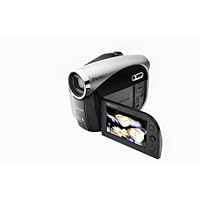
 I got the Samsung DigitalCam SC-DX103 from retail for $277 (without tax) to record my brother play the piano @ the Manchester Music School. There was a $680 Sony HandyCam with the Dolby 5.1 surround sound and really high quality video recording, but I didn't want to pay $400 extra & I doubted if the sound quality (my DigitalCam has Dolby Stereo sound) would be significantly better on the Sony Handycam because most of the costs would go to the video quality & not audio. So, for my purpose of recording a concert, I thought that this should suffice.
It did there was a bit of booming in the sound quality when I recorded myself playing piano but it wouldn't matter. At first, I thought that the camcorder might actually be terrible buy because after I made several test tries I played the videos from the camcorder & the sound was awful. Actually, the camcorder's speakers are mediocre & they sound terrible when they play the piano recording, but the actual recording's audio is not bad --> if you play the recording from a computer or a tv it should be fine.
The video quality was okay. In fact, the camcorder's software would make the recording really crisp & clear, but the only thing that made the whole thing "ok" was the smaller resolution of the recording--> doesn't look necessarily crisp on a tv. the video was fine in all circumstances except in really dark environments. then everything would turn unpleasantly gray. there's a c. nite function which i haven't used but i looked up & i think it's a special mode for dark situations.
the lcd has backlight function which, according to wikipedia, increases readability in low light conditions.
it also has wind cut function if you want to cancel out of noises caused by heavy winds.
its zoom is 34x optical & up to 1200 x digital. i tried the optical zoom @ 34 x, but i realized that my hand shaked too much (i.e. heartbeat) --> made me wonder if the 34x was just a hype & it was actually completely useless. then in the menu i found the anti-shake function that did reduce the shaking significantly (but there still was some shaking) at maximum zoom. the shake is almost unnoticeable in normal zoom.
something that amused me was the digital effect function. it has different modes including black & white, negative, art, emboss, mosaic, etc. the emboss & mosaic modes were really artistic & interesting the camera shows a modified version of my recording (as i am recording) & it looks like some sort of art painting done by picasso.
if you compare this to a similarly priced camcorder lets say "Sony Handycam DCR-HC30" @ 279.99 (see CNET review),
the samsung camcorder has larger resolution 720 x 480 @ widescreen (vs. 640 x 480), the same low light mode & image stabilization, better video format (mpeg-2 for dvd rather than mpeg-1 for vcd)
the sony contestant has a touchscreen lcd display that samsung camcorder doesn't but CNET says the response on the sony's touchscreen is terrible & I really like the feel & the response of the small joystick on samsung's display, so I'd think that the touchscreen on the sony handycam is a waste of money & samsung made a smart decision in putting a regular display with joystick control while putting that extra money into video quality
both have easy mode (enlarge menus, etc.), the sony lacks the 34x optical zoom (it has 10x)
both weigh .9 Ibs.
so in fact, after writing this review & doing all the research, i actually feel even better with my purchase. i give 4/5 stars (sony would get 3/5 stars)
ah, forgot to mention that if you use smart card for this camcorder, you can take pictures --> you can use it as a camera too.

Buy Samsung SC-DX103 DVD Camcorder Now
I made a HUGE mistake buying this camcorder. Let me preface by saying I did not get it at Amazon, but a "box" store, and could not return it, even though it was only 32 days old. The two year warranty was only for AFTER the manufactures warranty, and Samsung only warranties for defect and repair, they will NOT replace or refund anything.That said. The worst part of this Cam. was the loss of video for not using the "specific" mini-dvd-rw's the manual recommends. You can NOT use just any brand of mini-DVD in this camera, or you could cause 'data loss, and the disk could become jammed in the disk slot. All of this information was "conviently" located in the manual in fine print under the 5th bullet of DVD Disk types / functions, nothing on the box suggests these potential problems. IF you buy this camera only use TDK, MKM, or Verbatim disks specifically for Video cameras. If you don't....
Our first use of this camcorder was a two week trip to New York and Canada's Niagra Falls. This is a once in a lifetime trip for my husband and I and we purchased this camcorder specifically for this trip. Initally, it was excellent. The video quality was what we expected for the $$ we spent, and it was very easy to use. After recording approx. 10-15 min. the cam. gave us a black screen of death and said disk error. Fine, as we brought two diff. types of DVD-RW's two diff. brands sold by the same store we bought the camera in...and were told it would work with our camera. Each and every DVD ended up having disk errors and by the time we got home and were able to check what was recorded PRIOR to the errors, realized that NOTHING was there. The disk errors remained and we LOST our entire trip...mind you, this was 10 disks worth of filming our trip. All due to disk error.
The Second WORST feature...you cannot upload your DVD's from the camcorder to your computer for editing. YOU can only edit from the camcorder itself and any transfer of data is for viewing only. You can't use DVD's of any type to upload for Facebook, U-Tube or any other computer program. Instead, you have to buy the SD card, which is optional and a paultry max of 2gb!! (Equates to very small amounts of video). In this case you can only use what has been recorded to the SD card and cannot transfer between the DVD and SD card. THIS was completely unacceptable to me, even for a $200 camcorder!
Moral of the Story: Store would not take it back. Samsung won't refund, replace, or otherwise. We are stuck with a camcorder we HATE, and out $200, plus another $400, getting the one we should have gotten in the first place!!!! UGH... Buyer beware!
Read Best Reviews of Samsung SC-DX103 DVD Camcorder Here
I got this primarily as a throw-away car cam, throw away in the sense that if (or when) it dies I'm not going to be bothered by its demise. The main selling point on this camera to me was that it records video to SD and that it was only $149 at a local price club new. Since then I've seen it as low as $99 new on a common online auction site, still a fair price for what it does.Just for the heck of it I tried to record to some miniDVD disks I was given, but it wouldn't recognize them. I didn't bother to try figuring out if it was an issue of compatibility or the camera being defective since the little disks only hold (a pointlessly short) 30 minutes anyway compared to the 2+ hours of video on 2GB SD cards. This camera doesn't work with SDHC so 2GB is the biggest that can be used. However, those can be found all day for less than $10 shipped.
All following comments relate to using the SD card only for recording.
Video and sound quality are fair. Controls are simply arranged and easy to reach. Start up time from first power switch activation to the RECORD button being recognized is a longish 9 seconds, in part due to the fact that the disk drive does seeks looking for a disk even when there's not one in the camera. No disk is required to record to SD. Under XP Pro, Windows Media Player with a generic downloaded codec pack reads the files from the SD card without issues.
I have not tried to edit any videos yet. There is no headphone jack and the built-in speaker is fairly mediocre, so you'll need a separate monitor for playback if you're wanting decent sound. Batteries are inexpensive and plentiful; battery life recording to SD seems fair. The SD card inserts in the bottom of the camera next to the threaded mount hole, requiring the camera to be dismounted in order to change cards.
The camera does have a built-in lens cap, that's a definite plus in my book. This camera uses a standard type of camcorder strap that goes over the back of the hand, but the strap and pad is very narrow compared to most other cameras I've used. The result is that when sliding my hand into the strap the pad and strap tend to roll and twist; It takes some effort to get your hand into the strap properly even after some practice. I will probably modify this camera to accept the strap from my old Cannon.
Would I buy this camera again? Only at this price or less. It's only a bit more expensive than the novelty flash video cameras and has a whole lot more features. It has proven to be quite suitable for in-car mounted use, especially since SD is impervious to vibration.
02.04.11 Edit: Battery is dead, new one on order for ten bucks free shipping as soon as I can find fifteen bucks worth of eligible items to buy with it. :) Also, I added an aftermarket wide angle lense to it to get a wider FOV. The existing FOV is too narrow to get much more than the windshield width with the camera mounted just by my right shoulder.
Want Samsung SC-DX103 DVD Camcorder Discount?
In a nutshell, this camcorder is inconsistent when recording to DVD. Fairly often, the screen will flash "disk error" and all of your prescious memories will be trapped on the disk, never to be seen by anyone. In other words, the camcorder will write bad data to the disk, making it unreadable. Unfortunately, once this happens, it cannot be corrected. Also, the battery life is no more than 10 minutes.Save yourself some money and much dissapointment. Do not buy this camcorder (or anything Samsung). We've had one of thier digital cameras malfunction on us, too.
Save $0.01 Off

No comments:
Post a Comment