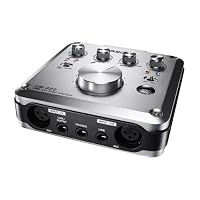
- High-Quality HDDA (High Definition Discrete Architecture) Mic Pre-amps
- Up to 24bit/96kHz Recording Supported
- Two XLR/TRS (MIC/LINE) Inputs with Full +48V Phantom Power Supply
- On-Board Digital Mixer and Digital Effects
- 2 Balanced TRS Analog Outputs and 2 RCA Analog Unbalanced Outputs

What I meant by a compromise is that even with interfaces that cost 3 to 5 times this price most of them have either good mic pres, and weak clocks, or vice versa, and some work with Windows but not so well with MAC and once again vice versa, etc. I researched interfaces for a long, long time, and considering non-crash reliability and a dozen other factors I finally sprung for an RME Fireface UFX USB 2.0 or Firewire High Performance audio interface 30 in, 30 out. Now that's an interface. I have been running it with Pro Tools 9 since 2011. Pro Tools 10Professional audio recording and music creation software is out and Pro Tools 11 is now being released.
So if you are looking for an inexpensive interface expect some compromises in one area or another. Rather than slam it out with performance specs under a microscope, I would rather provide a review helping those who are interested in setting up this Tascam US-322 or 366 so you can save a lot of time trying to figure it out. Sometimes a little help makes a huge difference in the amount of time saved. So what I did was load, and register the free and included Cubase LE6 complete with activation and eLicense registration and installation as well as installing the Tascam driver, and doing updates for both. I know a lot of the reviews here just downloaded a driver and used their existing DAW in order to test out the interface, and therefore they didn't need to spend much time with it. I don't blame them; the shortest distance between two points is a straight line. So get out a cup of coffee because installing this complete package doesn't happen in just one hour. So here goes...
If you have Windows Vista you are probably out of luck because the system requirements list Windows XP, 7, and 8. I am sure the omission of Vista is not a mistake. I know my Logitech AudioHub Notebook Speakers are non-functional in my Vista laptop if you are running Windows Media Center in it as well. It works in Win 7 just fine. So I installed it in my desktop running Windows 7 64 bit and it gives you the option of installing in 32 or 64. In addition to Cubase LE 6 it also installed AI Elements 6 as well as Agent One Content, Groove Agent One, Vintage Beat Boxes, Steinberg Drum Loop Expansion 01 which took a good amount of time to load, as well as Steinberg Halion Sonic SE 64 bit for AI Elements. I then had to activate and register Cubase LE6 which involves installing the latest eLcc, creating a Steinberg account (which is free and they don't ask you for a credit card). They provide you with an activation code after you register.
I have an iLok for Pro Tools which is a USB device that enables you to run the program. Cubase does not require that you have one, although they have an equivalent looking device, but fortunately they have a software based equivalent. They do this with an eLicense which you will then update to version 6.5.4.1122. There is an eLicense control setup and you have a Soft eLicenser number that you will use in order to generate the Activation Code generated at the Steinberg site. What came on my disc was version 6.05 which they instruct you to immediately do an update, which I did to version 6.07.
So we install the Tascam interface next which comes on a separate DVD. Included with the interface is a 5 foot USB printer style cable. You will need to install the driver disc before connecting it to your computer. Windows 7 recognizes it but fails to automatically load a driver. So install the driver off of the disc first, and then do the update. It took at least 15 minutes to do that update. What flashed on the screen was 154 megabytes and then all you see is an install screen with a scrolling series of round objects moving. At first it says, "This is going to take a long time", and they were exactly right. It almost tempts you to think something is wrong, because nothing is happening other than the scrolling, and then finally after ten minutes or so a dialogue box comes up and says, "Do you want to install?" and you click continue, and then it comes up again in another minute, and this happens a few times, and then finally it changes over to an installation finished box. (I have Verizon FIOS and usually download huge amount of data in a flash). Then you reboot.
Now this is important. Plug the US-322 directly into an available USB 2.0 port and not into a hub, even if it is a powered hub. It simply won't work. I tried it and the light wouldn't even come on indicating USB. When I went direct the interface lit up and it worked. The manuals also warn you not to use it with USB 1.1. The US-322 comes with a printed Quick Start Guide. There is also an owner's manual for both the Interface, and Cubase that are available either on the DVD, or by Googling the same and they come up as a PDF download. If you are new to setting up interfaces be prepared to do a good deal of reading. There is a driver to choose, input and output settings, as well as going into Windows Control Panel/Sound in order to choose the interface for playback, and recording. If you're new to these kinds of setups just take your time, and don't be dismayed if something doesn't work. All it takes is for one button to get pushed and Wahlah you have sound. For example in Cubase there is a monitoring button without it you won't get any sound from the headphones. If all else fails you can go to the Tascam web site by Googling Tascam US-322 and then click on the support tab, and they have a "you pay for it" phone call number in order to help you. Hope this helps.
PS: The real killer deal right now is Avid Pro Tools 9 bundle with the MBox Mini which is another limited interface but you are getting Pro Tools 9. Plus purchases of this bundle made after 10/2011 that has pro tools 9 will be able to have a free upgrade to pro tools 10 if you register your product with Avid. Considering what Pro Tools goes for by itself, and what the MBox sells for individually, and the bundle even comes with the iLok you can sell it used for what you are paying for it, and even more than you are paying for it if you take advantage of the discounts I have seen pop up as much as 20% off the already low price. Then you have Pro Tools 9, and 10 full blown versions, none of this LE stuff, and an interface, and can grow from there. This Tascam interface works great with Pro Tools. These Pro Tools 9 bundles are discounted to make way for 11, and I am seeing music stores running out of them. They are clearing the shelves preparing for 11, but it has bugs. I rarely purchase totally new versions until they have time to season some, and get feedback from users. After some time, and more updates, I will be browsing the shelves for discounts on the upgrade to 11; maybe in another year. PT 9 is all I need.
Buy TASCAM US-322 2-In/2-Out USB Audio Interface Now
I've used a friend's TASCAM US-144mkII to record electric guitar and vocals for some time and found it quite good. Almost zero noise on the guitar, when played over Guitar Rig, and good latency. A little too flat compared to my M-AUDIO Delta 1010lt.I recently moved from a desktop to a laptop so I needed a USB interface, as my Delta was PCI only. I was going for the US-144mkII but ended up buying this one (US-322), since it was newer and had higher sample rate support. In the end it does the job, but gave me an inferior experience to the US-144mkII.
Here's my take on it, compared to the US-144mkII:
Pros
* The controls feel better than the US-144mkII's, but that's about all.
* Higher recording sample rate makes a difference on some VSTs.
* Onboard effects like reverb/compression/etc (pretty pointless actually since any software these days has these fx with much better quality).
Same
* I didn't AB test, but from memory sound quality is about the same. The supposedly better preamps didn't make a difference on my cheap AT2020 condenser, and the DAC sounds the same.
Cons
* Drivers still suck. If I set latency to minimum, which is a requirement to record guitars on Guitar Rig unless all you play is reggae, windows 7 will BSOD in a matter of minutes.
* Circuitry seems worse than on the US-144mkII, I get more noise on the US-322 with the same guitar and the same computer. Could be the drivers also, who knows.
* No midi input.
* No official TASCAM support forums, so it's very hard to researching what kind of problems to expect from the product before buying it and what kind of response to expect from TASCAM.
I would only recommend the US-322 if either you don't require low latency recording at all or it's a temporary solution for you.
Read Best Reviews of TASCAM US-322 2-In/2-Out USB Audio Interface Here
For the person who wants to do a little recording a home without too much invested in equipment, this is a great solution. In addition to this box, here's what you need:A decent laptop or computer with a USB input.
A microphone for vocal recording (This accepts both 1/4 in jack and XLR mic cables)
1/4 cables for your music equipment (guitar of keyboard).
Headphones for monitoring, or an external monitor speaker.
I used this for recording some spoken vocals, and also recorded a piano track from my digital keyboard to my laptop and then burned a CD. My son used it to hook up his record player to his laptop to transfer some old audio tracks to CD.
This puts out a nice clean sound, and the controls are easy to figure out. The unit itself is about the size of a big sandwich, or a stack of CDs, so it's easy to take along. And instead of having a heap of controls on the unit, it has a mixer panel button to press, and a virtual mixer board will pop up on your computer screen.
I played around with the mixer, but couldn't get the effects to send to my recording software. I could hear the effects in the Tascam monitor, but the recording didn't have the effects. I'll have to play with some adjustments to see what I am missing. There is very little information included, so users have to figure it out without a manual.
Also, the Cubase software that was included isn't great. First, the box didn't indicate what "Cubase" was. It said it was included, but I couldn't figure out if it was software until I popped the DVD in to upload it. I couldn't get it to make a recording with Cubase, but the Tascam works great with my MAGIX Music Maker 2013 [Download] that I bought on Amazon a while back for use with an Alesis MultiMix 4 USB Four-Channel USB Mixer that I also purchased on Amazon. The Tascam unit produces a nice balanced sound without any audio hot spots where the record level is too high.
The Tascam is powered by USB, unlike some that require a separate power cord. My 4 year old laptop provided enough USB power to run it just fine.
One thing to note, is that depending on how your system is set up, you many not hear audio through your computer speakers when playing back your recordings. On mine, when the unit is plugged in, I can hear the audio by plugging my headphones into the Tascam monitor output. Once you disconnect the unit, your sound card will take over and you'll hear your tracks through the computer speakers again.
Technically, you could use the multiple inputs and the mixer tracks to record several instruments at once. However, I prefer to record each instrument on a separate track on my recording software and then mix them later. In fact, my MAGIX software has so many editing options that I can do after the recording that I prefer to do it that way anyway.
I would give this 5 stars if it came with software that was more user-friendly. Since the software doesn't add to the benefit, I would say this performs equal to the Alesis unit that I already own. Price point wise, the Tascam is a little spendy if you don't get anything more than you have with the Alesis.
Want TASCAM US-322 2-In/2-Out USB Audio Interface Discount?
I speak at conferences and events and like to record my presentations sometimes. When I am not able to record the video, I at least like to capture the audio and sync it to the slides using Keynote. I bought the TASCAM US-322 USB Audio Interface so I could connect my wireless lav mic system to my computer to record the audio.I have tried numerous ways to connect the lav mic, which is a traditional wireless RF system, with no luck. I first tried a simple adapter to plug the mic output directly into the computer, but I quickly learned that wouldn't work. After several google searches I was self-educated on the difference between "line level" and "mic level" volumes.
Suffice to say, I needed some kind of interface between my microphones and computer. In came the TASCAM USB interface. It's the bridge between my traditional microphones and my mac.
I really like that I can be speaking on a panel with multiple people, and record several different inputs straight to my presentation on my computer. At the same time, I think I can record each track to an external recorder like my Zoom H4n. I haven't tried that yet but will do that next time I have a speaking engagement and update the review.
Overall I'm probably on the lower end of the users of this device, but it works really well for my needs. I highly recommend it.
Save 41% Off
I love Tascam gear, and have used it for nearly 30 years. I was excited to try out this interface and see what it could do. Unfortunately, I was disappointed.While the construction and mechanical function of the device itself were good, the actual function with the computer left much to be desired. Also, the complete lack of a manual with the one I got made it very difficult understand the functions. (Sorry, but with a device this expensive and which includes 2 CDs of software, how hard would it be to include a full manual on the install CD?)
There was a very small quick start guide included, which basically just named the various switches, inputs, and outputs, and gave extremely sparse directions about using the software mixer screen. I was forced into trial and error to see if I could get a serious recording in anything remotely resembling a multi-track mode. I could not. I could record and layer multiple tracks (I was using Audacity, didn't want to install Cubase), but I could not get playback from the previous tracks while I also had live input. Now this could have been my computer of Audacity, as it is an older Win XP machine, but it played back multiple tracks without problem.
There was nothing in the mini-quickstart guide to address this, or even hint where one should look, other than going to Tascam's web site. I'm sorry, but that is just not good enough with a device this expensive. There should be a complete manual, at least in pdf, included with the product. If I am going to use this to do serious recording, the last thing I want to do is waste huge amounts of time digging information out of a website, or worse, from "user community" threads in some blog.
Which brings me to another minor complaint no Linux drivers included. I use mostly Linux, with only one Windows machine for software which I can't get on Linux. I wanted to try the software under Wine on Linux but was under time constraints.
Then there are the generic problems with software interfaces replacing hardware. With a hardware mixer, I can access as many controls as my fingers can handle (3 or 4 on some mixers) at the same time. Computerized mixers can only do 1 thing at a time, and one must be constantly moving the cursor from one thing to another to access controls. The controls on this interface were very fussy, and you have to position the cursor just exactly on a very small portion of a button to get it to react. I found it very tedious, and again, no actual instructions were included to help with that process. With a touch screen, it might be easier, but then why not just use buttons on a real mixer in that case? (Yeah, I know, touch screens are COOL.)
Also, software based functions are always limited by your computer and OS, and that means everyone can have a different experience consistency is much harder to maintain.
I am old school, and find hardware mixers far more responsive and useful. I know that lots of people are all excited about having software versions of hardware in their computers, and saving space, etc., etc. I value function over fashion, however, and that is what I have always liked about Tascam gear: it was supremely functional. This software falls far short of what I expect from Tascam, and the lack of a manual for the interface is inexcusable.
Good mixers, especially for multi-track recording, can be complex and difficult to learn. The layers of signal interconnection can be hard to understand at first, and takes some time to get comfortable with. Old Tascam manuals actually used to have a certain amount of instruction in multi-track recording, which was helpful to aspiring recording artists. Not so here.
I had really hoped to give this 3 or 4 stars, but sadly, it only rates a 2 (2.5 if I could) for me. Come on, Tascam, you can do better than this.
No comments:
Post a Comment