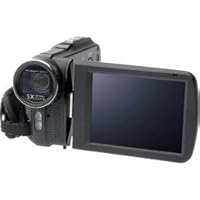
 When I was a kid, the closest thing to a camcorder that was available were movie cameras that used either 8mm or 16mm movie film. Some had no sound recording capabilities for home use, and some did. Our family had a Bell & Howell 16mm camera, projector, and take-down movie screen on a tripod stand. The camera and projector were very good quality and a top selling brand at that time. This year's offering from Bell & Howell, the DV5HDZ Touch Screen Full HD Digital Camcorder follows in the footsteps of its ancestors for quality and features. Obviously, digital video is more complex than 16mm film, with the advantage that the user doesn't have to send anything to a lab for processing.
The Bell & Howell DV5HDZ Touch Screen Full HD 1080p Digital Camcorder has a 5x optical zoom with 4x digital zoom enhancement for up to 20x zoom range. I received the camcorder ahead of the estimated delivery dates and immediately opened it and read through both the hard copy of the User Guide and the PDF version. The PDF version is more detailed.
When I had set the time and date, tweaked the settings, and was confident enough, I tried out the camcorder, holding it in my hands rather than mounting it to a tripod. I panned around the room, zooming in and out on various objects, narrating as I recorded to check the sensitivity and quality of the mic and sound recording.
I first shot some footage using the "Florescent" white balance setting at Full HD (FHD) (1920 X1080, 16:9) resolution. The results were very good, with very good color, excellent resolution, even in the shadows, where the light was low, and excellent sound quality. On my 50" HD plasma TV, the images were in sharp focus, overall picture quality was very good, and the video played flawlessly. I discovered, however that my computer, with it's single core 2.53 GHz Pentium 4 processor and slower bus speed could not play back the video in Windows Media Player or InterVideo WinDVD without stuttering and freezing the picture mid-stream, even with the nVidia GeForce video card's GPU. The ArcSoft TotalMedia Theatre media player that came with the camcorder played the FHD video just fine until I went to full screen. Then it couldn't keep up. Again, the problem was my old, slow motherboard and not the recording or media player's fault.
Next, I shot footage using the "Auto" white balance setting at FHD. This time, the color and overall picture quality was better than before, and again it looked very good on the TV screen. However, I still had problems with the video stuttering and freezing when playing the video on my computer except when using the ArcSoft TotalMedia Theatre.
Next, I lowered the resolution to 1280 x 720 pixels, 16:9 screen ratio (HD), leaving the white balance on "Auto", and shot some footage. The color and picture quality were excellent, and the video played without a hitch on both the TV and computer. This time my computer had no problems playing back the video in normal and full-screen mode using WinDVD, Windows Media Player, and ArcSoft's TotalMedia Theatre.
The DV5HDZ camcorder's White Balance settings are Auto, Daylight, Cloudy, Fluorescent, and Tungsten (incandescent). It's resolution settings are FHD (1920 x 1080, HD (1280 x 720), WVGA (848 x 480) and WEB (320 x 240). Videos can also be shot in normal color, black & white, or sepia. For very low light conditions, there is an LED light underneath the lens, right beside the self-timer. The mic is built inside the pivoting touch screen, with a speaker on the camera's body underneath the touch screen.
Other features are too numerous to mention here, and the ArcSoft TotalMedia Extreme software that is provided with the camcorder offers further flexibility.
The Bell & Howell Touch Screen FHD 1080p Digital Video Camcorder has some built-in video memory, but also has a regular size SD slot and a micro SD slot beside the battery compartment, underneath the battery compartment cover.
The camcorder comes with a carrying pouch; Quick Guide; an HDMI cable for playing directly from the camera to the TV or for using the TV as a monitor while recording; a USB cable for transferring video from the camera and SD cards to a computer; a video cable with standard red, white and yellow phono plugs; a Lithium battery; a power adapter/charger for recharging the lithium battery; and a software CD containing ArcSoft TotalMedia Extreme, a PDF reader, and a User Manual in PDF format. SD cards must be purchased separately.
For the money, I'm happy with the Bell & Howell DV5HDC Touch Screen Full HD Digital Video Camcorder. I gave it a 5-star rating, because it does everything I need it to do at a reasonable price.


No comments:
Post a Comment