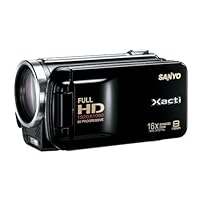
 If money is no object and optical image stabilization is your primary concern, then I recommend you buy the Canon HFS10 or HFS100. Now, with that out of the way, you have to temper your expectations with what you paid for. This camera is at least $600 less than the HFS100 for basically the same image quality minus image stabilization. You will see that I compare this with the Canon a lot because Canon has been king of the camcorder scene for a few years now.
Pros:
The image quality is almost as good and even better than the Canon in some aspects (based on online reviews as I don't own the Canon). The low light sensitivity is excellent (there is an option to turn up the sensitivity level). The thing we need to keep in mind is this: camcorders are best when used in areas with plenty of light. There is really no reason to film at night unless you absolutely need to. For the times when you want to film the night light or night scenery, this camcorder does its job very well. When hooked up to my 1080p television, the video was spectacular. I can't imagine how much better the Canon would be but I'm very satisfied with this. I know that it's impossible for the Canon to be twice as good as this camcorder for twice the price, at least for me.
It is small! I can definitely take this with me on vacation every where I go and not tire out my arms. It's much smaller than I expected, almost like a toy. Having used 5-pound camcorders in the past, this is definitely a good thing.
I can now leave my point and shoot camera at home as this substitutes as a regular still camera, hence the dual camera moniker. It takes 8 meg stills (don't use the 12 meg option as that's interpolated) which is impressive for a camcorder this size/price. There are ISO adjustments which I believe is lacking in the Canon.
Cons:
Image stabilization. If you like to film videos without tripods, monopods then I suggest you stay away from this. However, for under $500, I was able to buy this camcorder and a tripod, 16GB SDHC, and a camcorder bag. No optical stabilization can match a tripod/monopod. If you're serious about creating timeless videos that you can view 20 years from now, you need a tripod. Period.
Yes, it would be nice if the image stabilizer was better for the times when I don't have a tripod with me. However, it's serviceable if I hold the camera very steady so it's not as bad as some people would lead you to believe. I don't plan on filming while walking very often so it's perfectly fine. If you have a shaky hand problem and hate tripods/monopods then stay clear.
You can mitigate shaking with (1) a tripod, (2) steady hands, or (3) deshaker software (free online). You cannot mitigate $600 or low light sensitivity. No matter what camcorder you buy, you will need a tripod eventually if you're serious about taking good videos. So budget that into your purchase plan.
Normally, I would deduct one star for the bad image stabilization, but for a camcorder with superb image quality, low light sensitivity, and the fact that I can throw in a 16GB SDHC, tripod, and camera bag (all bought separately of course) for around $500, it's absurd to dock a star for it. This is the best camcorder for the money.

The test footage (starts around 2:07 in the video it was shot hand held) has been HEAVILY compressed and resized from 1920x1080! But hopefully, you can still get a general idea, especially the zoom capability. (the open boxing is obviously from a different camera)
This camera is really easy to use. I did not have to read the manual, it's really user-friendly, but it's nice that they include an actual manual book for you! (Funny how when I wish I could use a manual, some manufacturers only include it on a CD!) However I did later read it to understand more about a certain feature; the manual is just as easy to follow.
What I love most about this camera is the ability to set custom shortcuts to the 4 directional buttons on the camera. I love having greater control of the camera, so I set the shortcuts to quickly set manual focus (you can toggle between focuses), focus lock, exposure lock, and exposure compensation. This way, you can really have more quick controls of the camera than using the auto focus.
It's simple enough, but if you want it more basic/restricted, you can set it to simple mode (not something I would use or care). All you get then is:
video: select between HD and web quality
focus: automatic and macro
flash mode: auto, forced, off
For video options, you can choose from:
* Full-HR 1920x1080 (60 FPS HR) you better have one powerful computer if you want to edit these files. But for simple cut/join edits, you can do that through the camera of course.
* Full-HD 1920x1080 (60 field/s) same reasons with above
* Full-SHQ 1920x1080 (30 FPS SHQ) recommended
* HD-SHQ 1280x720 (30 FPS SHQ)
* TV-SHQ 640x480 (30 FPS SHQ)
* Web-SHR 448x336 (240 FPS SHR) limited to 10 second-recordings
* Web-UHR 192x108 (600 FPS UHR) limited to 10 second-recordings
* Voice Memo
For Photos:
* 12m 4000x3000
* 8m-H 3264x2448
* 8m-S 3264x2448
* 6m 3264x1840 (16:9)
* 2m 1920x1080 (16:9)
* 2m 1600x1200
* 0.9m 1280x720 (16:9)
* 0.3m 640x480
* 8m 3264x2448
* 4m 2288x1712
Focal = 5.95-59.5mm 1:2.0-2.8
Filter size: 37mm (this is the size that you need if you want to attach a wider lens)
Some pet peeve:
In the menu, it shows at the bottom in this order:
(MENU) EXIT (SET) OK
but on the actual buttons, the Set button is on the left and the menu button is on the right, so I think that's how they should display it on the menu as well.
I wish the SD card door would just be a slide open mechanism instead or just not have it at all for quick removable. Somewhat annoying to have to open the LCD, which also happens to turn on the camera, just to remove the memory card.
Even though Sanyo is a Japanese company, ironically, there's no Japanese in the Language Option.
I also have the TH-1 (720p) model, which is QUITE disappointing compared to this camera, but this one is definitely worth shooting with besides the obvious higher resolution; it performs much better in low lighting (quality is no comparison). On the TH-1, it's REALLY horrible when you shoot in low lighting. Low lighting is where most HD cameras hurt in quality; it's definitely not the best, but it's not the worst either when it comes to shooting in low light with this camera.
The TH-1 model does not warn about not having an SD card inserted (because it has 43MB internal memory so it will show an internal memory icon), but this camera (FH-1) will constantly nag you about it because it has no internal memory. I noticed there are two extra options with this camera versus the TH-1: Photo Wide-D (compromises both dark and bright areas) and Photo Stabilizer
I don't know if I received a broken remote, but the ON/OFF button did absolutely NOTHING. And yes, I've tried holding it for several seconds and from different directions. However, every other button seemed to work.
Unless you hit record, the actual image on the screen is actually not the full sharpness quality; I believe they do this to prolong battery life when you're still setting up your shot. So it's better if you don't always rely on what you're looking at until you hit record.
If you hold the MENU button while in playback mode, it will get rid of the display text on the screen and just show a seekbar of the video.
If you press the SET button while you're setting up your shot, it will get rid of all the display text info on the viewing screen; however, there isn't seem to be a way to get rid of all the info text display once you hit record.
Pros:
1080p excellent video quality. It's HD!
I love the 4 button custom shortcuts!
Compact! (smaller than a soda can) yet has a large 3" LCD screen and amazing what it can produce despite its size
Impressive 16x zoom!
Image stabilizer (not bad... I can see it functioning, although it's not optical for greater stability)
Excellent battery life (it's also nice that it displays the actual approx battery life time left instead of just a generic bar)
Comes with standard composite(yellow; red/white)+S-video AND component (RGB HD)
Comes with a small remote
It takes photos (definitely usable unlike the photo feature with the TH-1, which was horrible)
Files play smoothly on PS3! (take SD card out of the camera and use a card reader to it)
Cut/Join videos within the camera
Transfer directly to hard drive without a computer with the camera.
You can create new folders within the camera and set where you want the recording to go to.
Can fast forward up to 15x and can display 21 video thumbnails (by pressing the zoom out button; default shows 8 thumbnails) that you recorded on the screen
Can take snapshots frame by frame of recorded video
Cons:
Not Touch Screen (then again, the 4-direction button control makes it very quick to do everything)
No automatic lens cover
No built-in memory
No external mic
I wish it would have an option to keep recording even if you close the LCD (it ends up stopping the recording because it automatically goes to standby mode)
Preset manual focus distances (but at least they have auto focus lock)
Can't manual focus once you hit record. (however, you can still focus lock/unlock)
Tripod stand hole is not centered! (Why do they have to do this?!)
The set button has somewhat of a cheap feel
Overall, I give this camera a SOLID 4 star rating. (And I am a pretty harsh rater and rarely give 5 stars) I am happy with the quality and the quick access to the manual controls. The price is just right too. I hope they will make a waterproof version of this (I know they have it for 720p). Definitely would recommend. Avoid the TH-1 model (even if you're on a budget).
Buy Sanyo VPC-FH1 HD 1080p Flash Memory Camcorder w/ 16x advance zoom (Black) Now
This is my fourth HD camcorder... I own a higher-end Sony (HVR-A1U), a Canon HV10, and formerly a Hitachi BD70A Blu-Ray model. I have been "doing video" since the 80s.First of all... do keep the price in mind. This Sanyo VPC-FD1 was never intended to be confused for a professional model. Neither are the $1300-$1500 units from Canon (S10/S100/S11) or Panasonic (TM300). However, they are all symptomatic of the reality that the line between "pro" and "consumer" is blurring, at least with regard to picture quality.
The quality of this camera's HD image is quite good. It holds up well in low light... much better than any other consumer model I have used myself. It's also very good at capturing fast motion, which has until recently been a big problem for AVC based models, rather than DV or MPEG-2. It's not without some artifacting, but quite a bit better than earlier models, in my experience.
Some places claim the lens is 16x... it's really a 10x zoom lens, optically speaking. The 16x comes, as with many consumer camcorders, from "digital zoom"... that's when the software just uses a small bit of the whole sensor. They claim to be doing this intelligently... could be. In normal use, there's an 8Mpixel sensor here being cropped to about 6Mpixel... that's three times the pixels you need to create a 1080p image. That's also useful... you get better color and better light sensitivity, but if you cut out 2/3 of these, you'll still have decent HD video. More than that, and you'll get noticable pixelization. Which you do see in the viewfinder using digital zoom, but I have yet to look at it in finished video. Just something to be aware of.
The Great Big Feature of this model is 1080/60p video... you have to go to a pretty high-end professional model to get this anywhere other than in the VPC-FD1 or VPC-HD2000. Pros would like a higher bitrate than 24Mb/s (it's actually variable bitrate, peaking around 28-29Mb/s so far as I've seen), but it's not bad... the software clearly knows how to avoid macroblock distortion by adding a bit of low-pass filtering (slight blurring when necessary... don't worry, it does improve the video quality... compression mastering engineers do the same thing on DVDs to ensure that high speed video looks a good as it can on DVDs).
There are some caveats. One is the whole flash meets video meets FAT32 thing... like other current flash-based camcorders, this one uses the FAT32 file system. That offers big storage on 16GB and 32GB flash cards, but the maximum file size is 4GB. This means that, after about 21-something-minutes at 1080/60p, the camcorder needs to close one file and open another. That wouldn't be bad, only that the Sanyo doesn't pipeline this, so there's a delay of a few seconds between the end of one file and the start of another. Sure, it's better by far than changing 8cm DVDs every 20 minutes on a DVD camcorder, but it's an issue. They could fix this in firmware... they ought to. You get more time in a 4GB file as you drop to lower video modes (1080/60i, 1080/30p, 720/30p).
I have shot a number of High School soccer games with this in 1080/60p, and I get great results. Last year, I used my Sony in 1080/60i mode; this is overall better video. For one, I can downconvert to web video without interlacing artifacts. I can decide, after I shoot the video, if I want to make a 1080/60i, 1080/30p, 1080/24p, or 720/60p Blu-Ray disc, assuming I target Blu-Ray for delivery. That's pretty nice.
The other big issue is edit. Know this now: your PC is probably going to struggle just to play back 1080/60p at full frame rate. Neither Windows Media Player nor VLC had a prayer of playing this back on my Q9550-based desktop (that's 2.83GHz, quad core, 4GB fast DRAM, etc) on a 1200p monitor. Splash Lite did play it back, but used 65-75% of CPU power... that's all four CPUs. Using Nero Showtime with GPU acceleration enabled, I was able to play this video back with under 50% CPU on my desktop, and just about 100% CPU on my laptop (both using nVidia 8600 GPUs).
So when it comes to editing, you're in trouble. I don't know of a video editor yet that uses either multithreaded rendering or GPU acceleration during editing (most use the former for rending a final video... at least one also uses GPU acceleration). I opted to buy CineForm NeoVision for this. CineForm is an "intermediate CODEC"... you convert from your shooting format to CineForm for editing, then render to MPEG-2 or AVC or whatever you want for delivery. In theory, this means a loss of quality, in practice, nothing you can see. In fact, CineForm interpolates the 4:2:0 color of AVC to 4:2:2, so if you're doing lots of compositing and effects, the quality could actually improve. You need a ton of space for CineForm.. it runs over 100GB per hour of 1080/60p video.
The video format is MPEG-4 AVC in an MPEG-4 transport stream wrapper (.MP4). This is similar to, but not the same thing as, AVCHD, which is MPEG-4 AVC in an MPEG-2 transport stream wrapper. AVCHD is a full consumer standard, MP4 isn't, really. However, Sanyo's choices here should work with most software.. they're using MPEG-4 AVC at Level 4.2, and AAC audio, which is the usual MPEG-4 compressed audio format (AVCHD uses AC-3, formerly known as Dolby Digital, which is one of the Blu-Ray and DVD standards... the AVCHD standard really comes from Blu-Ray). I believe Sanyo has been making MPEG-4 camcorders longer than most companies, so they do have their act together here, even if they're not following the current popular standard to the letter.
I have not used still photo mode. They claim it's as good as a typical P&S still camera (that's the "Dual Camera" thing). I used my HV10 as a still camera, for about 300 photos, on a backpacking trip, and would have liked something better... I would be surprised if the Sanyo didn't do better stills. But it's not usually that important to me.
The battery is inside the camera, so you can't really get a much larger one. But unlike many kits, the stock battery delivers 150-180 minutes, which is ok. Also good is the fact this battery has been used by both Sanyo and Kodak for awhile... they didn't feel compelled to have to create a brand new cell here. So you can find 3rd party cells, chargers, and all.
The lens takes a 37mm filter/accessory, which is fairly standard. I was able to fit a polarizer from my Canon and a wide-angle lens from an old Sony SD camcorder... all good. There's no automatic lens cap.. there's a real lens cap that stows in the cloth handle when not being used.. fine with me. Those mechanical shutters generally break.
The image stabilization on this is digital (like my Sony), not optical (like my Canon).. that means it's inherently not as good. Optical these days always wins. With that said, optical can get confused by vibrations, and it can break if you drop the camera (so can other things, but that's one of the first to go). I usually shoot video from a tripod or monopod anyway, so this wasn't a big deal for me.
If you're buying just one camcorder, and plan to use it for video and audio, you probably don't want the VPC-FH1 (you might consider the VPC-HD2000, which is much the same, only in Sanyo's pistol form). The reason is simple: the mics are built-in, no plug to add an external mic. Microphones built-in on camcorders are general bad. The FH1's aren't noticably better or worse than anyone else's, they're just typical built-in mics. Not very sensitive, no wind screen, and ... well, at least they won't pick up tape noise like similar mics on similarly small DV and HDV camcorders. I have a Rode mic for my Sony that cost nearly as much as the FH1... you can imagine it does a bit better on the audio than any built-in. But it you're using this as a "B" camera, or using a field recorder for audio, that's not such a concern. The mics are located just below the lens, which is a superior location... many small camcorders put them on top somewhere, where your fingers will undoubtedly antagonize them no-end.
Read Best Reviews of Sanyo VPC-FH1 HD 1080p Flash Memory Camcorder w/ 16x advance zoom (Black) Here
I was lucky enough to receive this on Thursday and able to use it over the Easter holiday. I made several test videos and pictures to check out all the features before using it on Easter get-togethers. I strongly recommend buying this a couple weeks before using it on big events so you can test out features and set it up to get expected results. It's a great point and shoot camera/camcorder as long as you know what you're doing. It's not much bigger than a computer mouse and fits easily in a clip case. It came with a component video, S. video, mini USB and mini USB adapter (for the hard drive). It did not include a mini HDMI cable.For the Easter recordings, I used it in the full HD mode 60fps with noise reduction on because it produced the best video on a true HD television when checking out the test files. The quality is extremely good. as good as and in many cases better than actual HD TV programs. A nice feature is being able to take still pictures from video by playing it back and pausing on the frame you want. The still pictures from the video files were very clear and plenty good for printing. The still photos were all done in the eight megapixel mode with excellent results. It was easy to switch between recording video and taking snapshots. I took a few snapshots while recording video and everything worked OK but the picture quality of the snapshot wasn't that much better than taking a frame snapshot from the video during playback.
I tried a few of the features but haven't had a chance to really analyze them in detail. The image stabilization feature has its limits shooting video. It does a good job when zoomed out, but you'll need a tripod when zooming in halfway or more. When zoomed in, it's hard to hold the camera steady enough for the stabilization feature to work. It is very important to hold the camera steady except if purposely panning. When the camera jerks, it causes the entire image to move which causes the MPEG-4 compression algorithm to create a whole new picture instead of just the small portion of actual action. This comes across as sort of a strobe effect on a large high definition TV.
The standby mode works great. When you're finished shooting, just close the display. When you're ready to record again, just open the display and it will be ready before you can remove the dust cover. The face chaser had a hard time locking in on more than two or three faces. This might be because nobody was standing still for a very long period of time. When it did lock in it seemed to be good at correcting. This will need more experimenting.
The display brightness was good and adjusts well between direct sunlight and indoors.
A useful feature is the ability to edit and merge video files right on the camera without the use of a computer. You can also connect the camera to a hard drive without a computer. The downside is that the drive has to be formatted to fat 32 and can't be over 1 TB. File transfer is very easy on any computer with a USB 2 connection.
Want Sanyo VPC-FH1 HD 1080p Flash Memory Camcorder w/ 16x advance zoom (Black) Discount?
I purchased the Sanyo VPC-FH1 for a trip to New Zealand and Australia.Everything worked to near-perfection. I made over 80 gig of HD recordings, which I now have to edit down to presentable programs.
Here's the setup I used:
I bought two 32gig SD cards (adata SDHC class 6) and two "unknown brand" replacement batteries. Have you heard of "Wasabi" batteries? I hadn't, but the batteries worked acceptably, in addition to the Sanyo battery that came with the camcorder. I also bought a stand-alone battery charger (I forget the model and brand). It came with an all voltage power supply.
I used a Manfrotto monopod (676b) and Manfrotto micro ball head (482). A thread adapter is needed to attach these two items together, but it can stay inside the ball head. This monopod assembly is very light weight and fits inside my overnight bag with the ball head removed. I recommend the "3 clamp" 676b monopod over the "4 clamp" model that collapses to a shorter length. The 676B is sturdier in use, even with the trifling weight of this ball head and camera.
I own a USB multiformat flash memory reader/writer that plugs into my Dell XPS 1330 laptop, so I never attached the camera directly to the laptop. I just removed the SD cards from the camera and plugged them into the reader. The laptop was light enough that I never regretted having it.
I never came close to filling up one of the SD cards in one day, even though I recorded at 1080p most of the time. I used a second battery frequently, which was no real inconvenience. I averaged about two and half hour's worth of video in a day or less.
I downloaded each day's video to my laptop via the card reader and put the other (empty) SD card into camcorder.
If needed, I could edit the files quickly with Nero 9 Ultimate (Nero Vision module). I used this program to create some quick edited 720p programs, plus some PAL DVDs of the recordings for my friends in New Zealand. I'll use it at home to make the final edited programs.
Sanyo VPC-FH1 Picture quality:
I can't say the image quality matches that of more expensive cameras (maybe yes, maybe no), but I strongly doubt any camera at this price is any better. Low motion scenes in good light look terrific. With more movement and lower light, the picture degrades, but never horribly. Strong backlighting would make the foreground subject a dark shape.
For perspective about quaity, I played the raw files on a large LCD panel, using Nero Showtime and the HDMI connection from my laptop. I was pleased. Anyone else that saw the videos thought the results were much, much better than any other camcorder videos they had previously seen. Everyone asked how much it cost. Most agreed that the circa $450 cost was more than fair. Most were more impressed by the small size, commenting that this camera was small enough for anyone to tote around and use.
Likes:
Very light
Small
Closing the LCD flap forces standby
Adequate low light performance
Easy to hold and use
Real button controls--After having used a "touch screen" Sony camcorder in the lo-rez past, I much prefer the real buttons and clean LCD of the Sanyo approach.
Dislikes:
Lens cap noise--the remove cap/attach cap process annoys some people, but it doesn't bother me. However, the cap makes distracting clicks and clacks against the monopod while hanging on its tether if you forget to stow it in "slot" in the back of the handstrap provided for this purpose.
Also, you have to attach the tether when first prepping the camera. This is relatively easy, but I see many people skipping this step and soon losing the lens cap. This would be very bad, as the lens is not well shielded from errant fingers.
Lens flare: Shooting anywhere near the sun causes obvious flares. I'm going to look for an after market lens shade to mitigate this problem. I presume this is no worse than other camcorders with fast, multielement lenes, but I can't be sure.
Card Read Failure: After about 22 days of use, the camera reported that one of my SD cards was unreadable and asked to format it. But when I pressed "yes" to the "format card?" prompt, the format failed. After repeated insert/remove cycles (about four), the camera reported the card was fine and had no more problems that day or later.
I don't yet know if this problem will persist. If it does, it might be a fault in the specific Adata SD card (I hope it is) or a defect in the camera's internal card reader/writer (sigh).
**update**The Adata cards were the problem. Any other flash memory works fine. Avoid the 32gig Adata cards. The contact quality is unacceptable.
I am quite happy with the purchase of the Sanyo VPC-FH1.

No comments:
Post a Comment