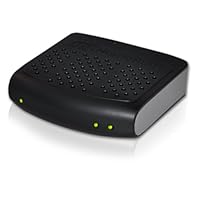
 In my house, I have a Linux home theatre PC in the TV room attached to the plasma. I have a Linux media server attached to an older TV in the basement for recordings. My wife has a Windows 7 PC on her desk. I have a MacBook Pro which I carry about and is on the home wireless network. So 4 screens in the house. All of which can call upon the HDHomerun attached to the rooftop antenna for high definition broadcast television of excellent quality, and very good reliability. The ability to share and the ease of configuration are the strong points of this device. I would not encumber my laptop with a USB dongle and a stiff length of RG-6 cable, just to watch TV, not when I have 802.11n wireless networking capable of carrying multiple HD streams at once. Nor would I want to split my antenna feed to give each PC a line in the off chance I'd want to view on it. And I certainly don't want to deal with indifferently supported USB drivers under Linux, or trying to find a home for my old PCI tuner in a house with no PCI slots.
An ARM based tablet computer, like an iPad, will not have the horsepower to directly decode HD MPEG-2 data streams, but you can setup a computer to convert the video to H.264. For instance, I can leave EyeTV running on my MacBook allowing me to watch content on my iPad. I don't do this because I don't like leaving my MacBook running constantly, but I could; modern computers are capable of realtime video conversion.
Even if you use this device with a digital cable system, you are likely to only receive local broadcast networks, so be aware. I combine my antenna based MythTV DVR with a Netflix subscription, giving me most of the programming I'll actually want to watch for $8 a month plus electrical costs, supplemented by pay per view from Amazon and Apple, and if I didn't have kids, that would be it for TV costs. As an added bonus, if your local broadcasters are not putting too many sub-channels on their frequency, the quality is unmatched by cable and nearly pristine. Unfortunately, some of my local networks put up to 4 sub-channels on their feeds, but most are reasonable and look great.
And electricity costs should be included in your budget. My home theatre PC and my media server are using $3 each a month in electricity just being on waiting for their "free" content.
Setting up an antenna starts with searching for the antennaweb organization's website and finding out what stations are in your area, and how big an antenna you need. I ended up installing a really big antenna on my roof with a pre-amp, but once it was setup, it was setup and maintenance free for years. In my particular setup, I have my antenna split 3 ways, to this dual tuner, to a single tuner blue HDHomerun, and to the Panasonic plasma in the TV room, allowing me to record three programs while watching something live. This is much more than adequate, as it's unusual for me to need more than two simultaneous tuners given the limitations of local broadcast content.
Installation of an HDHomerun is simple, simpler in my experience than standard tuners directly attached to a PC. The package comes with one of those mini CDs hated by Macs and other slot loaders, so you should probably get your setup software from Silicondust's website. They make prompt firmware updates as issues arise, and write high quality if spartan software. I was able to use their setup utility on Windows 7 to get Media Center to see and use the tuner. Also EyeTV on OS X saw and used the tuner, and it was very simple using MythTV to see and use the tuners on Linux. Use wired Ethernet for distribution if practical, if not do not use less than 802.11n wireless, as I've found that g wireless is not quite up to the task of streaming HD video. I generally use my MacBook with the MythTV frontend for "OS X" to watch recorded programming on the Linux media server, it's free and works reasonably well, but I do own a license for EyeTV and have watched live TV with it.
I have owned the previous incarnation of the dual tuner HDHomerun for many years and it still works, but I was eager to compare this device to the previous models, the original white one and the single tuner blue one. I'm interested in signal quality, so I spent a couple hours with an iPhone/iPad app I wrote, Signal GH, looking at how these three devices handle my hard to lock television stations.
I hoped the tuner chipset in the Dual would improve upon the 5 year old chips in the original. And it did. The new tuner is more consistent than the original and a bit more consistent than the blue. Where the older model would swing over a wider range of signal quality, for instance ranging from 65 to 75 signal quality units on a given marginal station, the Dual will consistently stay in a range like 68 to 70. In fact, for some stations my original Dual will drop signal quality entirely either for a half second or even continuously even while showing good signal strength, something the other two devices do not do. Whether this is by age or design flaw I don't know. I just know the Dual is improving on the situation which will be great when the leaves grow to block my signal in the summer. To be clear any of these will handle a strong, direct, easily tuned signal, it's the marginal stations where the newer chips make the difference between an hour lost in a show and an hour of constant distraction.
This model has only one coax port. Previously the original had two ports which would have allowed you to dedicate one port to digital unencrypted cable, QAM, and the other to digital over the air ATSC, but the vast majority of users will be only using an antenna and most of the rest only QAM, so that is no great loss. Power usage is 5 W while tuning and 3 while not, an improvement in the idle power usage, but still another electricity sink. The original also had a remote control, which I never had cause to use, but some could use for simpler setups.
I've owned a couple other TV tuners over the years and this network based product is the only one I recommend. It is flexible, can be used with a wide variety of software, does not rely on often flaky USB drivers and is available to all my computers. And it can be located remotely from my already over hot TV cabinet reducing the need for noisy cooling. If you are sure of needing only one tuned channel at a time, than the single tuner model is cheaper and has fine signal quality performance. SiliconDust has released the HDHomerun Prime CableCard network device which sounds interesting but is likely to be less flexible than this DRM free device. The fact that the new Dual is cheaper than it used to be and has a more consistent signal quality only enhances the value.
Highly recommend for cord cutting antenna users within range of multiple major network TV stations,

For my setup, I had to
a) disable the Windows7 LAN firewall (until I got it working and specifically added firewall rules for the two programs involved (QuickTV and Windows Media Center)
b) remove my other QAM tuner device and deleted all the old program guide data from Windows7 Media Center to get the HDHR3 channels to be seen inside Windows Media Center without manually adding them each, one-at-a-time. This involved more complexities than can be explained here.
c) Every time I ran the HDHR3 setup program, the bad firewall settings are put back. I'm running the latest available windows software from 2 weeks ago. Be certain you get the latest available from the SiliconDust website.
IP Addresses
There is no way to set a static IP within the device. You'll need a DHCP server on your network and if you want a static IP, then your DHCP server will need to provide that. This probably isn't important to all but a very few users. If you don't have DHCP then it gets more complicated since a 169.x.x.x address will be used by the device and you'll need to set that up on your PC.
Encrypted Cable
More and more digital cable channels are being encrypted. A year ago, I received over 100 ClearQAM channels, then the cable company started encrypting them. Now we are down to about 15 useful channels (local broadcast + community access + lots of shopping). Channels above 30 are all encrypted by my cable provider and cannot be viewed through this device. Modern HDTVs have built in QAM tuners, so you can probably use that to see which channels will be viewable through the HDHR3 at your location. It does not have an analog cable channel tuner like the old "cable ready" VCRs or TVs, only ClearQAM.
Multiple Sources
Though it is a dual tuner, since there is only 1 coax input, you will need to choose either digital cable QAM or ATSC/OTA broadcast reception for both tuners. Don't expect this model to support 1 tuner on ATSC and the other on QAM regardless of the ability to select one for each tuner in the GUI.
Very Happy
Besides those items, it works wonderfully and I wish I'd purchased it sooner. The recordings are beautiful and the integration with Windows7 Media Center is great, once it is setup. I haven't tried MythTV or GB-PVR or XBMC or any other options for tuning, but suspect they will each work as expected.
Buy SiliconDust HDHomeRun DUAL High Definition Digital TV Tuner HDHR3-US (Black) Now
As with previous versions of their product this one works fine, once you have installed the require software (downnloadable). Integrates very well with Windows Media Center (Windows 7 32 and 64 bit). I use it to watch over the air TV in HD. Media Center provide TV guide and Tivo like functionality: pause live TV, schedule recordings etc.Using this tuner and Ooma for my phone service, I was able to give Verizon FIOS is marching orders, get faster, cheaper internet from RCN and cut my monthly bill down from $170 to $50. I do not miss cable at all.
One thing though, Silicon Dust's tuners (this one and previous models) just never seem to be as sensitive as the tuners built into the TVs this is a problem with over the air reception of marginal strength tv channels.As the subject indicates, I already had one of these. I loved it so much... that I decided to buy another. And... sadly... I'm thinking about buying another.
Way back, when HDTV first started being broadcast Over The Air, I bought a HDTV tuner card. Being able to record HD TV programming without having to buy a massive processor to do all the encoding was really attractive. It was really nice to record HD programming and watch it in full HD quality sometime later. I know you can buy a box that does all that... back then, you couldn't... and then you could, but it was really expensive.
As HDTV programming was added, I quickly realized that I wanted more than one tuner. That was when I purchased my first HDHomeRun Dual tuner. It was so easy to setup and so easy to use, that I quickly realized that I needed another.
I have two of these hooked to a $24 antenna. I get something like 40 50 HD channels. I use MediaPortal v1.2 as the recording and playback software on my P4 box running Windows XP.
So far this fall, there have been a couple of time slots where I was recording using all 4 tuners... and wished I had a 5th.
Having said all that... if you're looking for a portable device to use with your laptop when you're on the go... this isn't it.
Pros:
1 The box is really small.
2 It draws very little power.
3 It can be put almost anywhere -I have mine in the basement next to my Antenna splitter and home network router.
4 Solid reception even on a cheap antenna.
5 Plug-n-Play. Even Win XP recognizes it as a tuner device for Media Player.
6 Almost nothing to do for setup.
7 Two tuners.
8 One RF input, One Ethernet connection
Cons:
1 It's another box -you have to find some place for it.
2 If you have more than one antenna, you'll need a splitter/joiner or two of these.
3 No recording software provided by Silicon Dust.
4 Little or no Documentation.
5 not portable -requires A/C power or other power adaptor.
Want SiliconDust HDHomeRun DUAL High Definition Digital TV Tuner HDHR3-US (Black) Discount?
I just purchased the SiliconDust HDHomeRun from Amazon. I went through hours of frustration trying to get it to work on an APPLE iMAC. After phoning both SiliconDust (not helpful), and Elgato (very helpful), I got the story about SiliconDust and Elgato. SiliconDust version of the HDHomeRun is for PC computers, and Elgato's version of HDHomeRun is the same hardware, plus the activation code for EyeTV, which MAC users will need.So I'm returning the SiliconDust, and bought the Elgato.
APPLE Macintosh users should buy the ELGATO version of HDHomeRun DUAL. The hardware is the same, but huge difference in software!!
Elgato is $149 and comes with the $79 EyeTV activation code, and the $20 TV Guide (for one year).
You could buy the SiliconDust hardware for $90 (non-mac friendly), go thru all the frustration and tech support, and then buy the Software for $80 to get the same thing as the Elgato hardware which comes with software and cost less.
Save 40% Off

No comments:
Post a Comment