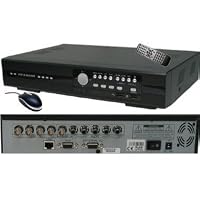
 I got one of these over a year ago as part of a complete package for my office & was happy with it (see my other reviews). So when I needed another 4 camera system for my home, I decided not to get a complete system & buy everything separate. I wanted smaller cameras because it was for my house & I didn't think those big silver soda can sized cameras that come with most of the Complete 4 Camera Systems would look good on my house.
With what I know now after my previous purchase, I looked at many DVR's like the zmodo which are around the same price. I like my previous CIB DVR, but I am not married to it & would be open to another brand. I am no pro security installer but I did a little homework this time. Different DVR's record video at different resolutions, like CIF, HD1 & D1. CIF is the lowest quality and D1 is the highest quality. I believe HD1 is Half-D1, which falls in the middle. It seems like you would want a DVR that records in D1 at 30 frames per second on each channel for best quality. When choosing a DVR, you need to look at the specs closer, they may do 120fps but that is at CIF and maybe only like 6fps on D1 recording. For example, I saw a zmodo that said it was D1, but a close look at the specs reveals that it DISPLAYS in D1, but RECORDS in CIF. This means it will look great live, but when you go to play back recorded video it looks poor, because it was recorded at a low quality. I noticed the 8 camera version of this CIB model only does D1 on 4 channels while recording CIF on the other 4, channels. I even saw one DVR that says it is D1, but only for 1 camera, what the heck is that? That being said, this DVR records in D1 on all 4 channels at 30fps, while most other DVR's in this price range do not.
I also looked at the android apps for all the brands like zmodo, q-see & kguard etc., since I want to use my phone to view video. Some apps have a user rating of 2.5 or 3 stars with many complaints, while the EagleEyes app for this DVR had like a 4.3 star rating from users. It looks like all the android apps have their haters but the EagleEyes had the least, so that also factored into my decision on which DVR to choose.
So with all that, I was torn between this DVR and the Linux based one for $99, which also got great reviews and had full D1 recording on all 4 channels. But it was not available through Amazon Prime. So the Prime shipping, the positive Android app reviews and most importantly, the full D1 recording made me choose this DVR.
As far as the DVR, it works well and is easy to setup & use. It seems to have all the features you would expect, like motion record, per channel setup options, schedule recording, etc.. I do not like the way you have to search for video to playback, you have to search for video between certain dates & times, but I am used to the way it works from my other one. Pretty basic but very functional is the best way to describe the interface. But I can't complain, especially considering the price. I would suggest getting a 1TB drive if you will be recording in D1 since the higher quality you record at, the more disk space you will use. Also, the EagleEyes app works fine on my Droid Razor Max.
Bottom line, when choosing a DVR, check to see if it RECORDS at D1 on ALL channels at a FULL 30fps on ALL channels if you want the best quality recordings. I bought some small 600TVL cameras to go with this and the recorded video looks just as good as the live view when I record in D1.

Note 1: There are others who didn't receive the right product, I got the exact model I asked for and couldn't be happier, but given the other reviews I would advise caution buying a hard drive prior to receiving your product.
Note 2: The menus for me were anything but natural. I found them semi hard to navigate but despite it not feeling very natural, it was pretty easy to adapt to it.
Note 3: If you are planning on getting this, make sure you have something that supports VGA, as the composite output SUCKS hardcore. The visual difference between the two is astounding... but anyone who knows about these things could tell you that.
Note 4: If you absolutely must have HDMI, look up VGA to HDMI Upscalers on amazon, they have them and that will solve your problem.. you can find a decent one for around $30-50.
Note 5: The controller is apparently a universal on for all models as mine has 4ch 8ch and 16ch mode (which the product is obviously only 4ch) and there are other features.. no big deal, just thought it was interesting.
My final thought, we tried the wifi broadcast over iPad and it works great. The video feeds when all 4 are up are degraded but once you bring up a single feed, after a few seconds it clears up and looks great.
Overall, a fantastic product for the price.Beware buying this. The Amazon page showed in stock when I purchased it. The next day they sent an email cancelling because it was "not in stock." The Amazon page still shows in stock from same seller. This makes it a pain since you will normally buy a hard drive with it. The best replacement comes with a hard drive, so you end up having to return the hard drive.a low cost, high quality replacement of a machine that was horrible to work with. My existing parts fit right in and everything was ready to go on the first boot. It couldn't have gone smoother. The interface is clean and straight forward and easy to work with. I got everything working except the email features... anyone figure that out yet?


No comments:
Post a Comment