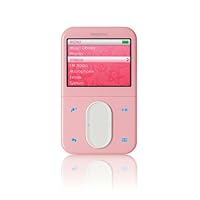
- 30 GB multimedia device holds tens of thousands of photos, up to 120 hours of videos, or 15,000 songs
- 2.5-inch, high definition LCD screen features a 320x240 resolution and hundreds of thousands of colors
- Supports many video formats, such as AVI, DivX 4 and 53, XviD4, MPEG-1, -2, -SP, WMV9, and Motion-JPEG
- Integrated FM radio and recorder, voice recorder
- Measures 4.1 x 2.4 x 0.7 inches and weighs 5.7 ounces

Pros: Beautiful and Bright Screen (displays thousands of more colors than the Ipod video by the way). Even at 50% brightness (which is default setting out of the box) it looks bright!
Ability to Customize most of the features. This includes being able to set your own photos for the wallpaper, custom equilizer, custom brightnes setting, custom shortcut button, organization of folders(audio, photo, video folders)...etc.
Great Sound! This isn't a surprise because Creative develops sound hardware/software like soundcards.
Good User Interface: The thumb scroller interface takes a few days to get used to, then it's pretty user friendly. You can customize the sensitivity of it too.
Ability to play lots of different video files like Divx and Mpg4.
This was a big selling point for me. The screen is perfect for watching cartoons and anime on.
Good Size. I'm refering to it's physical size. It's actually the perfect size and feels great in your hand. Still pocketable and still feels rock solid and not fragile.
Displays Album cover art! I had trouble with this function in the beginning only because in order to get it to display the album art correctly, you need to rip the Cd album with a program that automatically downloads album info including art. One program that does this is Windows Media Player.
--For the techies that don't want to re-rip everything to get the album art to display, just download a small jpeg image of the album cover that is about 150 by 150 pixels, rename it folder.jpg, make it a hidden file and place it in the folder of the correct album. When you move it to your player it will ask you whether you want to move it to the photo folder, make sure you select "no" and leave it where it is.
Cons: There isn't a lot about this player that is negative. But one aspect which is really annoying is that to charge it or plug it to the computer you have to use this tiny seperate adapter that comes in the box. It's the white adapter/attachment that looks like a dock connector. What the heck were they thinking! I have to carry the separate item everywhere I go just in case I need to charge it or upload music. It sucks man! Why the heck didn't they just build all of the ports into the player itself!!
Also, they should've included the video output cable instead of selling it separately! Or at least made it use a standard video cable! Also, the battery is not removable... at least not meant to be.
These are the only reasons why I gave this player 4 out of 5 stars. Otherwise I would have given 5 out of 5! All in All this player really rocks and is worth every penny! ... and is a much better buy then the "other" competition out there.
Hope this is helpful to you guys. If it is, please give me a vote. Thanks!
For more electronics and technology reviews, visit my site at:
http://newtechnews.blogspot.com/
Buy Creative Zen Vision:M 30 GB MP3 and Video Player (Pink) Now
I had ordered one of the players as a gift for a family member, then realized how difficult it appeared to get them, so I ordered another from a second source.I received the first unit as promised. I immediately started loading this on it. It's a little thicker than the iPod, but I actually like how it feels in my hand better (IMHO). The screen is beautiful, the file formats that are supported are great, the integration with WMP10 and the on-line stores is certainly better than the iPod. I just love it. I loved it so much, that when the second unit arrived, I decided to keep it for myself :)
I have used iPod many times before and I do like them. But they can coexist and the competition will make all the players better. If you love the iPod's great. Again, I like them too, but right now I would pick this player. I have synched up CD music, on-line songs, even a bunch of my TiVo shows (via Tivo To Go TTG). I have taken those shows and played them directly on my TV too (with an A/V cable).
The currently availability of accessories is a bit frustrating, but livable I am sure it will not match or surpass the iPod in that respect.
Like the iPod and other devices like this the screen scratches pretty easily. I immediately bought some Palm protectors and cut them to fit. I have customer shields ordered (from theinvisibleshield.com) but this will do for now.
This FM radio works fine. I personally like one integrated. It doesn't take any more space and it's nice on rare occasion. I have read other reviews that say having the FM radio is a "negative" of this player. Huh? Why? If you don't want it, just don't use it.
There is a reason why this little player just won the overall best of the 2006 Consumer Electronics Show (CES). Even my friends that have iPods snap their heads when they see this. But again, this shouldn't be a religious discussion of iPods vs. non-iPods. Buy what you like best and suits your use.
This one suits mine. I am even thinking about buying a third one. Why? I don't want to share mine (or my wife's) with the kids LOL
Read Best Reviews of Creative Zen Vision:M 30 GB MP3 and Video Player (Pink) Here
Is the Vision:M a 5th generation (video)iPod clone? You bet... right down to the little green battery charge indicator in the upper right corner. Is it better than the 5th generation iPod? In my mind there's no contest, but there are trade-offs. Judge for yourself.Creative Vision:M, why is it better?
-Plays DivX and XviD video, as well as WMV-9 and MPEG1/2/4.
-Higher color screen (262,144 colors vs 65,000 colors)
-Natively plays MP3, WMA and WAV, without conversion.
-Better signal-to-noise ratio under same frequency response.
-Longer battery life (approx 4 hours video playback vs iPod's 2 hours)
-Includes AC charger.
-FM Radio/ Recorder.
-Voice Recorder.
-Compatible with popular music services, like Napster.
-Customizable menu, with background image.
-Organizer features Outlook sync support; Contacts, Calendar & Tasks.
-Colors blue, green, and pink are also available.
-The back side isn't made out of scratch magnets like the iPod.
-Natively acts as external hard drive in Windows.
Apple iPod 5th Generation, why is it better?
-Slimmer. iPod 0.43in / Vision:M 0.7in.
-Lighter. iPod 4.8oz / Vision:M 5.7oz.
-Clickwheel is still the preferred navigation input for many.
-Lots of first and third party accessories available.
-60GB version also available.
-iTunes support.
-30 USD cheaper.
If you're in the market for a 30GB player and you're considering the 5th generation iPod, give the Creative Vision:M a serious look. If your friends ask you why you bought a "generic iPod," you can tell them with pride all the reasons why the iPod simply wasn't good enough for you.
Want Creative Zen Vision:M 30 GB MP3 and Video Player (Pink) Discount?
For those of you looking to read something with substance, here's a review from someone who actually owns both an Ipod and Zen Vision M and has used the Ipod Video.I've been looking for a feature rich portable media player (PMP or PVP) and was about to jump on an Ipod Video when I saw the press release for the Vision M in December. I already own a regular 4G ipod and loved it. The clickwheel made using it so easy. I borrowed a Video Ipod from a co-worker and was impressed with the video capabilities; however I really wanted something with FM radio and better video codec compability.
The early reviews of the Vision were fairly positive, but had a few bugs like video buffer issues and no on the go playlists, but both are now fixed via new firmware. The clincher was CNET's awarding it the Best In Show at the 2006 CES. For a reputable site to recommends this as best in show over the hundreds of other new devices says a lot.
Ok, on to the real review.....
I purchased the Black Vision M and the two things that stand out is the clean front layout and thickness. It is about .7 inches thick so it's signficantly thicker than the Ipod. Although I would prefer the slim shape of the Ipod, the thicker Vision M was fine as it still fits in my pocket comfortably and is quite snug in my hand. The instructions require you to do two things first:
1) Update Quicktime if it's version 7.0 through 7.0.2 before installing Creative's software
2) Charge it up first using the AC adapter which only takes about 2 hours (great advantage over Ipod)
User Interface and Slide Touchpad:
The software is pretty straight forward and so is using the menu system on the Vision M. The slide touchpad takes a little getting used and I have to admit the Ipod clickwheel is much easier to use. However, it does have its advantages. You are able to very quickly scan though large song lists by holding down at the top or bottom of the touchpad. Alternatively the user interface allows you to search alphabetically via song, albums, artists, and genre. This is something I wish the Ipod had as going round and round on the clickwheel sometimes gets old if you're looking for something in particular. The touchpad also doubles as a previous/next or rewind/fast forward button by pressing it the left or right respectively.
Additionally, there are four buttons located around the touchpad: Play/Pause, Context Menu (Options), Back, and Custom Shortcut where you can set it to whatever you want (almost, you have a list of options). These buttons light up in aqua blue which is nice for night time use.
Sound
So how's the sound quality? Very good! The headset that comes with the Vision is slightly better than the average as they fit snug in your ear and have good response. In my opinion, both the sound quality of the Ipod and Vision M are good, but the Vision M is slightly better. Additionally you can enhance your listening experience with the built in preset or custom equalizer and bass boost options. I only wish it saved more than one custom equalizer setting. Be careful when using bass boost as doing this combined with boosting the low end using the equalizer may distort the sound.
Oh, did I mention you can bookmark your music so you can pick up where you last left off which is something the Ipod doesn't do.
Other info
Radio: Very very good. your headphones is used as the antenna and the reception is very good. You are able to preset up to 32 stations (including renaming them) manually or thought the auto seek option. You also have a signal strength bar (similar to ones found on cellphones)
Video: The player's codec supports DivX4/5, XviD5, MPEG-1/2/4SP, and WMV9 as well as Motion-JPEG. The included software will convert your videos to the proper codec and resolution including cropping if you so desire. My only complaint is the 4-6 seconds of wait time when you start playing, but since this is a hard drive based device, it's understandable. Oh yeah, you can even password protect files from viewing.
Screen: Excellent, the 2.5" screen is bright and the colors are vivid; it's capable of displaying up to 262,000 colors. Easily better than the Ipod Video which I thought was good to begin with.
Pictures: The viewer allows you to choose from specified folder and displays contents in a 5 x 4 format. You then pick the one you want to see via touchpad and then you have the option of zooming in. Again, colors are vivid and you can even get picture details (via context button).
Miscellaneous features:
Voice Recording, Custom Wallpaper, Sync your Outlook Calendar option, Button lock (disables the touchpad and buttons), song and picture rating, Play music while viewing pictures, Compatible with Windows Media Player 10, 6 hours of video battery life, Smart Playlists (higher rated songs play back more frequently I think), Smart Volume (Normalizes volume of all songs), Video Out, power saving options, and PlaysforSure compatibility.
Weakness:
So what keeps me from giving this unit a 5 star rating?
An overly sensitive touchpad (should get better as I get more used to it), lack of accessories at this time, lack of a removable battery, lack of lyrics display support, can't do anything with it when docked to the PC, separate 3 in 1 dongle for USB, AC connectivity and Video Out. Overall these are fairly minor complaints.
In summary, if you just need a decent mp3 player with video and photo capabilities, then the Ipod is a fine choice. For those searching for a more feature rich player, this is an excellent option. This item is selling well and I hope that translates to more accessories for this wonderful player.
I have thoroughly enjoyed using this player and hope you find this review informative.

Pros: Beautiful and Bright Screen (displays thousands of more colors than the Ipod video by the way). Even at 50% brightness (which is default setting out of the box) it looks bright!
Ability to Customize most of the features. This includes being able to set your own photos for the wallpaper, custom equilizer, custom brightnes setting, custom shortcut button, organization of folders(audio, photo, video folders)...etc.
Great Sound! This isn't a surprise because Creative develops sound hardware/software like soundcards.
Good User Interface: The thumb scroller interface takes a few days to get used to, then it's pretty user friendly. You can customize the sensitivity of it too.
Ability to play lots of different video files like Divx and Mpg4.
This was a big selling point for me. The screen is perfect for watching cartoons and anime on.
Good Size. I'm refering to it's physical size. It's actually the perfect size and feels great in your hand. Still pocketable and still feels rock solid and not fragile.
Displays Album cover art! I had trouble with this function in the beginning only because in order to get it to display the album art correctly, you need to rip the Cd album with a program that automatically downloads album info including art. One program that does this is Windows Media Player.
--For the techies that don't want to re-rip everything to get the album art to display, just download a small jpeg image of the album cover that is about 150 by 150 pixels, rename it folder.jpg, make it a hidden file and place it in the folder of the correct album. When you move it to your player it will ask you whether you want to move it to the photo folder, make sure you select "no" and leave it where it is.
Cons: There isn't a lot about this player that is negative. But one aspect which is really annoying is that to charge it or plug it to the computer you have to use this tiny seperate adapter that comes in the box. It's the white adapter/attachment that looks like a dock connector. What the heck were they thinking! I have to carry the separate item everywhere I go just in case I need to charge it or upload music. It sucks man! Why the heck didn't they just build all of the ports into the player itself!!
Also, they should've included the video output cable instead of selling it separately! Or at least made it use a standard video cable! Also, the battery is not removable... at least not meant to be.
These are the only reasons why I gave this player 4 out of 5 stars. Otherwise I would have given 5 out of 5! All in All this player really rocks and is worth every penny! ... and is a much better buy then the "other" competition out there.
Hope this is helpful to you guys. If it is, please give me a vote. Thanks!
For more electronics and technology reviews, visit my site at:
http://newtechnews.blogspot.com/

No comments:
Post a Comment