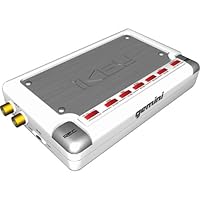
 I bought this thing a few weeks ago (actually, reading that ikey-plus just got announced for the ridiculous price of $279 msrp, i'm glad i found mine on amazon.com for $109) and it's functional for what it's made to do. Depending on your applications, if you're just looking for a straight device that will allow you to record any audio material like your DJ mixes or in my test case, audio from the TV, it's fine for those who don't want to drag their laptop or a long cable from their desktop to hook up to the audio source. Agreed, it's not going to impress audiophiles, but the signal to noise ratio isn't that bad. If the signal is loud enough, then noise can be negligable in most cases. I actually prefer this method of recording now than when I used MiniDiscs for a few reasons. Recording times are greatly lenghthened with this unit in that it's not hard to find USB drives nowadays. I have a 512mb stick which will yield about 8 hours recording time at the highest mp3 setting. I was happy back in the day to even get two hours recording time out of my MiniDisc. I plan to get a 2 gig USB Flash Drive so I'll have 20+ hours recording time, which of course is overkill. Some reviews have talked about the signal to noise ratio or even hum from the recording after it's made. Like I said before, if the signal is loud enough it's negligible. When I used MiniDiscs (which sad to say mine's probably gonna sit in its case collecting dust now that I have a new way to record) I would sometimes get hum/noise if the signal was too low on top of the fact that I could also sometimes hear slight nuances of the motor (something you might hear also if you ever recorded to cassette). It was so annoying to hear that as I faded out a mix. Now I can just concentrate on reducing the hum or noise using editing software. I'd also recommend probably not using the included audio cables that come with the ikey for the supposed hum/noise issue. Since I got mine cheap (not rubbing it in), I went out and bought some Monster Cables (goldplated-DJ version) and used those to hook up to my iKey and everything seems fine. For the price point and it's basic functionalities, at $149 I think it's perfect for what it's made to do, a simple straight-to-record-digitally device that uses most USB storage devices. I don't know if I'd want to spend the $300+ or so price that Edirol (R-1 Recorder) and M-Audio (Micro-Track) are charging for their units on top of spending the extra loot for a specfic type of memory (Compact Flash). I'd probably buy one of those units if I was producing on top of DJing and absolutely had to have that kind of audio capability with me. I'd just as easily use my laptop and a good $99 usb-audio box to do that. From my usage, I'm happy with this unit.
I am right now using it to record from a cassette to mp3, and plugged into my stereo tape deck, I can imagine using it like this a lot. I have not been able to attach it to a hard drive, so I have only used it with a usb2 compact flash reader and a 1gb card, and generally successfully. But again, the only way to know if you are really getting the sound right is to stop recording, remove the card or whatever, and plug it into something that does play it, like a computer. And I have one next to my stereo, so I can do that if I want.
For field recording I have found this to be too much of an impediment. I am however enthused about trying the ikey plus, as soon as it is available at your usual online retailers like Amazon here (Just released apparently, and has a mic input and a headphone out.) I will probably sell this one as soon as I can get the plus model.
********************************
This added much later. I have since sold it and gotten the iKey Plus, and am very pleased with it, at least for the few times I have used it. Not only does the iKey Plus add several key functionalities, but improves on the ones already present. But the absolutely crucial feature of being able to monitor your input is what really made the difference. I'll probably give the Plus model a favorable review in a few more weeks, unless I encounter some major glitch.
Buy iKey iKey Audio to USB Drive Portable Recorder Now
This thing is great for what it is supposed to do. It will record from an inline device, like Cassette, Turntable, etc. Think of old audio and this as another "new" recording device like a new casette deck or a "New" 8-track recorder (showing my age).It is very limitied in what it does, but what it does works well and is quite simple.
The biggest problem I have with it is remembering if I have it on "record" or not. The other problem is also have the record level set up correctly. Too low and you get nothing and too high and the signal is distorted. The manual states that it is better to record too low than to record too high and I agree. I have found that taping the dial to the best setting from the previous time works best so all your recordings from the same type source are all at the same sound level.
I then take the USB drive out and connect to my PC and dump the mp3 files or wav files into my hard drive and then edit using Music CD Recorder by databecker. You can use any audio editing/recording software like cakewalk pro, etc.
Gemini has a plus edtion that provides more functions and less "blind" type recording, but all in all this little device delivers what it promises. You can't monitor what you're recording and you can't check it (playback) until you have a PC to connect it to. I think everyone of the bad reviews are from people who might have expected too much or didn't read and comprehend the directions in the owners manual.
I use this at my Karaoke shows to record singers and then later burn a CD of their own singing as a little gift of appreciation for them coming out and helping to draw a crowd (I do this for the "good" singers", not the Scary-oke singers).
I set it at mp3 192 kbps and get a full evening of recording with no problems.
I've seen this recently for as low as $79.99. If you don't like blind recording, then wait for the "PLUS" version to go on sale.
I also see this very useful for people who have a stack of old vinyl that want to QUICKLY transfer 45's to mp3 for their iPODS with little or no hassle and no bother with a computer editing program.
It does exactly what I needed it for.
Read Best Reviews of iKey iKey Audio to USB Drive Portable Recorder Here
This is a great little invention. It works great, but it takes some trial and error to get your input settings correct. All in all it's terrific, but...1)the input dial is a little thumb dial and it's easy to turn it without knowing it. We had to put a piece of tape over it.
2)The other thing is that there is no way to monitor your recording. If it had a headphone jack on it, that would be great! You really don't know what you've got until it's finished, so if it's a long recording you may have wasted a lot of time.
3)The only other thing is that it takes a couple of seconds to start recording, so it's not an instant push to record kind of thing.
There are so many pros to this unit that I really hate to complain. These are really not complaints but small annoyances and wish list for Ikey 2.0
Want iKey iKey Audio to USB Drive Portable Recorder Discount?
I was very frustrated with this device until I resolved what seems to be a fundamental problem with the design that others seem to have run into as well, so I wanted to share my findings. As with some others who have written reviews here, I was having trouble with the unit "freezing up" after recording for more than a few minutes. This problem was resolved by putting batteries in! Although the unit comes with as AC Adapter which would lead one to assume that batteries are not required, the documentation states that batteries are indeed required. I put in standard Alkaline AA's and left the adapter plugged in thinking this might conserve battery life. This is a bad idea for two reason. First, because the adapter acts as a battery charger when it's plugged in (btw, the unit must be switch "on" to charge the batteries) and second, because (in my case at least) when I left the adapter plugged I continued to have recording problems. This may not be the case if one uses rechargeable batteries.I hope this helps someone else. It sure looks like other people ran into this quirk. Perhaps some of the adapters are defective as the doc seems to indicate you can use with batteries "or" adapter (but it also says batteries are "required" at another place in the doc.)
One more note. I was unable to use a 250 GB USB drive with the iKey. It just doesn't appear to recognize large drives, at least not the Buffalo drive I tried. 512 MB and 1 GB flash drives worked without a problem (after batteries were installed and adapter disengaged of course).


No comments:
Post a Comment