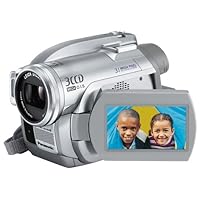
 The Panasonic VDR-D300 "Palmcorder" is a compact 3CCD camcorder that records videos to mini DVDs: 3" (8 cm) DVD-RAM, DVD-RW and DVD-R. (Note that it cannot use the "plus" version of DVD+R/RW.) Thanks to the three separate 1/6" CCD image sensors inside, it shoots broadcast-quality videos and turns in decent low-light performance. It also doubles as a 3.1MP digital camera, but its forte definitely lies in shooting video.
5/4/06 UPDATE: before going any further, let me offer a bit of a "warning." The fundamental differences between DVD camcorders and tape (miniDV) camcorders are two: 1) DVDs let you access a scene quickly and easily, while tapes have much faster start-up times (assuming you are already at the point where you can record or play); 2)DVD camcorders like the VDR-D300 use MPEG4 compression whereas miniDV camcorders compress much less. For most scenes you won't notice a difference. In fact you can probably shoot a good professional-looking movie on the VDR-D300. Just be aware that the MPEG4 can very occasionally raises the ugly head of heavy compression for certain shooting conditions. The "warning" concerns the DVD media: if you use DVD-RW, which is more common and cheaper than Panasonic's DVD-RAM, be prepared for up to 5 minutes of formatting time and up to 10 minutes in finalization time (both have to be done with the AC adapter attached, not from battery). In a nutshell, if you plan to do some editing, use DVD-RAM. If you plan to just shoot and watch (like me), use DVD-R or DVD-RW in Video mode (both require finalization but can be played back on almost all DVD players). I just wanted to point out the long formatting and finalization times as the biggest caveat with DVD camcorders, including the DVR-D300.
Update2: if you buy this between now and 7/31, you can get a free camcorder bag and 3 DVD-R blanks from Panasonic by mail. Check their website for the PDF rebate form.
Before offering my take on the VDR-D300, let me tell you why I chose it. My story might be of some help in your own decision making.
First, I had always wanted a 3CCD camcorder of my own. Most consumer camcorders on the market have one image sensor inside. The image sensor is like the eye of the camcorder. The VDR-D300 has not one, but three CCD image sensors, each designed to process a specific color: red, green or blue. In fact, all professional video camcorders -like the ones used to shoot things on TV (news, dramas, etc.) -use the 3CCD design to better capture color. Together with proper white-balance calibration and judicious choice of lens, you get eye-pleasing colors and sharpness not found in most consumer camcorders, which tend to give dull, bland, fuzzy video images.
Second, I was a little fed up with using tapes for video recording. You know the drill: you buy a tape-based camcorder, then you find out it's a pain to dub it to a VHS or a DVD, or to transfer it to a computer, so you end up using the camcorder like one or two times a year. Like many folks I have been using the video function of my digital camera a lot and left my Sony DCR-PC5 camcorder behind in the closet. My Fujifilm F10 digital camera shoots pretty good video for a camera, but for important occasions, I still want a real camcorder. (Cameras are designed for still images whereas camcorders are designed for moving pictures. For now and the foreseeable future, there's no perfect hybrid camera that does both very well.) DVD-recording has always appealed to me because I could just pop in a recordable/rewritable DVD, shoot some footage, and then play it back, without all the fussing involved with tape recording. I played with my friends' DVD camcorders (Panasonic and Sony) and really liked this "new" way of shooting videos. I waited until someone released a camcorder that combined DVD recording and the 3-chip design. Panasonic finally did, and I bought.
Oh, when I was contemplating the purchase I also considered Sony's HD (high-def) camcorder, which records high-def video on MiniDV tapes. In the end, budget constraint (that one is $1500, a lot of dough for a poor guy like myself), compatibility concerns (i.e., impossible to burn HD video to DVD, not many friends having HDTV) and also the fact that I have been totally let down by the subjective quality of HDTV content on TV convinced me to stick with the standard NTSC resolution. My priority was to get a camcorder that shoots great colors and clarity, not one that gives the highest resolution. It's the same thing with buying a digital camera: higher number of megapixels doesn't necessarily mean a better picture; the camera's image sensor is just as important, if not more.
OK, let's take a look at the VDR-D300 itself. (A slightly cheaper model, VDR-D250, also sports the 3CCD design and records to DVDs. It has slightly lower resolution and lacks a built-in flash and a few other features.)
Whenever you evaluate a camcorder, video image quality should account for 75-80% of the composite score, because you buy a camcorder to shoot videos! Here, the D300 shines, thanks to its 3CCD design. Video quality is especially excellent when there is a lot of light. It's difficult to describe in words, but let me just say that with this camcorder, you can shoot video that looks almost like the professional stuff you see on TV: clear pictures, pleasing colors, smooth motions. Even though the D300 shoots at the same resolution as other NTSC (standard defintion TV) camcorders, its video images are very noticeably clearer and look sharper. Many consumer camcorders exhibit bleeding reds, but the D300 is largely free from this defect. I would like to point out that when I say "professional-quality eye-pleasing" colors, I don't mean high-saturation colors. Most people like warm, high-saturation colors that "jump out" of the screen. The D300's colors are rather muted when set to auto white balance. If you want to get warm colors, you'll need to manually set the white balance to achieve this effect. I personally use WarmCards from VortexMedia.com.
Indoors, without professional-grade lighting rigs, the D300 turns in good performance. Definitely better than 1CCD camcorders (except probably Sony's HD camcorders), but you'll get most of the 3CCD prowess if you provide enough lighting. After all, photography and videography is 99% about lighting. Not just how much light, but the angle of light, the temperature of light (i.e., white balance), and the quality of light (i.e., diffused or concentrated). Having a 3CCD camcorder like the D300 helps improve your home video images tremendously, but if you want your video to look close to being professional, you need professional lighting techniques. For example, when shooting indoors, use a video light. You can buy a cheap one and just mount it on top of the D300 (it has a cold shoe) and turn on the video light manually. Also use the WarmCards I mentioned earlier to achieve the white balance you desire.
The D300 records videos in three quality settings: XP, SP and LP. XP here means the best quality. (On some video equipment XP means eXtended Play, which equals the least quality, but not here.) You can fit about 18 minutes of video on one side of the DVD media (DVD-RAM, DVD-RW or DVD-R). SP, or Standard Play, gives you 30 minutes, but the quality is noticeably inferior. I'd never use LP (Long Play), because video quality there is worse than VHS. The battery that comes in the package lasts well over an hour of shooting with LCD on (you can also use the viewfinder only to conserve power). You can buy an extended battery that doubles the battery life.
The D300 has some nifty features not found in other brands. One truly unique feature is something called AGS (auto ground-directional standby). This mysterious-sounding function automatically pauses recording when it detects the camera titled straight up or down. This is most useful when you (like I) often forget to stop the recording and end up shooting a lot of junk footage of the ground, shoes, etc. Another nice feature is optical image stabilization, which utilizes a set of small lenses to compensate for handshakes. In theory, optical image stabilization is better than the electronic type (found in Sony's products); in practice, the D300 seems to do a good job of minimizing, but not completely eliminating, handshakes.
The D300 can double as a 3.1MP digital camera, but this feature is nothing to write home about. Still image quality is just okay; I defintitely prefer to use my Nikon D70 or Fujifilm F10 for photography anytime, anywhere. Pictures are recorded on an SD or mini SD card (neither included). BTW, unlike with Sony's recent offerings, you cannot record video to the SD card or capture pictures on the DVD. It doesn't matter to me at all, since I would have wanted to keep video clips and still pictures separate anyway. (You can insert a still image captured on the SD card into your video during editing.)
Video editing can be done in camera, or on a computer. Both Windows and Macintosh are supported, but you definitely get more functions if you use a Windows PC. In fact, Mac users will be disappointed to know that the things they can't do with Panasonic's software, they can't do at all (i.e., no other software is compatible). In the end, it's worth keeping in mind that you buy a DVD camcorder really for its convenience; in my case, for example, I hate editing, so I'm just going to shoot, delete bad scenes, and finalize; no editing whatsoever. If you are an editing type, a miniDV camcorder will be better as all the major brands (Canon, Hitachi, JVC, Panasonic, Sony) offer comprehensive editing support for both Windows and Macintosh.
Conclusion: The Panasonic VDR-D300 (along with its lesser sibling, the D250) is the first DVD camcorder that offers the 3CCD design. Having three separate image sensors for the different primary colors improves image quality tremendously. Recording to a DVD provides the videographer lots of convenience, at the expense of having fewer editing options available than with miniDV tapes. If you want the convenience of shoot-and-watch and want broadcast-quality video, the D300 is absolutely worth its price tag.
I cannot fit everything I have to say here on Amazon, but you can check my blog for more comments and you can also e-mail me if you have any questions about this camcorder. Check my profile for contact info.
One final note: I've seen this model advertised for much less than Amazon's price on other websites. Those websites, all run out of Brooklyn, NY, are all masters at the bait-n-switch game. I know because I'm from Brooklyn and was neighbors with these irresponsible stores. Do not believe the high ratings these sites seem to have on shopping sites; if you search on the web you'll find a lot of unhappy customers who never received what they had ordered. Go with a reputable seller like Amazon or Best Buy or Circuit City. Good luck!

Buy Panasonic VDR-D300 3.1MP 3CCD DVD Camcorder with 10x Optical Image Stabilized Zoom Now
This is my first DVD camcorder and I absolutely love it! It's also my first 3-chip video camcorder. The image quality is just really good, like the other guys said. The machine is also apiece of cake to use. I e-mailed "gadgester" and he recommended TDK 8.cm dvd-r blanks from amazon, so I bought them and now I just pop one in and go! No formatting needed. Finalization in the camcorder is needed to make the dvd-r compatable with my Sony dvd player at home as well as my Thinkpad.One gotcha to look out for is the slow start-up times, from power off to on. It takes anywhere between 5 and 10 seconds for the camcorder to be ready to record, after you insert yoru dvd-r. If you use dvd-rw, the manual says it might take up to 20 seconds! Other than that, I have no problems with the camcorder. It's high quality, and I just love the conveneince as well as image quality.I have been using mine for about 2 months now. The picture quality is very good. I purchased a Sima light as an add on. It enhances the pictures even better. The still pictures are amazing too. I was trying to decide between Sony and this one. Finally decided on this one because of the picture quality.
Want Panasonic VDR-D300 3.1MP 3CCD DVD Camcorder with 10x Optical Image Stabilized Zoom Discount?
The picture quality is exceptional and it is very easy to use. So much nicer than punching the screen for menus like the Sony 405. Who wants to worry about finger prints and scratches all over the screen with those touch screens? It is also priced better than the Sony 405. We researched these cameras a lot before settling on the Panasonic, with picture quality being our #1 objective. We are more than pleased with our purchase!!

No comments:
Post a Comment