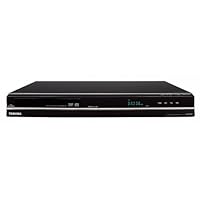
- Built In ATSC, QAM, NTSC Tuner
- Records -R or -RW, +R or +RW Formats.
- Playback , MP3, VCD, JPEG, Kodak Pic.
- It has DV Input
- 1080P Upconversion

I first did a test setup by connecting the CATV coax cable to the antenna in and then connecting the DR570 directly to a Sony Bravia LCD via HDMI. Initial setup was straightforward and I let the unit do an autoscan for channels. Scanning for "in the clear" digital channels took awhile (common issue with most QAM tuners) and unsurprisingly, it picked up some channels but not others (the Sony Bravia TV is no different in this regard). My actual setup just uses S-video and audio connections from my digital cable box (I don't use the built-in tuner).
I used a DVD+RW disc to try some test records with the different quality settings. These settings determine the bit rate (variable bit rate) of the MPEG-2 video stream and what I found is the LP mode (4 hours of recording) offering pretty good overall quality. The only exception is anything with fast action where you will notice a substantial degradation in the clarity during those particular recorded scenes. Both the XP (1 hour) and SP (2 hour) mode will take care of this issue at the expense of being able to record less content on a disc. Both EP (6 hour) and SLP (8 hour) mode offer pretty poor picture quality and are at least for me, unusable.
As others have mentioned, loading a disc can take around a half a minute when either inserting a new disc or powering on the recorder. Rewritable DVD discs need to be formatted first (takes less than half a minute). Recording is quite simple and no different than a VCR. One caveat with many of these DVD recorders is that when you stop recording, you may lose the last few seconds (so I usually just let the recording go for 2-3 extra seconds before pausing or hitting stop). Another note is that unlike video tape where when you hit stop, you can quickly record again, this DVD recorder writes to the disc for around half a minute before you can do any other action. Playback is like any standard VHS or DVD player. If you hit the TOP MENU button on the remote, this will show moving thumbnails of each recording (which Toshiba refers to as "titles"). With rewritable media, there are some rudimentary editing tools which allows you to "remove" scenes (i.e. like say if you want to "delete" commercials). Note that you don't gain any extra recording time doing this (the only way to do that is deleting that entire title or completely reformatting the disc). The advanced portion of the manual covers this.
Like all DVD recorders, there is a finalization step which allows the DVD disc to be playable on most any other player (like if you are planning to share it with someone else). The DR570 provides an auto finalization setting so that you don't need to remember to do this once your disc is full.
Programmed recordings is also relatively straightforward and simple. Just like their VCR's, you need to power-off the unit to place it into standby/programmed recording mode. So far, I haven't encountered any missed recordings.
As for media, I've been using Verbatim DVD-R, DVD+R, and DVD+RW without any problems. I haven't yet come across any lockup issues with this recorder.
Like many others, the main complaint is the remote and its dark lettering. I've since memorized the location of the key buttons which I use but compared to the remotes for my Toshiba television (which has a simple but very nice glow in the dark buttons which are big) and VCR's, this thing is pretty bad from a usability perspective (this minus one star).
Overall, I've been very pleased with this recorder and most of Toshiba's recent consumer electronics devices. Whereas some other brands look and feel like disposable pieces of junk at this price range, the DR570 doesn't give that impression and I would definitely recommend this unit to others looking to make the jump from VHS to DVD.
November 2010 Update:
Thought I would provide an update after one years worth of solid use (at least 200+ disc worth of material recorded). In a nutshell, the particular unit I received has been extremely reliable and I've had no problems (no lockups, no odd clock problems that some are experiencing, no missed programmed recordings, etc). I now use a universal remote (Logitech Harmony) in place of the one that comes with the recorder. As a standard def recorder, I've been satisfied with this product and have still been recommending it as an "upgrade" from a VHS recorder.
Buy Toshiba DR570 DVD Recorder/Player - Black Now
I purchased this DVD recorder two weeks ago due to a need to replace an aging VCR that had provided many years of excellent service. Since I currently own a Toshiba DVD player and the VCR was a Toshiba,I decided to purchase the DR570, a newer version of the DR670 which was overwhelmingly positively reviewed.The setup was extremely simple. The built in tuner has made recording easy and the picture quality is amazingly clear. I have not had any problems with the machine locking up or losing settings. I have played DVDs of both TV programs I have recorded as well as feature films. True, the remote does not feature a volume control-however, neither does my Toshiba DVD player purchased back when video rental stores switched from VHS to DVD.
My only complaint is that loading is a little slow, but all in all I am extremely delighted with my purchase.
Read Best Reviews of Toshiba DR570 DVD Recorder/Player - Black Here
I purchased 2 Toshiba DR570 DVD Recorder to replace by VHS. What a difference. I record on it daily because I hate watching tv with all the commercials, and I can watch the shows when I want. It is like watching a live broadcast with the bonus of fast forwarding through the commercials. At times, I have taken the disks out of the Toshiba and play them in a DVD player that is several years old. No Problems. I did set up the Toshiba to do automatic finalization of the disk when I finish recording after reading the review that some people have problems with playing back in older DVD players.I do record on Memorex 4x DVD+RW. It says I can record on them 1,000 times. So far, no problems with re-recording on the same disk. I do have to remember to Format each time I want to tape over something which you need to get use to after having only VHS. The Toshiba does tell you how much record time you have left. So if you have a problem when you record, I have found it is usually the "operator" or "me" setting the times.
So, Great Product. Yes, I would buy again!
Want Toshiba DR570 DVD Recorder/Player - Black Discount?
The Toshiba DR570 DVD Recorder is better than I expected for this value. I've only had it for about three days but here is my evaluation so far.Pros: It has coaxial in and out jacks so that allows me to send a signal from my cable box through to my old VHS recorder and then to my TV. According to the manual it has copy protection but so far that hasn't interfered with my ability to record anything from cable. (I don't have any of the premium channels like HBO however, so I don't know if it can record from those.) In the "top menu" it allows you to preview the videos you have recorded with icons that display motion and sound when you select them. When you program a timer recording, the recorder powers off when it's done. The picture quality of the recordings I've made seem fine to me but I'm not a stickler for HD level quality. I won't spring for a Blu-ray player because the difference between that and regular DVD quality, for me, doesn't justify the expense. So, if you're like me, you'll be happy with the picture quality.
Cons: The remote is black and the buttons are labeled with dull gray lettering which can make it difficult to read in certain lighting. It takes its time loading and revising whatever changes you make, like changing titles on a video file, but if you're not in a hurry, it's a small quibble compared to the pros.
I've only commented on the features that I have actually tested at this point. Next, I'll try dubbing old VHS recordings onto DVD and let you know how it goes.
UPDATE August 19, 2009: In regards to dubbing from old VHS tapes, this model Toshiba does well with homemade tapes but would not dub from a tape that has copy protection.
A con I might mention, though minor, is that programming the titles is ponderous. You have to spell out the words using a telephone-like keypad. My last recorder spoiled me. It had an on-screen layout of the alpha-bet that I could scroll through pretty quickly.
Another pro I discovered however, was that it has a nifty "one-touch recording feature." That means that when you push the record button repeatedly the recording time increases by 30 minutes with each push. (30, 60, 90, etc. up to 8hrs) This is great if you don't want to fiddle with programming the timer.
All and all, I'm very satisfied.


No comments:
Post a Comment