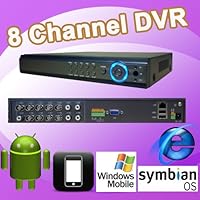
 The DT-L3108HV DVR is a small 8-channel DVR (desk footprint slightly bigger than a 10" netbook). It accepts one SATA 3.5" hard drive (although the electronics look like it was designed to accommodate 2 drives since there is an unused SATA data connector on the board). Note that NO hard drive is included, this is a DIY addition. I have installed a 2TB drive and it works fine.
THE GOOD:
+ There is a front mounted USB port so when you want to backup to a USB drive you don't have to fumble at the back of the DVR (possibly disconnecting a cable).
+ There is a single 40mm fan to cool the electronics & hard drive.
+ The local DVR Interface (i.e. using the mouse) is polished, with slick menu icons. The only thing that's missing from the local DVR interface is an exit playback button (you have to right click then select stop playing, then view desktop to exit playback mode and resume live view)
+ An interesting thing is that for the 9-view split (remember only 8 cams can be connected) the 9th view shows codec bitrate information for each channel which can be useful for understanding how different resolution/quality settings affect bitrate. This is something that I have not seen with other DVRs that I've used. However it would be useful if the DVR would average the last 30 seconds of video and display MByte/Hour statistic as well as the # of days of currently stored recorded video.
+ The DVR interface does show the start/end dates of stored video (you have to dig in the menu options to find it)
+ You can schedule periodic reboots.
THE BAD:
Monitor output is only VGA, there is no HDMI output (you can also connect a "spot" monitor via BNC output connector but most people will not use this). Even though there's no HDMI support the GUI interface allows "widescreen" resolutions via VGA (up to 1440x900)
Case was a little harder to open/close than expected, you have to slightly bend the sides apart while raising/lowering the back of the case.
The printed documentation is atrocious, even by DVR OEM standards. There are no instructions on how to open the case, and the operation of the DVR isn't really covered in the sort of detail that I'd like. However by playing around you can probably figure out most things, but I would prefer to read an accurate manual to save time. There were also documentation files on the CD but my CD was defective (see further below) so I don't know if a better manual was on the CD.
Placement of video out (BNC) jack is right next to channel 1 input, if you are not careful you might plug a cam into this jack. There should have been clear visual separation of camera inputs from similar-looking connectors (or at the very least a label on the top of the DVR pointing this out).
Unlike most other DVRs the hard drive LED just remains "on" all the time, it doesn't blink to indicate activity.
IMAGE QUALITY:
+ Recorded playback quality is very good at D1 resolution and "best" quality. It is SUPERIOR to the Nightowl Zeus DVR that I have previously reviewed (which has a blocky mess of pixels for video playback)
PC CLIENT (CMS) SOFTWARE:
+ Software has good layout and options
+ You can actually view live video while playing back a video file (each in different windows). This is both good & bad both use bandwidth so if you only want to playback and don't care about live monitoring you should stop the live live (click on the cam icons to turn off) before playback. Many DVRs don't allow live monitoring while playing back.
+ You can click on the video timeline to quickly jump around during playback.
+ You can adjust DVR settings remotely via the client software.
Slow/Fast playback does not display an onscreen speed indicator "2x, 4x, 8x" etc like on other DVRs.
One negative thing is that Fast Forward sometimes causes playback to stop, especially at the higher fast forward playback speeds. When this happens you have to click stop then restart playback of the video file that you were watching (you don't have to close or restart the client software though). I have verified that this consistently happens even on a LAN connection, so it's nothing to do with internet bandwidth or transmission. This really should never happen for a DVR and is an unfortunate black mark against it.
I have not tested the web-based (IE browser) software because I think the PC CMS software does everything needed for most remote access. The DVR also comes with mobile software for Android/Blackberry/Symbian & Windows Mobile devices (untested by me).
The miniCD that was included with the DVR was defective I could not read the software from it and on visual inspection it had a bumpy defect on the data side. I downloaded the software from D&T's website at
BUILD CONSTRUCTION/INCLUDED ACCESSORIES:
Remote does not come with batteries. Some other DVRs include them.
There were a few solder splashes inside the case. I removed them but production staff is obviously not being careful enough they could potentially cause damage to the internal electronics.
The plastic cover that covers the DVR's infrared remote sensor came out and was rolling around inside the case. I guess this was not glued down as it should be (this is a cosmetic issue, the remote will work without the cover in place)
OVERALL, I would recommend this DVR, even though it's an 8 channel DVR. In terms of the last DVR I reviewed (16 channel Nightowl Zeus DVR) the DT-L3108HV has better image quality, a more usable interface, and is also smaller in size (although it only holds a single hard drive).
I hope you have found this review useful!

Update 1:
Contacted DNT directly through Amazon. After a series of emails expressing healthy skepticism ("you CLAIM it doesn't work" yea, that's what I am claiming) they agreed to allow me to ship it to them at my expense. After a week the first email said there was nothing wrong with it, then eight minutes later another email was sent telling me the power supply was bad. Well, possible, though I had tested it with a multimeter before sending it off, so doubtful. We'll see what they come up with next.

No comments:
Post a Comment