 Like many others before me, I bought this unit to digitize some old audio cassettes. (In my case, old radio shows from 1930-1950.) I initially tried this with a cassette player and the analog audio input on my Mac but the results were disappointing; there was a tremendous amount of humming in the finished audio. My friends at Tekserve recommended this device instead.
Installation is just a matter of plugging it into the USB port; the Mac required no drivers and saw the device as another audio device. QuickTime Player, GarageBand, iMovie, the Sound preference panel and Griffin's own "Final Vinyl" application immediately recognized the device.
I connected my tape player to the iMic, launched Griffin's "Final Vinyl" application, and got to work. The results were stunning, like night and day when compared to the analog recording I'd previously made. There was absolutely no hum to be heard. I experimented with other audio cassettes and detected no hum, static, or other problem that could be attributed to the iMic device.
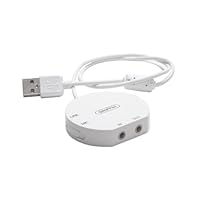
The device has two standard mini stereo ports (audio in and out), and a switch on the side to change between line input and microphone input (this is important -if the switch is in the wrong place you will be disappointed with the results). It also includes a mini-to-RCA adapter cable which I thought was a nice addition. The USB cable is rather short (about one foot long) and is hardwired to the unit so don't break it.
As was previously pointed out, the "Final Vinyl" software needs work and is inarguably the weakest part of this package. (Truthfully, if Griffin DIDN'T bundle "Final Vinyl" with the iMic I would have given this a five-star rating.) It is a COMPLETELY bare-bones application. I get the strong impression that "Final Vinyl" started life as a quick hack that a programmer wrote up in a couple of hours so that they could test the iMic device, but someone in Griffin's Marketing department saw it and decided to make it part of the package. It is not very intuitive (highlighting a segment of audio and hitting the DELETE key does nothing, forcing you to go into a menu to select DELETE which also has no keyboard shortcut), offers almost nothing in terms of audio editing capabilities, is surprisingly slow, and it crashes quite a bit. (Although I think Griffin knows this; when you relaunch the app after it crashed, it remembers the audio you had previously recorded and offers you the option of using that data or starting from scratch.) Fortunately the app doesn't crash (*knock on wood*) when importing audio; the crashing seems to happen when you're trying to open or save a file AND do something else with another application at the same time.
The only other thing about this unit that bugs me is its awkward design. It's about the size of a silver dollar and perhaps 3/8" thick. The short cable means you can't keep it plugged into the back of your machine and be able to easily access it, particularly if your machine is on the floor (like mine is). The rounded shape of the unit means you can't set it on edge and tuck it into an otherwise unused bit of space, and you can't easily attach it to your computer (i.e., with a zip-tie). I have mine plugged into the front USB port on my computer with the cable looped over the handle but it's an awkward placement at best, and I have to move the cable over whenever I want to open the CD drawer. It's not REALLY horrible since I'll likely rarely use the iMic once these tapes have been digitized, but I think Griffin could have done a little more to make this unit a little more elegant.

According to the Griffin website "iMic allows you to connect virtually any microphone or sound input device to your iBook, PowerBook, PowerMac or other Mac or PC systems with a USB port. iMic supports both mic and line level inputs via a selectable switch, as well as a variable level output for connecting speakers or headphones" All you do is connect your turntable directly to your computer. It works perfectly! Combined with the free recording software Final Vinyl it make recording your LP's a breeze.
RC adapter cables are included. iMic is compatible with both Mac and PC but Finyl Vinyl works only on Mac's. You can use other recording software for PC's.
(Note: iMic and Final Vinyl work great for those who simply want to record to their computer. You can do some fine tuning, but you will want a higher level of technology if you also want to "clean" the sound of your old recordings.)
Buy Griffin Technology iMic USB Audio Device Now
It should go without saying that the iMic is not a professional recording device. It might also go without saying that it is just fine for the purposes for which it is intended: recording from vinyl or other similar mic or line level to your computer. I bought mine because my MacMini doesn't have an audio in (what was Apple thinking?!). Generally speaking, it does its job of getting sound into the computer, and is fairly transparent while doing so, acting much like a piece of built-in equipment would.What should not go without saying, though, is that there is no ASIO driver for the iMic. So, it is incompatible with any recording software that requires an ASIO driver, particularly Steinberg's Cubase. As far as I have been able to find out, neither Steinberg nor Griffin have any plans to do anything about this. Note that Griffin does produce an ASIO driver which only works under Mac OS9, and there is a third party driver which will make it work, but it costs more than the iMic itself.
For the price, you can't beat the iMic. In fact, it's the lowest priced external audio interface I was able to find. And there are precious few bits of gear that fill the void between its price point and the $100 mark. Just be aware of its limitations before buying. I ended up spending another $180 on a more apropriate piece of equipment, and now my iMic is lying on my office floor.
Read Best Reviews of Griffin Technology iMic USB Audio Device Here
If you want to move your precious vinyls into your Mac or iPod, this item does the job quickly and inexpensively.Given that audiophile external DACs for your computer may be in the two to three thousand dollar range, this little gizmo does a lot for the money for about one percent of an external Dac's price.
I have been using it with my MacBook Pro 5,1. The audio gear attached to the iMic is a good turntable (Ariston RD90), an Audiomat phono pre-amp, and a Benz Micro wood-bodied L2 cartridge. The connecting cables are high-end Cardas (cartridge to pre-amp) and high-end JPS (pre-amp to iMic).
Best lesson I learned is that the supplied software, Finyl Vinyl, works fine, but is glitchy and occasionally crashes when you set out to save the tracks individually. It also does zero noise reduction wizardry. Finally, it is not terribly accurate in doing auto-mark to divide your file into separate tracks. Always double-check track separation using the slider that stretches the on-screen soundwave graphic.
To avoid the crash and the loss of the recording, my solution was as follows. After marking off each track, save each track separately. Do not just click on "Save as" in the drop down menu (that is where the crash sometiems occurs). Instead, make a right click while your cursor (a vertical line with an inverted triangle at the top) is in the space for that track. You will see a small box saying "Save track as______" Enter the track name and then press return. The program will then saves the individual track with your file name already in place for transferring to your media player.
Best quality I have found so far is recording at 44.1 kHz, 32 bit. Since the resulting files are large, you convert them later to Apple Lossless or another lossless format inside your media player.
Quality of sound? Since I am using relatively expensive audio gear, it seemed strange to use a little device like the iMic -I was afraid that it was going to act like a box of kleenex in the middle of the data stream. But, instead, what I got was high quality digital tracks that I can make into CDs, play through my computer into my amplifier, and transfer to my iPod Touch. Definition, clarity, transient response and musicality remain good with the iMic.
I have not tried out the recent turntable and cartridge combos that are selling for about $200. No system of digitization will ever achieve the magic of a direct listening to your vinyl. However, the iMic taught me that no matter the cost of the system, it is the music to which I listen. The iMic accomplished what I had hoped for: minimum interference with the analog signal provided.
Want Griffin Technology iMic USB Audio Device Discount?
I got an iMic2 because I wanted to convert musics from my LPs and tapes to AAC/MP3 files, and my Mac Mini doesn't have an Audio-In port. It works great! It comes with adapter cables for RCA plugs, so no other equipment is needed to connect my turntable and cassette deck directly to my computer. I was a little worried that the built-in pre-amp wouldn't boost the turntable signal enough, but even that isn't a problem; the only adjustments I need to make when using the turntable as a source are to set the iMic2's input switch to "Mic" and crank my computer's audio input level all the way up. The software that comes with it, Final Vinyl (*for Macs only*), also works really well. I originally planned to use Roxio Spin Doctor to do my recording, but it freezes frequently for no apparent reason -so that was a waste of money; I just use Final Vinyl instead. It's really simple to use, and the special EQ setting for LPs mimics the EQ circuit provided by a stereo amplifier's turntable input jack (without that, the turntable signal has a "tinny" sound -but since that setting alone creates a kind of muffled effect, I like to add a second EQ setting on top of that, to boost the treble). I save the Final Vinyl AIFF files to my hard drive then import them into iTunes and convert them to AAC files there. They sound GREAT. What a nice surprise that my computer can do all this, with very satisfactory results, with just this little device and Griffin's free software.

No comments:
Post a Comment