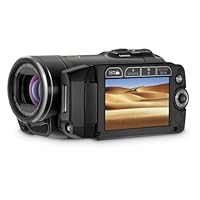
I bought the HF10 from Amazon and love it; its amazing. The HF20 is the next generation of that camera line and it produces .MTS file format (AVCHD) high-definition files. I just want to warn all perspective buyers that what they state in the Pixela software manual about the minimum requirements in order to actually be able to watch/ edit the highest-res video that comes off this camera are true and cannot be ignored: I have a Pentium 4 @ 3.6Ghz and 2 GB RAM and a PCIx video card and it is not good enough to play the video back smoothly (using Pixela software player) wihtout dropping frames ! The amount of system or video RAM is not the key; you MUST have either a fast Pentium "D" class or a Pentium Core 2 Duo (at least) processor (with matching motherboard w/ Intel chipset) or you can't really play/edit the highest res of video that comes out of this camera! (Note that my PC can archive the video to hard drive, DVD etc , just not smoothly playback and edit). Playback and editing may be possible on a lesser system but the performace will leave you unhappy most likely. Hope this helps with your search.

Functionally this camera is fantastic....lightweight, small and has incredible image quality. Well laid out controls. Just a caution is that most people will not be able to actually make use of its outstanding image quality without a Blu-ray burner and Blu-ray player as in iMovie and many other programs the quality is imported at a reduced quality and you cannot burn HD quality movies on regular DVD's. This is not this camera's fault however as all HD cameras are more technologically advanced than most people presently can make use of.
My main gripe however, and why I subtracted one star, is in an otherwise incredibly engineered camera Canon used the "mini advanced accessory shoe" and NOT the "advanced accessory shoe" (and it took me about 15 minutes to discover there were two different kinds of shoes...who would have even imagined there could be two different kinds of accessory shoes for consumer products!!?).
First this mini shoe is I believe only on a very few products and needless to say it is NOT compatible with anything using the "advanced accessory shoe". I found this out when I obviously mistakenly ordered the DM-50 microphone which does not fit.
The mini shoe is a stupid idea in the first place, and more importantly Canon has intentionally engineered INcompatibility within their own product lines. Something like microphones, lights, flashes, etc should be cross compatible across all of their product lines and, if you own other Canon products, would, for example, force you to buy almost identical duplicates of accessories because you could not use them on different Canon cameras. Why they did this is something that defies understanding.
Take Home Message: Choose you accessories carefully!
Buy Canon VIXIA HF20 HD Dual Flash Memory w/32GB Internal Memory & 15x Optical Zoom - 2009 MODEL Now
Video from HF20 is too good. Connected the camera to my 1080p TV, with a $5.00 HDMI cable, I could not believe the video quality.
My grip is about the night shots, captured video is too noisy. The still images are also bad in low light. I know it does auto focus by sensing the reflected beam of IR or something from the subject. But in low light it seems to get lost or takes a long time.
I have still not used the software provided by Canon. Windows Vista does not recognize .mts files. So I got Window-7 RC and it works great, as soon as the camera was connected to PC, Win-7 started copying the .mts and .jpg files to hard drive, then played them.
Read Best Reviews of Canon VIXIA HF20 HD Dual Flash Memory w/32GB Internal Memory & 15x Optical Zoom - 2009 MODEL Here
First off, I'm going to keep my actual feelings about the camcorder brief, considering other reviewers have covered the bases far better than I ever could. The HF20 is a pretty great AVCHD camcorder, especially for the price, and I just wanted to share a couple things I noticed as well as a couple of add-ons that I've tested myself that greatly enhance the experience.
Now the camera itself is a little larger than the size of your palm. The grip is a bit awkward at first, but you quickly adapt and it feels quite natural. While the camera itself has no optical viewfinder, the side mounted pivotal LCD does the job more than well enough. The zoom toggle and record buttons are located in natural positions, but the bulk of the controls are done through buttons located on or around the LCD panel.
The HF20 has 32 gigs of internal memory, as well as an expansion slot for SDHC cards. I was first leaning towards the HF200, which is the same camera, spec wise, but lacks the internal memory. Seeing as how I wanted to use this camera for moderate amateur film-making purposes, I figured I'd want the flexibility, so I settled on the HF20. The internal memory included is flash based, so there are no moving parts to break or move around. Since you can choose where to record easily enough, I enjoy having the best of both worlds.
Two others I looked into were the HFS10 and the upcoming HFS20. While these cameras were supposedly much better in terms of feature sets and overall quality, I found the advantages to be evolutionary rather than revolutionary, especially for the much higher cost. The quality on the HF20 puts it far ahead of cheaper camcorders, but if I was going to spend upwards of $1000, I would consider more fully equipped professional options.
The camera itself is a sleek combination of gloss and matte blacks (this is another reason I chose it over the HF200. Trivial I know, but the black just looks better than the silver/grey). When gripping the camera with your right hand, your index finger rests naturally on the zoom switch, and your thumb on the record/stop button. Moving your thumb to the right gives access to the mode toggle dial, alternating between picture mode, movie mode,and dual-shot mode. Beyond these, and a small picture button just behind the zoom switch, there are no other buttons accessible with your gripping hand.
Opening the LCD gives you access to the rest of the camera layout. A small enclosure opens to reveal the expandable SDHC slot. And there are access indicator lights that flash to show read/write activity. On the LCD itself is a small joystick for navigation, and buttons along the bottom row for playback settings. A function button rests below the joystick, which acts as a switch for the front light in certain modes. Now the learning curve for the menu system is steep, but you'll easily be navigating in no time. The LCD also has a hidden IR receiver, for use with the included remote. This comes in handy, but the remote has to be pointed at the screen portion to function properly.
As for the still picture quality, it is good enough, but will not replace any dedicated point-and-shoot cameras of comparable quality. When in picture or dual-shot modes, video tweaks are turned off or throttled back so severely that they almost aren't worth using. If you're buying this camera, it's most likely for the video, not the stills, and considering the fact that stills can be extrapolated from footage in post on a computer, I see no need for dual-shot or the dedicated picture mode.
The battery is adequate, but by no means stellar. Fully charged, I get about 80 minutes of usage when using the highest settings. Video playback cuts into this total as well, so for longer shooting sessions (with the internal 32 gigabytes, coupled with a 16 gigabyte SDHC card, I get about 5.5 hours at highest settings) you're going to want to keep the included ac adapter plugged in.
As for the footage and the highest quality settings there-in, I'll be brief due to the myriad variations you can tweak. I'll say this though: in MXP, 24p, and Cine modes, the results are breathtaking in normal light, and more than satisfying in lower light conditions. Using the camera extensively, the video quality is bar far it's strongest selling point, and any other gripes are negligible by comparison.
But there ARE gripes, albeit small ones. The included software is garbage, everyone knows that. If you're just shooting home movies, and just need to move them to a computer, any Windows or Mac will due that via SDHC card reader or USB to the camcorder. Editing however, is another issue, and I'll get to that soon. Another problem is the fact that the camera needs to remain plugged into a power source while transferring. This isnt huge, but a bit of a gripe considering other cameras let you transfer via USB without attaching external power.
Lastly, lets talk briefly about editing and computer performance. Because the included software is relatively horrible, you're going to want to use a dedicated video editing suite. I'll recommend one later for you PC users. Mac users should be able to use the latest versions of Final Cut Pro and iMovie to get the job done. The real problem is computer specs for the AVCHD format, which has been mentioned in other reviews. Now, to clarify, I bought this camcorder knowing the strengths and minimum requirements of the format. Others, however, may not think of this. Let this be a warning: if you're computer is not a fast dual-core with a decent amount of RAM as well as shared video memory, it will not handle the AVCHD format well at all. I myself am running a Core 2 Quad processor with 6 GB DDR3 and a Geforce GT250. It's a bit overkill, but edits beautifully. Any high end Core 2 Duos, or any Quads, i5s, or i7s should do fine. I havent used AMD chips in years, so I cant comment on their performance.
Finally, I wanted to link and recommend some products I've found essential when trying to shoot quality movies. One thing I'm not going to mention here is lighting, which is key. Outdoors on a sunny day is fine, but any interior or nightime shots should be lit properly, and you should usually use something to diffuse the light and make it less harsh. But thats another discussion entirely.
First up, if you're buying the HF20 over the HF200, you're going to want a solid SDHC card. Myself, I picked up a 16 GB Transcend Class 6. Two things to look out for are the class (get 6 or better for HD video) and the size (I found 16 GB cards hit a sweet spot between size and value. The 32 GB cards, to me, are still too expensive. But they also double the memory provided internally, so it's up to you), but beyond that, you can pick almost any brand and get comparable results. The Transcend card hasnt failed me yet, so it gets my seal of approval.
Transcend 16 GB Class 6 SDHC Card: http://www.amazon.com/Transcend-Class-Flash-Memory-TS16GSDHC6/dp/B0015AOK1O/ref=sr_1_1?ie=UTF8&s=electronics&qid=1268752588&sr=8-1
You're definitely going to need some good editing software if you're looking to make short films are pro-looking clips. Since I'm a PC user, I went with Sony Vegas Pro 9. I've heard good things about other programs, but from experience, I know this works and I know it offers a ton of options for editing and perfecting film clips.
Vegas Pro 9:http://www.amazon.com/Sony-SVDVD9000-Vegas-Pro-9/dp/B001GM275C/ref=sr_1_2?ie=UTF8&s=software&qid=1268754253&sr=8-2
Next, you're going to want to beef up the audio to match the video quality. While the internal microphone is far from horrible, separate add-ons do a much better job of offering semi-pro sound at decent prices. One of these is from Canon directly, and plugs directly into the accessory shoe at the top of the camera. The other plugs into the external mic jack, on the back of the camera. The shotgun mic is omnidirectional, and should be used in most situations. I threw in the lapel mic for interviews and such, as it has pretty focused sound for singular voice and whatnot.
Canon DM-100 Shotgun Mic: http://www.amazon.com/Canon-2591B002-Directional-Microphone-Camcorders/dp/B0012ILNK0/ref=sr_1_5?ie=UTF8&s=electronics&qid=1268752501&sr=8-5
Sony DS70P Lapel Mic: http://www.amazon.com/Sony-ECM-DS70P-Electret-Condenser-Microphone/dp/B00006HOLL/ref=sr_1_1?ie=UTF8&s=electronics&qid=1268752576&sr=8-1
The basis for all good shots is a good, stable tripod. I have three different ones for three different situations. First is your basic, regular-old tripod. Almost any brand will do, but with tripods it's good to read reviews. I have the one mentioned, and it does what it's supposed to well enough. The second is a steadycam system. These things are handheld, but offer a counter balancing weight system to keep moving shots steady and clean. The Tiffen Merlin is the best, but it's ludicrously expensive. I myself have a Hague, but Amazon doesnt sell those (Google it). The one I'm linking is sold by Amazon, looks reasonably priced, and you get the idea of what it does. Youtube it for test results, it really does make a difference. Lastly is the Gorillapod. I love these things. I have three of em, all different sizes, and I always carry at least one with me, no matter what. Essentially, it's an ultraportable, ultraflexible tripod, which can be bent in any way to wrap around branches, poles, arms...you name it. The one I'm linking is the size you want for the HF20. Smaller cant handle the weight, and bigger is more money than you need to spend. I also have the Gorillatorch, which I'm not linking. The Torch has nothing to do with cameras, but is essentially a gorrilapod with magnetic feet and a super-bright LED flashlight fused to the top. Look it up, very useful.
Dolica 62-Inch Proline Tripod and Ball Head: http://www.amazon.com/Dolica-AX620B100-62-Inch-Proline-Tripod/dp/B001D60LG8/ref=sr_1_3?ie=UTF8&s=electronics&qid=1268754799&sr=1-3
Manfrotto 585 ModoSteady 3-in-1 Camera/Camcorder Stabilizer: http://www.amazon.com/Manfrotto-585-ModoSteady-Camcorder-Stabilizer/dp/B00103BRMQ/ref=sr_1_fkmr0_3?ie=UTF8&qid=1268754769&sr=8-3-fkmr0
Joby GP2-D1EN Gorillapod Flexible Tripod with Bubble Level: http://www.amazon.com/Joby-GP2-D1EN-Gorillapod-Flexible-Digital/dp/B001QVUEFI/ref=sr_1_1?ie=UTF8&s=electronics&qid=1268752548&sr=8-1
Finally, I suggest this for anyone, not just people with the HF20. Doesnt really matter what brand, but carry one of these everywhere. It's a lens cleaning pen, and it includes a retractable brush, as well as a soft chemical cleaning pad for smudges. While the HF20 specifically has an automatic lens cover, it's always good to clean it frequently to avoid problems down the line. A necessity.
Nikon 7072 Lens Pen Cleaning System: http://www.amazon.com/Nikon-7072-Lens-Cleaning-System/dp/B00006JN3G/ref=sr_1_1?ie=UTF8&s=electronics&qid=1268752562&sr=8-1
Beyond that, there isnt much else you'll need. As I said before, look into good lighting options and diffusers. For post effects, a cheap green screen might be a good investment. Other than that, all you need is a bag, and almost any will do. I personally use a Canon DSLR bag, since I can fit everything in there and it supports the camcorder nicely. It's up to you though.
Well, that ran way longer than I expected. I hope I covered all of the bases, and if I didnt, feel free to comment and I'll do my my best to answer any questions. The HF20 is a really solid camera, the best in it's price point, actually. Of course, more money will get you a better camera, but this is an awesome balance of quality, value, and versatility for any video situation.
If you want to see test footage, or a review, visit my Youtube Channel: Alfeetoe.
Again, thanks for reading, and good luck
Want Canon VIXIA HF20 HD Dual Flash Memory w/32GB Internal Memory & 15x Optical Zoom - 2009 MODEL Discount?
When it comes to filming and making it look good, lighting is everything. As long as there is adaquate light in your shot, the HF20 will give you a crisp, vivid picture that looks great on HDTVs. AVCHD is gaining greater support, and on my Mac, it's as easy to work with as P2 downloads. Both iMovie and Final Cut Pro (Version 7) can easily ingest footage from the camera. I highly recommend springing for a shotgun mic that sits in the hot shoe, and a higher capacity battery. With 32GB storage, you need a better battery before you can ever expect to full the memory on a single shoot. Very easy to use, and very favorable results.
 This cable works fine even though the price is so low. It is the very thin style cable with just a thin covering of insulation, so be careful not to over bend the cable.
 I do have to say that this phone serves it's purpose. I bought it because I wanted a smart phone, but I did not want to pay AT&T for a Data plan I did not need. I also did not want to spend a lot of money, only to find out the AT&T will find out I have a smart phone and automattically add a data plan. I have had it for a few months now and have only seen one $2 charge for some data. Not sure where that came from since I thought that the data settings had all been disabled on the phone, but so far that is all I have seen. No other data charges yet. As for the functionality of the phone, sometimes the screen seems a little slow to refresh, possibly due to the slow 600MHz processor. Also the camera does not autofocus which can make it difficult to scan bar codes if they are too small. Memory space is limited, so if you like to play with apps, you will need to move them to the SD card (2GB was included). Voice quality is fine and battery life seems good. I leave Wifi, Bluetooth and GPS enabled all the time, but I don't talk alot on it and I have to charge it about every 3 days. Seems to be a decent starter phone for the money.
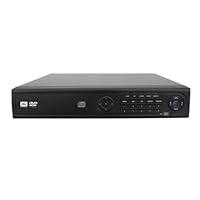 This system is an upgrade from our previous PC based security system which was buggy and was prone to hard drive corruption because of Windows. Having an all in one is the way to go. The interface takes a little getting used to but overall, it works great. If you have any old cameras like we have, they will be recording at a much greater resolution. I to suggest that unless you need constant recording, set your cameras to only record when movement is detected, otherwise your hard drive will fill up fast. The only gripe I have is that this should have come with a BluRay burner.
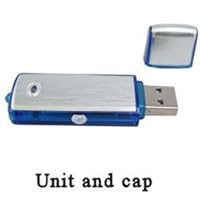 I am quite late with this review but as the saying goes, better late than never. I have been using this recorder for the last two years now and its been really dependable and amazing not to say awesome! Clear pick up, easy to use, sturdy and discreet. I have decided to buy the latest models which offer 8 hours operation with a single charge and more storage space. I also had amazing service from Sally's store.