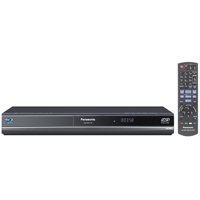
- Detailed picture and superior audio for faithful reproduction of the nuances, touch, and atmosphere the filmmakers intended
- On compatible screens, full HD 3D sends a separate 1920 x 1080 full-HD image to each eye, for sharp, crisp 3D images
- Enjoy VIERA Cast Internet entertainment/applications with a wired or wireless LAN connection
- Up-converts all standard definition video formats to 1080p; audio is up-sampled and remastered to 96 kHz quality
- Decoding and bitstream output of Dolby Digital Plus, Dolby TrueHD, DTS-HD Master Audio Essential, and DTS-HD High Resolution Audio

The player lacks some features compared to the top of the line DMP-BDT350: no dual HDMI output (only needed if you are using this with an older non 3D-compliant receiver), no multichannel analog outputs (for use with non-HDMI receivers) and no built-in WiFi networking (can be added via the Panasonic Wireless LAN Adapter). It also offers a fairly clunky user interface lacking the modern graphic-driven GUI that you see on current LG and Samsung Blu-ray players, though it is superior to the user menu on the Pioneer players. But the DMP-BDT100 provides all the basics, and several advanced features, as well as strong high def video and audio performance. The player passes all the upconversion and film cadence detection tests on the "Spears and Munsil" and "HQV Benchmark" DVDs and Blu-ray Discs with flying colors and also offers enhanced 4:4:4 color output with 24p (24 frame/second) output options for both DVDs and Blu-ray Discs. If silver discs are primarily how you watch your movies, then there is little to fault in the BDT100.
We did notice a peculiarity with Netflix streaming on the BDT100. Streaming SD content from Netflix, we observed something called the "CUE" (chroma upsampling error or "chroma bug"). This is something that can occur when a compressed video source has its color information upconverted to restore color detail lost in the compression process. On the BDT100, this upconversion is imperfect, which can cause visible color banding or jagged edges on the borders between colors. The problem is only noticeable on standard definition Netflix streaming content. Netflix HD, standard DVD and Blu-ray Disc playback do not exhibit this issue. And frankly, those with untrained eyes might not even notice it. It becomes more evident as you move to larger screens (e.g., front projection systems), but it can be viewed on some Netflix SD content even at the more common 42-inch and up screen sizes. As to whether this issue is a deal-breaker to you or not, that depends on how much standard def streaming you do from Netflix, and whether the chroma bug is something that bothers you. But we would be remiss not to mention it. According to our contacts at Panasonic, they are aware of the issue and are working toward a fix.
If Netflix SD content is not a part of your streaming media diet, then we give the BDT100 an unqualified recommendation. But if you do find yourself watching a lot of standard def streaming content on Netflix then you may want to look elsewhere or wait to see if Panasonic can deliver a fix to this issue on the BDT100.
Our more detailed review of the player is available on our web site at Big Picture Big Sound (dot com).
Buy Panasonic DMP-BDT100 Full HD 3D Blu-ray Disc Player Now
This player was thrown into the deal when I bought my Panasonic TC-P58VT25 TV two weeks ago. The TV is terrific. This player worked fine but was shipped with downlevel ver. 1.04 of the firmware. The Panasonic site had a download and instruction to update the firmware to ver. 1.14. Followed all the instructions, burned the update disc and followed the instructions for the update. Everything worked per the instructions except the last step. Tray opened and message on panel says UPDNG. OK so far. However I never got a finish message and can now do nothing with the player. Called Panasonic Tech Support which is a nightmare and I said it's been sitting on UPDNG for well over and hour without going to Finish. Was told the update normally only takes about 30 minutes and they had me try the update again with the same results. I even tried burning another disc in ISO 9660 format as per the instructions with the same results. Tech Support said they'd send me an update disc but will take 7-10 business days to arrive. I have doubts it will fix the problem and now my player is useless until I can try what they send. Anyone else have update problems and figured how to solve it? Except for this problem I was happy with the player and TV combo.UPDATE: After getting nowhere with Panasonic help and having a player that did not work I managed to return the broken player and exchange it for another one. This time I waited until I had my ethernet connection in place and saw the message about a new version of firmware available. I followed the directions in the manual for a network update and it worked flawlessly. So I guess my advice would be to not try burning an update CD yourself. If you need to go that route contact Panasonic to mail you one (they will).
Read Best Reviews of Panasonic DMP-BDT100 Full HD 3D Blu-ray Disc Player Here
I waited to buy this Blue-ray 3D player because it was half the price of the BDT350. I was a little worried if it would be as good? I have to say this player is great. I first watched the movies Panasonic sent me for buying the 50inch VT25 3D TV. Now it is time to pick out some more movies! I am no tech, but the 3D is great on the movies they sent. I am glad I went with Panasonic they seem to have an edge on 3d! I wanted to buy more 3D glasses that is why I waited for the BDT100 to come out. Why spend the money on a player when you can outfit the whole family in 3D glasses! I made the right decision!Want Panasonic DMP-BDT100 Full HD 3D Blu-ray Disc Player Discount?
In the past 3 years I have own 5 different blu-ray players, all Sony, except for this one. I have the Panasonic DMP-BDT100 blu-ray for hooked up to a Panasonic TC-L37U22.The overall rating of this unit is based on a variety of basic uses that most new customers will find important, I have also rated each of these uses individually, based on my experiences with the Panasonic DMP-BDT100.
Playback of blu-rays:
3 out of 5 stars
Every once in a while (not often) it will not read a blu-ray disc for reasons that are unknown to me. When this happens I just take the disc out, clean it with some blu-ray cleaning fluid and this almost always fixes the situation. When a blu-ray is first inserted into the machine it has to "load" (unlike a DVD) and a "loading" image comes up on the Panasonic main menu, as well as on the screen once the blu-ray is actually playing (it says "loading" on the bottom of the screen even after the blu-ray starts playing). The overall picture quality is very good; compared to other blu-rays that I have used it's no better and no worse. There is an excessive amount of noise coming from the player itself because a fan comes on anytime a blu-ray is being played. Although this is normal, it does not come on for DVDs. Also, the audio seems somewhat lower when a blu-ray disc is being played, I have tried adjusting the sound levels on both the player itself and on my TV and nothing seems to correct this. The unit does not say the name of the blu-ray on the home menu, also the unit does not have that very cool looking Back to The Future blue light that comes on anytime a blu-ray is being played.
Playback of DVDs:
4 out of 5 stars
The unit plays back DVDs wonderfully. The picture and sound quality is excellent. To get to the main menu of a DVD you must press the "sub menu" button on the remote control. There is no mention of this anywhere in the booklet though and it took a while to figure this out as this button is located on the bottom of the remote. Loads DVDs very quickly.
Playback of other media (such as DVD-Rs and CD-Rs):
4 out of 5 stars
Plays back other media very well. The unit doesn't seem overly fond of homemade media though as it takes somewhat longer to load sometimes.
Viera Cast:
1 out of 5 stars
If you're looking to stream directly from your blu-ray (and in twenty-eleven who isn't?) this is probably not the unit for you. It is not user-friendly, there are very few Internet channels (see below) and the overall Viera Cast menu is somewhat slow. I have since found out that this is directly attributed to Panasonic as they have not dedicated the time and the energy into their online channels as Sony does. Another odd thing is that the Viera Cast menu just goes down intermittently (and I have a wired connection) from time to time. Panasonic told me that this is "normal" and the best way to combat this is to turn off the "quick start" setting on the main menu of the blu-ray.
One thing I did notice was that the overall sound quality is better with Viera Cast compared to playing an actual blu-ray.
Another thing I do not like with Viera Cast is that it does not come up on the main menu when the machine is first turned on. I have to press the Viera Cast button on the remote and then toggle through Viera Cast and the main menu. It would have been nice if Panasonic would have created one interface for everything. It also seems to take some time going from each of these menus.
One more thing I should mention is that the unit does not have a central way to log into your accounts through Panasonic's Web site. You have to log into each account separately.
These are the Viera Cast channels:
YouTube You can sign into your account and your playlists will come up. However, it's somewhat cumbersome. Because everything is loaded in one long list with the menu buttons at the very top of it while the playlists load below and this often take a while for the entire list to populate. Also, anytime the unit is unplugged you have to log back into your account. It does not have continuous play unless you adjust the setting to this. And I have found out that you cannot fast forward a YT video, you only skip to an entirely new video.
Amazon VOD This probably works better than any other channel on Panasonic's Viera Cast. One thing I did notice when I first started using it was that the video was pushed to the far right side of the screen. I have found by unplugging the unit and plugging it back in this has fixed the issue. Also it is rather annoying because even videos in my library that I own all have a "buy" option next to them; I have spoken to Amazon about this and they informed me that this was done by Panasonic.
Weather This is just an instant feed of local weather, no video streaming is included, nor are any images or pictures or sound available at all. Sometimes this channel is a little sluggish, have no idea why since no video/sound/pictures are included.
Pandora This is a free music service, I have this on my Sony player as well so I just logged into my account and everything transferred over.
Fox Sports This just includes information to read, no video or sound is included. Rather boring.
Bloomberg News This just includes information to read, no video or sound is included.
German News Includes video and sound, but who wants something in German? It would have been nice if Panasonic would have paid a few more bucks and gotten CNN (like Sony does).
Twitter Allows you to log into your account from the Viera Cast menu.
Picasa Web Album This is a free service provided by Google which allows you to upload pics from your computer, you can then log into your account through Viera Cast and they will come up.
Vudu Movies Paid on-demand movies.
CinemaNow Another paid on-demand service.
Netflix Allows you to log into your account and stream through the player. Obviously this is not a free service and I do not expect it to be, but it would have been nice if Panasonic would have had at least a couple more free video services on their Viera Cast (such as Crackle, Hulu, and FearNet).
Remote control:
4 out of 5 stars
Solid, great looking remote control. Just about everything is where it appears to be, except for the menu button which is right next to the OK button (this button is used primarily if you're using Viera Cast). There is an open/close button on the remote which is helpful.
Appearance:
3 out of 5 stars.
The overall appearance is pretty good, it is black and basically tends to blend in. The unit does seem somewhat large and a little clunky, it reminds me of one of those old-fashioned looking "VCRs" from the '70s and '80s. Also there is a huge "3D" logo on the front of the unit that looks out of place and sorta corny. There is also an open/close button on the top, righthand side of the unit.
Panasonic blu-ray tech support:
0 out of 5 stars
I have had to call Panasonic tech support with some basic questions (none of which were answered in my instructional manual) and I can tell you that they are absolutely lousy. There is always a long wait (20 minutes or more). They are not open round the clock like other big-name electronic companies, their phone number is not on the unit, and the person that first answers the call to ask what you're calling about (at least for me), has always transferred me to the wrong department. The people in the blu-ray department are not properly trained on blu-rays because they seem to know even less than I do and often have to put me on hold to answer basic questions (this is on top of the 20 minute wait just to get through to them). They always call blu-ray discs "DVDs" which is just incorrect and they also often seemed annoyed with my questions and do not go out of their way to help me or provide me with the information that I needed. For example one lady that I could barely understand says to me "look in the book" and I had to inform her that I already did that and the information was not in the instructional manual. On more than one occasion Panasonic's blu-ray tech support even transferred me to other departments even though I had a blu-ray-related question. And there is a language issue as Panasonic puts all of their calls out of the US. If you do have to call Panasonic blu-ray tech support ask to speak to a manager immediately. This has helped me somewhat as the manager I have spoken to at least tried to help and at least tried to get the basic information for me. Overall, though Panasonic's tech support is abominable (Sony is 1000X better) and if I had known this prior to purchasing I would NOT have gotten the unit because for me this is a big deal.
Amazon's support and pricing structure:
5 out of 5 stars
They ship out quickly (even with free shipping) and their pricing is very good (although I paid more than it is currently listed for). Anytime I have had to call Amazon they were always wonderful. (Note: I did not take this into consideration when I gave my final rating, as this is no reflection on Panasonic.)
Other features, benefits and disadvantages:
2 out of 5 stars
Viera link This is what allows you to control both the TV and the blu-ray all with the same remote. No directions were in the booklet and it took some time to figure out how to do this. Also there is a rather long time delay when turning both the player and TV on at the "same" time. The unit also seems rather slow when shutting down and being turned off.
Instructional booklet Most questions and basic info covered (at least for me) were not in the manual. If Panasonic is going to have such horrible tech support they can at least invest a little bit more effort in their booklet.
Disc memory Sometimes the unit remembers where a blu-ray and/or DVD is at (after going to the main menu) and sometimes it doesn't. The unit never seems to remember though if it is shut off.
BR Live This will only work with an SD card and there was no mention of this in the manual. It would have been nice if this would work with a USB flash drive like most other blu-rays but since I do not use BR Live too often this is not a big deal for me.
I did receive a free copy of the limited edition 3D blu-ray of "Avatar" with this purchase. This is only available if you purchase the blu-ray as a standalone unit.
Overall rating for this unit based on everything I have described is 2.33.
Even if you're seeking a basic unit only for playing DVDs and blu-rays I do not recommend the Panasonic DMP-BDT100 because it's not very consumer centric and although it plays DVDs fine there seems to be some unresolved issues with blu-ray discs. And if you're seeking a more advanced unit for multi-media streaming there are many other more cost-effective units on the market which will allow you to get more bang for your buck.


No comments:
Post a Comment